-
July 16, 2026
- Share:
-

-

-

-

QAs often face issues like a checkout button that works fine in Chrome but disappears in Safari. It’s not uncommon for websites to lose visitors and customers for a reason as small as a “Buy Now” button being hidden behind a CSS rule that only Safari reads differently.
Cross browser testing tools exist to solve these issues. They let you check how your website behaves on different browsers, screens, and devices before your users have to deal with the problems.
If you are trying to pick the best web testing and cross browser testing tools for your team in 2026, this guide walks through the top options, a full feature comparison, a checklist, and answers to questions people search for most.
What Is Cross Browser Testing?
Cross browser testing is the process of verifying that a website or web app behaves the same way across the different rendering engines, browser versions, operating systems, and devices your real audience actually uses.
Chrome, Firefox, and Safari each run on a different engine (Blink, Gecko, and WebKit) that parses your HTML, builds the page’s CSS rules, and runs your JavaScript in its own way.
Most of the time it’s fine. But sometimes one engine reads a line of CSS slightly differently than another, and that’s when you get a button that works perfectly in Chrome and quietly breaks in Safari.
Chrome holds the largest browser share worldwide, but Safari, Edge, and Firefox together still cover a large enough chunk of users that ignoring them means ignoring paying customers.
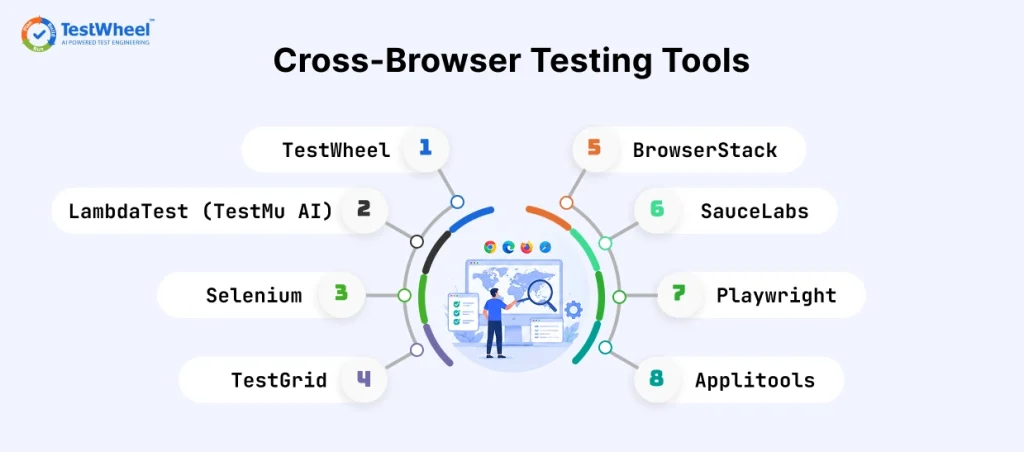
8 Best Cross Browser Testing Tools in 2026
Here is a closer look at the best cross browser testing tools worth considering right now, starting with the one built to cover the widest range of testing needs on a single plan.
1. TestWheel
TestWheel is a cloud-based, AI-driven test automation platform covering web, mobile, API, performance, and desktop testing from one account. It is one of the best cross browser testing tools to help a non-technical tester set up full browser coverage without any code.
How TestWheel Handles Cross Browser Testing
Create an application, describe your test steps in plain English (“open the signup page, fill in the email field, click submit”), pick the browsers and operating systems to run against, and let TestWheel handle the rest. There is no local browser lab to install or maintain.
TestWheel’s AI does the rest:
- It converts your plain English steps into an automated script.
- It detects when a button, menu, or layout element shifts and repairs the test automatically (called self-healing).
- It flags flaky tests before they trigger false alarms in your build pipeline.
A recent U.S. Air Force software project running on TestWheel cut test execution time from 40 days down to 14.
Key Features
- You write test steps in plain English and TestWheel turns them into runnable tests. No Selenium boilerplate, no maintaining locators by hand.
- When a developer renames a CSS class or shuffles a div, the self-healing kicks in and adjusts the test instead of just failing it.
- Coverage runs across Chrome, Firefox, Safari, and Edge on Windows, macOS, and mobile, all from one dashboard.
- Every test run gets recorded on video. A failure screenshot tells you something broke, a recording tells you what actually happened seconds before it broke.
- It plugs into Jenkins, Azure DevOps, and Jira, and runs tests in parallel across browsers.
- It’s not just a browser tool. Mobile, API, load, and security testing live in the same platform.
Who Should Use TestWheel?
TestWheel is one of the best cross browser testing tools for teams migrating away from manual testing, teams juggling too many separate tools, non-technical testers who need coverage without coding, and government or enterprise teams that need compliance-ready testing.
Pricing
| Plan | Price | API Testing Limit | Users |
|---|---|---|---|
| Basic | $10/month | Up to 10 APIs | 1 |
| Pro / Team | $30/month | Up to 100 APIs | Up to 5 |
| Enterprise | Custom | Unlimited | Unlimited |
2. BrowserStack
BrowserStack is among the best cross browser testing tools offering access to thousands of real desktop and mobile browsers for testing.
It is cloud-based, and runs on actual physical devices sitting in BrowserStack’s own data centers. So a test on an iPhone 15 running Safari behaves exactly like it would on a customer’s real phone, including battery, network, and touch quirks that emulators cannot fully replicate.
The Live testing feature lets a developer manually open a real browser session in the cloud and click through a page themselves. For automated runs, BrowserStack Automate plugs into Selenium, Playwright, and Cypress scripts you already have.
It also ships with Percy, a visual testing add-on, for catching layout shifts that functional tests miss.
Pricing
| Plan | Price | Users |
|---|---|---|
| Team Plan | $150/month | Up to 5 users |
| Team Pro Plan | $249/month | Up to 5 users |
| Team Ultimate | $375/month | Up to 5 users |
3. LambdaTest (TestMu AI)
LambdaTest, now branded TestMu AI, offers live, manual, and automated cross browser testing across more than 3,000 browser and OS combinations. It also has built-in DevTools for inspecting layout issues.
Its live testing mode opens a real-time browser session in the cloud. The built-in Chrome DevTools panel lets a developer inspect elements, check console errors, and tweak CSS on the spot.
LambdaTest’s HyperExecute grid can run large automated suites in parallel. Its Smart TestOps Hub pulls together automation logs, screenshots, and video recordings in one dashboard, which helps a distributed team debug a failure without having to reproduce it locally. Geolocation testing is built in. Again, one of the best cross browser testing tools in the game right now.
Pricing
Free tier available.
Kane CLI Starter: $19/month
Kane CLI: $99/month
The Enterprise plan comes with custom pricing.
4. Sauce Labs
Sauce Labs is a cross browser testing platform built for teams that need scale and reliability, especially in regulated industries.
It runs on its own global infrastructure and handles a huge volume of test minutes every day across its customer base. That scale is a big part of why banks, insurance companies, and healthcare platforms lean on it.
This automated cross browser testing tool holds certifications like SOC 2 and ISO 27001, which matter a lot to compliance teams.
Sauce Visual adds AI-based visual regression testing on top of the usual functional checks. That means a layout bug on Firefox gets flagged even if every functional assertion technically passes.
It is considered one of the best cross browser testing tools because of it’s ability to give detailed test analytics. This includes flaky test detection, so a QA lead can see which tests fail inconsistently and are wasting engineering time.
The catch is that combining virtual cloud, real device cloud, and visual testing on top of each other adds up in cost quickly.
Pricing
Live Testing: $39/month
Virtual Cloud: $149/month
Real Device Cloud: $199/month
The Enterprise plan comes with custom pricing.
5. Selenium
Selenium remains one of the most recognized names in cross browser testing. It is free and works with nearly every programming language, and is the backbone on which many commercial tools are built on.
At its core, Selenium WebDriver sends commands to a browser through each browser vendor’s own driver (ChromeDriver, GeckoDriver, and so on). This lets the same test script technically run against Chrome, Firefox, Safari, or Edge.
Selenium Grid can distribute tests across multiple machines and browsers at once, but someone on the team has to set up and maintain that grid, or pay a cloud vendor like BrowserStack or Sauce Labs to host it.
It supports Java, Python, C#, JavaScript, and Ruby. A common real-world pattern is a mid-size engineering team writing Selenium tests in Python, running them locally during development, then running them on a cloud grid for the full cross browser run before a release.
Built-in reporting, video recording, or self-healing has to be added through separate libraries or paid add-ons.
Pricing
Free and open source.
6. Playwright
Playwright, built by Microsoft, is considered one of the best cross browser testing tools because it runs fast and supports Chromium, Firefox, and WebKit engines natively, out of the box.
Playwright connects to browsers via each engine’s own automation protocol rather than a separate driver layer. This is why its tests run noticeably faster and flake less often.
It has built-in auto-waiting, so a test does not fail just because a button took an extra half second to become clickable.
Playwright’s trace viewer records the full timeline of each test run, including DOM snapshots and network calls. A developer can see exactly what happened when a test fails, similar to a video recording but fully interactive.
The tool supports mobile browser emulation for Chrome on Android and Safari on iOS. A frontend team already using TypeScript or JavaScript across their stack often adopts Playwright because their existing developers can write tests without learning a new language.
But it does not include real device access, cloud infrastructure, or built-in reporting dashboards, so teams pair it with a cloud provider for full cross browser coverage.
Pricing
Free and open source.
7. TestGrid
TestGrid focuses on AI-assisted cross browser testing across a large pool of real devices and browsers. It gives you broad coverage without stitching together multiple vendors.
Its record-and-playback feature lets a tester click through an application once, and TestGrid converts those clicks into an automated script.
The platform includes self-healing locators, which prevent tests from becoming obsolete due to simple UI changes.
TestGrid also bundles API testing, performance testing, and mobile app testing into the same dashboard. Its real device lab covers a wide range of Android and iOS devices alongside desktop browsers.
It’s good for a mid-size enterprise team that wants one vendor covering browser, device, and API testing.
Pricing
Available on request; leans towards enterprise budgets.
8. Applitools
Applitools is one of the best cross browser testing tools for visual testing. Its Visual AI compares screenshots pixel by pixel across browsers and flags anything that looks visually off, even if the code technically works.
This is important because many cross browser bugs are not functional failures. A button might still be clickable in Safari even though it is visually overlapping another element. A standard functional test that only checks “does clicking this button trigger the right action?” would pass that bug.
Applitools’ Visual AI is trained to ignore trivial pixel differences, like a single anti-aliased edge rendering slightly differently. It catches real layout shifts, overlapping text, or broken responsive breakpoints.
Eyes, its core product, plugs into existing Selenium, Playwright, and Cypress test suites, so a team does not have to rebuild their functional tests from scratch to add visual checks. It also supports Ultrafast Grid, which captures one screenshot and renders it across many browser and viewport combinations in the cloud, cutting down the time a full visual regression suite takes.
Pricing
Free trial available.
Prices for paid tiers are custom.
Cross Browser Testing Tools Comparison Table
| Tool | Best For | Real Device Testing | No-Code / AI Self-Healing | Free Plan | Starting Price |
|---|---|---|---|---|---|
| TestWheel | One platform for web, mobile, API, and load testing | Yes | Yes | 14-day trial | $10/month |
| BrowserStack | Real device access at scale | Yes | Limited | Trial only | $150/month (for 5 users) |
| LambdaTest (TestMu AI) | Live, interactive browser testing | Yes | Limited | Yes | Free tier |
| Sauce Labs | Enterprise reliability and scale | Yes | Limited | Trial only | $39/month |
| Selenium | Full scripting control, zero cost | No (needs external grid) | No | Yes (open source) | Free |
| Playwright | Fast, modern automated testing | No (browser engines only) | No | Yes (open source) | Free |
| TestGrid | Broad enterprise device coverage | Yes | Yes | No | On request |
| Applitools | Catching visual layout bugs | No | Yes (Visual AI) | Yes | Free tier, custom pricing |
How to Choose the Right Cross Browser Testing Tool
Pick a cross browser testing tool by checking three things first: which browsers your real users are actually on, whether your team can write code, and whether it slots into your CI/CD pipeline.
A tool that supports 3,000 browsers sounds impressive, but it’s useless if your team can’t script it or if tests still need someone to remember to hit “run” before every release.
At a minimum, ask these questions before making a choice:
- Does it cover the browsers your real users are on, based on your own analytics? Pull up your traffic data. A tool with 3,000 browser combinations does not help if your users only handle four or five of them.
- Does it offer real devices, or only emulators? Emulators catch basic layout bugs, but they miss things like touch gestures and camera permission prompts that only show up on real hardware.
- Can someone without a coding background write and run a test? If your QA team is mostly manual testers, a tool that requires scripting will sit unused.
- Does it plug into your CI/CD pipeline so tests run automatically on every build? Tests that only run when someone remembers to trigger them manually eventually get skipped.
- How much manual work does it take to fix tests after a UI change? Ask about self-healing or auto-repair before you commit.
- Does the pricing stay reasonable as your test volume grows? Check the cost at your expected usage in six months.
For a longer, step-by-step version, this cross browser testing checklist will take you through what to validate before, during, and after a test run.
Why Choose TestWheel for Cross Browser Testing?
There are four major advantages TestWheel can bring to your cross browser testing protocols:
- You skip coding entirely. Most cross browser tools assume you already know how to script. TestWheel lets testers describe what they want in plain English, so product managers and junior testers can build coverage without waiting for devs.
- Self-healing cuts down on busywork. Browsers update, buttons get renamed, layouts shift. Normally, every change breaks an existing test, and someone fixes it. TestWheel’s AI detects changes and repairs the test automatically.
- One platform. TestWheel folds web, mobile, API, load, and desktop testing into a single account. For rendering-specific bugs caused by browser engine differences, this guide to browser compatibility testing breaks down the technical side.
- The pricing is built for small teams. At $10/month for Basic and $30/month for Pro, TestWheel is priced for startups, not just enterprises with five-figure budgets.
Frequently Asked Questions
1. What are cross browser testing tools used for?
Cross browser testing tools check whether your website looks and works equally well across multiple browsers like Chrome, Safari, Firefox, and Edge. They catch layout bugs and broken buttons before real users find them.
2. Is cross browser testing the same as compatibility testing?
No. Compatibility testing is the broader category, covering browsers, operating systems, screen sizes, and devices. Cross browser testing focuses on verifying software quality on different browsers.
3. What is the best free cross browser testing tool?
Among the best cross browser testing tools, Selenium and Playwright are the most widely used free options. Paid platforms like TestWheel, LambdaTest, and BrowserStack also offer free trials so you can test coverage before paying.
4. Can cross browser testing be fully automated?
Yes. Automated tools run the same test script across multiple browsers without a person repeating each click by hand, which is the only realistic way to keep up once a site grows past a few pages.
5. How many browsers should my team actually test on?
Start with your own analytics. Figure out which browsers your audience uses most often, and prioritize them. Most teams find that Chrome, Safari, and Edge cover the bulk of their traffic, with Firefox close behind. There is no need to chase every browser that has ever existed.
6. Do I need real devices, or are emulators enough?
Emulators are fine for quick checks, but real devices catch touch behavior and rendering quirks that emulators routinely miss. An emulator can tell you a button exists in the right place, but it cannot fully show you how a page feels when someone actually taps, swipes, or pinches to zoom on a real phone.
7. What is the best tool for someone with no coding background?
TestWheel is a great option for QA professionals without coding knowledge or experience. You just describe test steps in plain English instead of writing code, and the AI engine converts those steps into a working automated test.