- November 23, 2026
- Share:
-

-

-

-


Quick question: Have you ever bought a new keyboard, only to find that the “E” key does nothing? Bad purchase, right? Now imagine the factory had tested every key one at a time before shipping. That bad key would have been caught in seconds. That is unit testing in a nutshell. Software teams check each tiny piece of code on its own, before it gets glued into the bigger product. This article is for those who are starting with Unit testing; you’ll learn what it means, how it works, which tools developers use, and how AI is changing the game in 2026. Don’t worry if you are not from a coding background; it is completely beginner-friendly!
What Is Unit Testing?
Unit testing is a software testing practice where individual, isolated pieces of source code, such as functions, methods, or classes, are tested to verify they work as expected. It forms the foundational layer of the software testing lifecycle, sitting beneath integration, system, and acceptance testing.
A ‘unit’ is the smallest piece of code you can test on its own. Usually, that’s one function: a mini-recipe inside the software that does one specific job.
Connect the keyboard to the software with this simple tabular column:
| Keyboard World | Software World |
|---|---|
| One key | One function (a “unit”) |
| Pressing the key and checking the letter on screen | Running a unit test |
| Key works | Test passes ✅ |
| Key is dead | Test fails ❌ |
| Checking every key before shipping | Running the full test suite |
Where Unit Testing Fits in the Software Testing Life Cycle STLC
The Software Testing Life Cycle (STLC) is the step-by-step process teams follow to make sure software is tested properly. Think of it like building a house. Before moving in, you need to understand the plan, prepare the materials, build everything, and check whether it’s safe. Software testing works pretty much the same way and this is how the steps go!
1. Requirement Analysis – What are we building?
Before writing code or running tests, the team needs to understand what the software is supposed to do. This stage involves reviewing business requirements, functional requirements, and technical specifications to identify what needs testing. For example, if a team is developing a login page, they need to understand requirements such as username validation, password rules, and authentication.
Tools: Jira and Azure DevOps help teams manage requirements, user stories, and tasks. Confluence can be used to document requirements and share information across teams.
2. Test Planning – What’s the game plan?
Once the requirements are clear, the QA team creates a test strategy and test plan. This includes deciding the testing scope, testing types, resources, timelines, tools, and responsibilities. For example, the team might decide to perform unit testing, integration testing, functional testing, and regression testing before releasing the login feature.
Tools: TestRail and Zephyr help organize test plans and testing activities, while Jira and Azure DevOps help track tasks, timelines, and responsibilities.
3. Test Case Design – Preparing scenarios to check the software
Now it’s time to figure out exactly what to test. Testers create test cases and test scenarios based on the requirements. These cover positive testing (checking whether things work correctly), negative testing (checking how the application handles invalid inputs), and boundary-value testing (checking limits such as minimum and maximum password lengths).
For a login page, test cases might include entering a valid username and password, submitting an incorrect password, leaving fields empty, or entering a password that doesn’t meet the required length.
4. Test Environment Setup – Let’s get things ready!
Before running tests, the team prepares a test environment that closely matches the conditions in which the application is expected to run. This includes configuring the required operating system, database, browser, server, testing frameworks, and test data. If developers are testing a web application, they might set up a staging environment with a test database and browsers such as Chrome or Firefox.
5. Test Execution – Running the tests and finding bugs
This is where the actual testing begins. Testers and developers execute their test cases, compare the actual results with expected results, and report any defects they discover. This is where unit testing plays an important role. Developers test individual functions, methods, or components before combining them into larger parts of the application.
Tools: JUnit: Used for unit testing Java applications; pytest: Used for testing Python code; Jest: Commonly used for testing JavaScript applications; NUnit: Used for unit testing .NET applications.
6. Test Closure – Are we good to go?
Once testing is complete, the team reviews the results, checks whether major bugs have been fixed, and prepares the final testing report.
So, where does Unit Testing come in?
Unit testing is not necessarily a separate or fixed stage of the STLC. Developers generally write and execute unit tests while building individual features, often before integration testing begins. These tests can also run continuously whenever code changes, helping teams identify bugs early in development. Imagine you’re building a login page. Instead of waiting until the entire login page is ready, a developer checks each small part separately:
- Does the username field accept the correct input?
- Does the password validation work?
- Does the login function return the right result?
That’s unit testing! This lives in the earliest part of execution. Developers usually write and run unit tests while they build a feature, before QA testers ever touch it. That’s why it’s called the foundation: if the base is shaky, everything built on top wobbles.
The Software Testing Pyramid
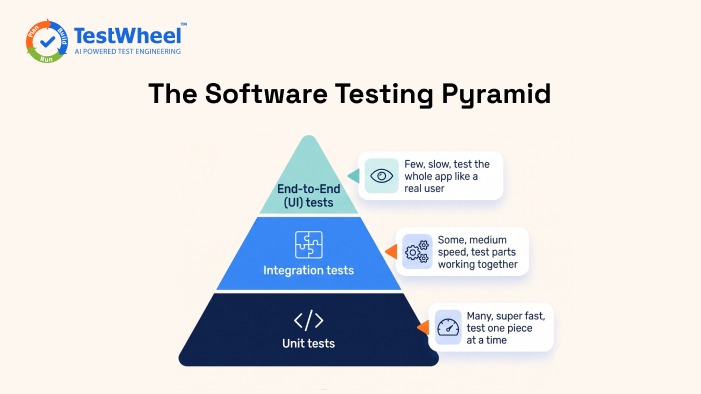
The software testing pyramid is a guideline rather than a mandatory testing ratio. It generally encourages teams to write many fast unit tests, a moderate number of integration tests and fewer end-to-end tests. However, the actual balance depends on the application’s architecture, complexity and testing requirements.
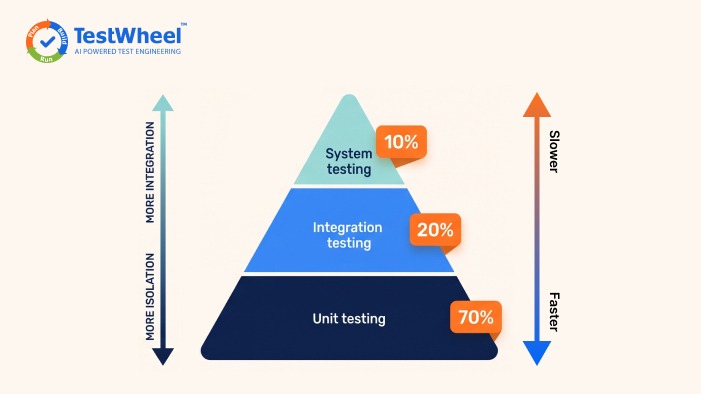
What Is the Primary Purpose of Unit Testing in Software Development?
The primary purpose of unit testing is to verify that each small piece of code does its one job correctly, so bugs are caught early, when they’re cheapest and easiest to fix.
That purpose shows up in three ways:
- Early bug detection: a bug found during coding takes minutes to fix. The same bug found after launch can cost days and some valuable customers.
- A safety net for changes: when someone edits code later, the tests act like a smoke alarm. If something breaks, you know right away.
- Living documentation: a good test shows exactly how a function is supposed to behave.
How Unit Testing Works: The 3 A’s (Arrange, Act, Assert)
What are the 3 A’s of unit testing? They are Arrange, Act, Assert (AAA), a simple pattern that keeps every test clean and readable.
- Arrange: Set up what you need (the inputs).
- Act: Run the function you’re testing.
- Assert: Check the result matches what you expect. “Assert” just means “I claim this is true. Prove me wrong.”
Let’s test a function that adds sales tax. Here is the sample code being tested:
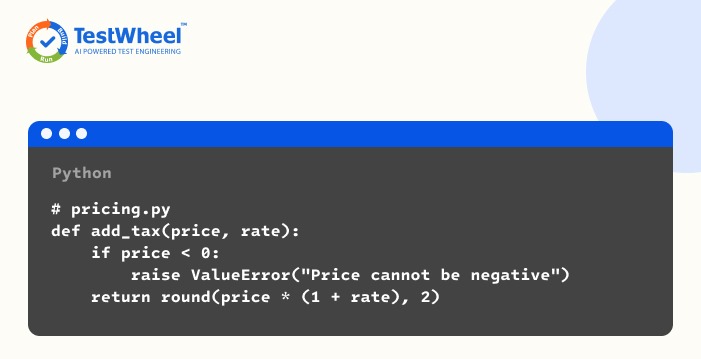
And here are the unit tests, using AAA. This is python unit testing with pytest:
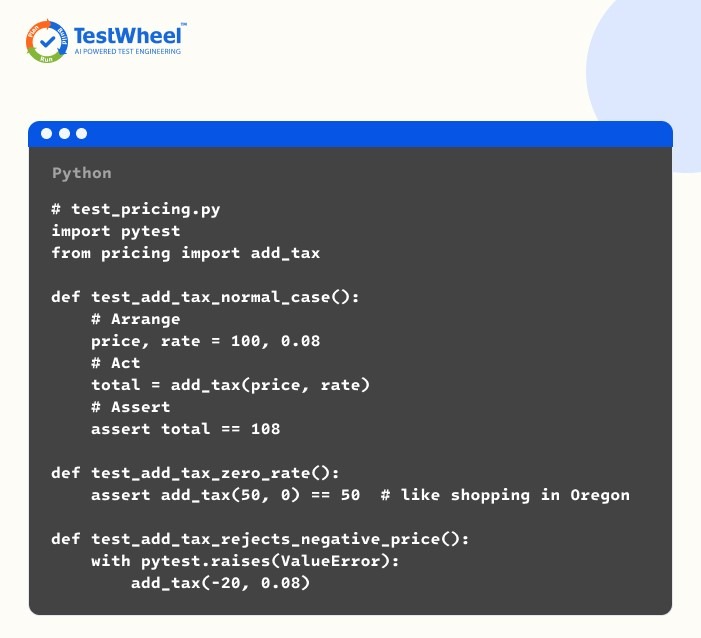
When you run them, the output looks like this:
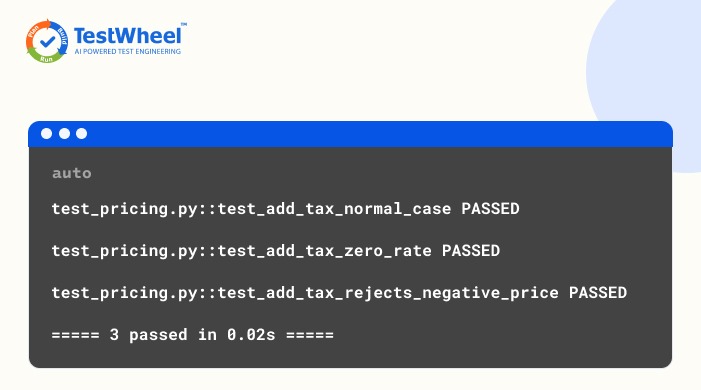
If a developer later breaks the negative-price check, that last line flips to FAILED and points straight at the problem. Three tests, 0.02 seconds. That’s the magic.
Key Principles Behind Good Unit Tests
But what makes a unit test effective? Let’s look at the essential principles developers and QA engineers should follow.
1. Follow the F.I.R.S.T. Principles
F.I.R.S.T. is a simple checklist for writing unit tests that are reliable and easy to maintain.
- Fast: Tests should run in milliseconds so developers can run them often without slowing down their work.
- Isolated (also called Independent): Each test should work on its own. It shouldn’t rely on a real database, an external service, or the result of another test.
- Repeatable: A test should give the same result every time. That means it shouldn’t depend on things that change, like the current time, random numbers, or internet speed.
- Self-Validating: A test should report pass or fail by itself, with no one reading logs and judging the result by hand.
- Timely: Write tests alongside the code, or even before it, so bugs get caught early.
2. Use Mocks and Stubs to Stay Isolated
A unit test should focus on one piece of code, not on the real services around it. To make that happen, developers use test doubles, which are fake replacements for real dependencies.
- Stubs: Return a predefined answer. Example: returning fake user details instead of fetching them from a real database.
- Mocks: Check that a specific action happened. Example: confirming an email service was called after a user registered.
Isolation is also what keeps tests fast. Tests run in milliseconds when they skip real databases and network calls. Frameworks like JUnit, Jest, and pytest then run hundreds of them in seconds and point straight at any failure.
3. Automate Tests with CI/CD
Why run tests by hand when a machine can do it for you? Teams plug unit tests into CI/CD (Continuous Integration and Continuous Delivery, or Deployment), the automated pipeline that builds and ships software. The tests run every time new code is committed or a pull request is opened.
Tools like Jenkins, GitHub Actions, and Azure DevOps manage this process and alert the team when a test fails.
4. Try Test-Driven Development (TDD)
TDD is an approach where developers write the test before the code. It follows three simple steps:
- Red: Write a test for a feature that doesn’t exist yet. It fails.
- Green: Write just enough code to make the test pass.
- Refactor: Clean up the code while keeping the test green.
3 Main Testing Approaches: White, Black, and Gray Box
| Approach | What It Is | What the Tester Knows | Example | Typical Home |
|---|---|---|---|---|
| White Box | Testing with full view of the code, like looking inside a clear glass box. The tester checks that every path, condition, and line of logic works. | Sees all the internal code | The code says: if the promo code is “SAVE10”, take 10% off; otherwise, charge full price. The tester sees both paths, so they write two tests: one with “SAVE10” and one with the wrong code. Every if branch gets checked. | Unit testing |
| Black Box | Testing without looking at the code, like pressing buttons on a sealed box. The tester only checks that the right input gives the right output. | Sees only inputs and outputs | The tester opens the app, adds a $10 latte, types “SAVE10” in the promo field, and checks that the total shows $9.00. They have no idea how the discount is calculated and don’t need to. | UI, system, and acceptance testing |
| Gray Box | A mix of both. The tester has partial knowledge of how the system works inside and uses it to design smarter tests. | Knows some internals, not all | The tester knows the app saves used promo codes in a database. So they apply “SAVE10” in the app (black box), then check the database to confirm the code is marked “used” and can’t be applied twice. | Integration testing |
Unit testing is commonly associated with white-box testing because developers often have access to the source code and understand its internal logic. However, unit tests can also follow black-box principles by checking expected inputs and outputs without depending on the internal implementation.
Popular Unit Testing Frameworks by Language
A unit testing framework is a toolkit that gives developers a standard way to write, run, and report tests. Each programming language has its favorites:
| Language | Popular Frameworks |
|---|---|
| Python | pytest, built-in unittest module |
| JavaScript / TypeScript | Jest, Mocha, Vitest |
| Java | JUnit, TestNG |
| C# / .NET | xUnit, NUnit |
| C++ | Google Test, CppUTest |
Unit Testing Python
Python developers usually pick pytest for its short, readable syntax. The built-in unittest module needs no install, which is handy for beginners.
Jest Unit Testing for JavaScript, React, and Angular
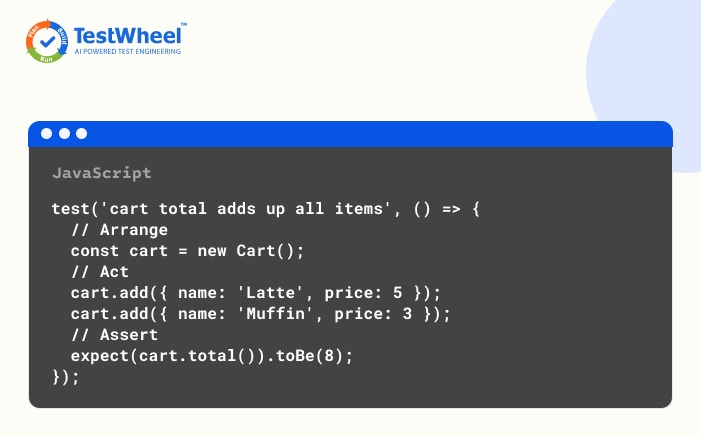
Jest and Vitest are popular JavaScript and TypeScript testing frameworks. Jest is widely used for testing JavaScript applications, while Vitest is particularly popular in modern Vite-based projects. Mocha is another flexible option, commonly paired with assertion libraries such as Chai. Here’s the AAA pattern in Jest:
For React unit testing, teams commonly pair Jest with React Testing Library to check that a component shows the right thing on screen. Angular’s official documentation now lists Vitest as the default test runner for new Angular CLI projects, so that’s what you’ll get out of the box. Jasmine and Karma are still supported, and a lot of existing Angular apps still run on them. No need to panic-migrate. You can keep your current setup and move to Vitest when it makes sense for your team. Mocha is another flexible JavaScript runner, usually paired with an assertion library like Chai.
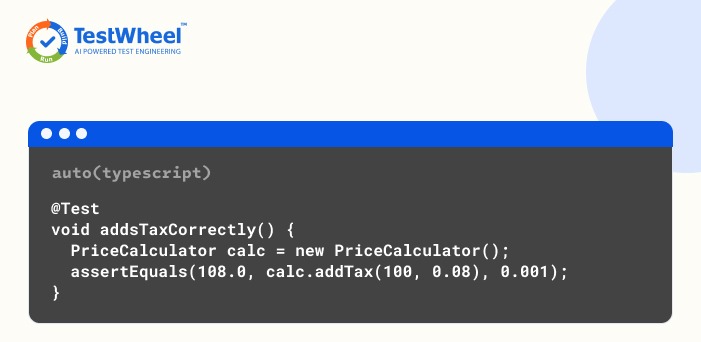
Java Unit Testing
Java unit testing is dominated by JUnit, with TestNG as a popular alternative.
Unit Testing C# and .NET
Unit testing C# is usually done with xUnit or NUnit:
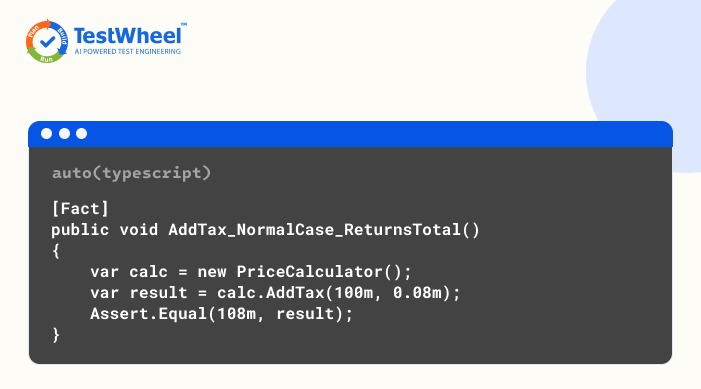
Different languages, but the idea is the same: Arrange, Act, Assert.
Key Benefits and Limitations of Unit Testing
| Benefits | Limitations |
|---|---|
| Catches bugs early, when fixes are cheap | Can’t prove the whole app works together |
| Fast feedback, in seconds | Takes time to write and maintain |
| Makes code changes safer | Weak or sloppy tests give false confidence |
| Documents how code should behave | Doesn’t catch UI, performance, or real-world user problems |
| Plugs into CI/CD for automatic checks | Over-mocking can hide real integration bugs |
The big takeaway: Unit tests are a strong foundation, not the whole building.
2026: The AI Impact on Unit Testing and How to Handle It
AI can now write unit tests for you. That’s real, it’s moving fast, and it might surpass you, if you don’t try to learn it.
Recent Case Study: Diffblue’s Autonomous Testing Agent
In March 2026, Diffblue published a benchmark of its Testing Agent across eight real-world Java projects. The agent ran autonomously and averaged 80.7% line coverage and 61.3% mutation coverage. In the same benchmark, an experienced developer iterating with an AI coding assistant for two hours averaged about 32.3% line coverage.
- Line coverage: the percentage of code lines your tests actually run.
- Mutation coverage (or mutation score): the percentage of deliberately planted bugs your tests catch. It’s a stronger measure of test quality.
Note: This was a vendor-run benchmark on Java projects, so treat it as one data point, not a universal rule.
The Catch: Green Doesn’t Always Mean Good
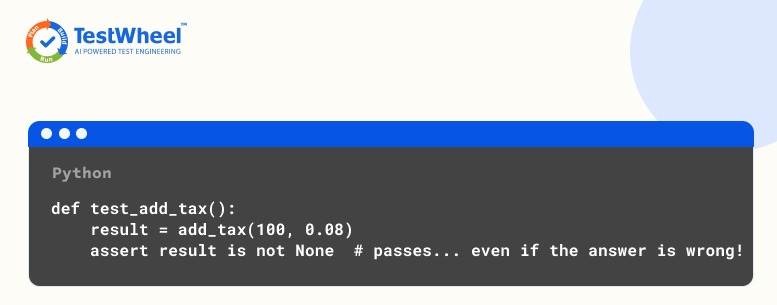
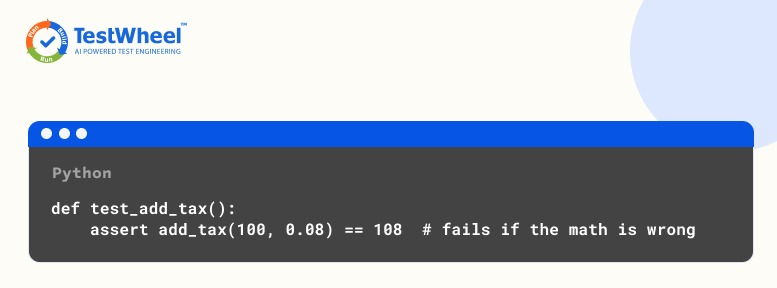
AI-written tests can look great and still protect very little. Research on AI-generated tests has found that they often rely on weak or superficial assertions, which means high coverage but limited bug-catching power. Think of a smoke alarm with no batteries: it’s installed, but it won’t save you.
Example of a weak AI-style test:
The strong version:
How to Overcome the AI Pitfalls
- Review AI tests like you’d review a teammate’s code. Ask: does this assertion check a real business rule?
- Track mutation score, not just coverage. Tools like PIT (Java), Stryker (JavaScript and .NET), and mutmut (Python) plant bugs and see if your tests notice.
- Keep tests isolated. Make sure AI-generated tests don’t secretly call real files, clocks, or services.
- Add negative tests. For every “it works” test, add an “it fails correctly” test.
- Let humans own the intent. AI is a speedy assistant. People still decide what “correct” means.
Conclusion
Unit testing is like checking every key on the keyboard before it ships: small, fast, and surprisingly powerful. You learned what it means, where it sits in the STLC and the testing pyramid, how the 3 A’s keep tests tidy, which frameworks fit each language, and why AI-generated tests still need a human eye.
One last thing: unit tests only prove that the parts work. To confirm the whole app works the way real users use it, across web, mobile, API, and performance, teams add higher-level testing on top. No-code platforms like TestWheel are built for that end-to-end layer, working alongside the unit tests your developers write. See how no-code testing fits your workflow with the 14 days free trial today.
Frequently Asked Questions (FAQs)
Yes. Agile teams build software in short cycles and need fast feedback, so unit testing is a core practice. Developers write and run unit tests continuously, and they usually run automatically in CI/CD every time code changes.
No. Unit testing checks small pieces of code and is done by developers. UAT (User Acceptance Testing) is the final check, where real users or business stakeholders confirm the software meets their needs. Unit testing is at the bottom of the pyramid; UAT is near the very top.
A unit test checks one function inside the code, usually with no network involved. An API test checks an endpoint, which is a door that lets different systems talk to each other, by sending a request and checking the response. Unit tests look inside the building; API tests check the front door.
It depends on the language. Common choices are pytest for Python, Jest for JavaScript, JUnit for Java, xUnit or NUnit for C#, and Google Test for C++.
JUnit testing means writing and running unit tests in Java using the JUnit framework. Developers mark test methods with @Test, and JUnit runs them and reports passes and failures.
No. Unit testing is the practice of testing small pieces of code. JUnit is one tool for doing that in Java. It’s like the difference between “cooking” and “a frying pan.”
Developers, usually. They know the code best and can write tests while building the feature. QA engineers often review the tests and focus on higher-level testing, and in teams that use TDD, developers write the tests first.
No, but they overlap. Unit testing is a level of testing (small pieces of code). Regression testing has a purpose: making sure new changes didn’t break existing features. Unit tests are often reused as part of regression testing because they run fast.