-
February 24, 2026
- Share:
-

-

-

-

A few years ago, I joined a new role, which came with a regression testing suite that proudly claimed “92 percent automated coverage.” On paper, it looked perfect.
In reality, every third CI/CD run was red, half the tests were flaky, and releases had to be delayed for manual verification. The automation mechanism was there, but no one trusted it.
This is when I learned an exceptionally valuable lesson, one I carry to every QA team I lead: automation is not valuable because it exists. It is valuable when engineers trust it.
Effective automated software tests are systems designed to communicate intent, survive product change, reliably check quality, and reduce human effort.
Whether you are building regression testing for a fast-moving startup or scaling QA automation across multiple teams, the same core features will deliver solid results every time.
This guide will discuss the features consistently seen in high-performing automated software testing pipelines. The focus here is not on theory or vendor claims, but on field-tested practice.
Common Challenges in Automated Software Testing (a.k.a Why Most QA Automation Suites Struggle)
Most automated software testing failures come from design shortcuts, unrealistic expectations, and maintenance neglect.
Plenty of automation platforms look pristine in demos but collapse under the daily CI/CD pressure. Here are the most common challenges that undermine QA automation and regression testing ecosystems.
Flakiness Disguised as Coverage
It often happens that a team runs thousands of automated tests, but a significant number of them fail intermittently. QAs have to keep rerunning them until they pass.
This is a completely unstable setup. You cannot rerun tests until they pass. Not only is this pointlessly time- and effort-consuming, but it also undermines all confidence in the release.
Framework Overengineering
Many QA automation efforts abound in custom wrappers, layered abstractions, and internal SDLs. This works fine at first, but when the original authors leave or move to other teams, new owners become confused with what seems like contextless convolution.
My last team dealt with a Selenium-based framework that required three weeks of onboarding before a tester could safely add a test. At that point, automation is creating an additional bottleneck.
UI Heavy Regression + Weak API Coverage
UI tests are automated most often because users directly interact with this layer. But the UI is also the most brittle layer; it keeps changing as the product evolves.
Tests need to enforce business rules at the API level. Otherwise, test suites become slower, heavier, and more difficult + expensive to maintain.
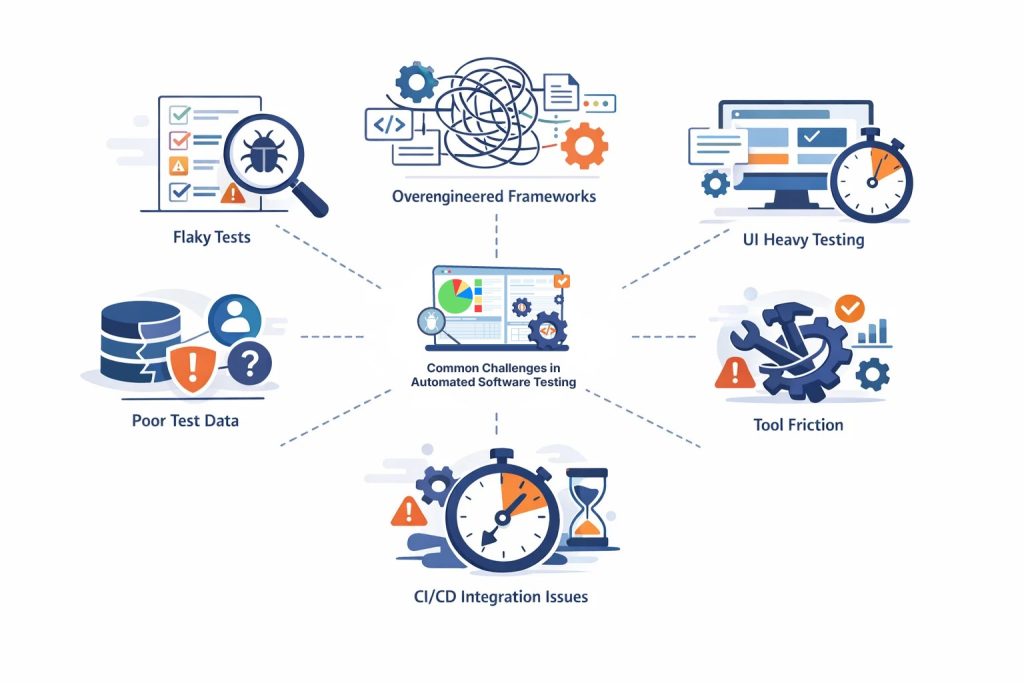
Inadequate or Improper Test Data
No automated software testing is possible without accurate and precisely structured test data. Look out for shared accounts, reused records, and environment drift, as they can cause unpredictable failures. For instance, many nightly regression runs fail because another team’s load test consumes the same dataset.
It’s ideal if each automation suite isolates and generates its own data.
Tool Friction
Tool friction is especially real with open source stacks. Selenium, Cypress, and Playwright are practically useful, but they demand engineering discipline. With these tools, QA teams will be taken up by version conflicts, driver issues, dependency updates, and custom infrastructure.
This is where no-code and low-code platforms gain a major advantage in efficiency. Less framework plumbing, and more test intent with a lower barrier of participation.
CI/CD Integration Gap
Many automated software testing suites are not pipeline-friendly. Tests run for too long, require too much manual setup, and generate unclear results. When automation cannot run cleanly and quickly inside CI/CD, it becomes a resource drain.
10 Features of Effective Automated Software Testing for QA and Regression Testing
The only real standard for knowing whether an automated test is “good” is this: Would you trust the test enough to bet a deploy on it? Would you trust the test enough to approve or block a release?
Across the board, tests that earn this trust tend to share the following traits.
Tests should be Written Around user behavior, not UI choreography
A test should describe and verify the system’s final outcome. The exact sequence of clicks and selectors is not as important (unless it breaks the user journey).
If your tests read like a script of DOM interactions and not much else, it won’t survive too many product redesigns. Rather, focus on verifying the business scenario at hand.
For instance, “User can upgrade plan and billing reflects new tier” will probably outlive three redesigns. “Click upgradeBtn_primary then confirmModal_ok” will not.
This small but foundational shift will also make regression testing suites more resilient and cut down human effort in the long run.
See How TestWheel Delivers These Features
Tests should check one thing at a time
A single automated test should answer one clear question or validate one user outcome. No more.
Each test should ideally validate a single risk and check one aspect of system behavior. A test created to verify multiple outcomes will confuse devs and QAs anytime a bug shows up. This muddle slows down debugging and makes CI/CD feedback less dependable.
For example, let’s say you’re testing a login page. One large test is written to verify everything in a single flow: user logs in, dashboard loads, the right profile name shows up, the notification badge count is accurate, and that recent activity is immediately visible.
If the test fails, all QA learns is that something in that chain of user actions broke. What exactly? Someone has to dig through logs and screenshots to find out.
It’s better to split the test into three smaller modules:
- One test checks that valid credentials allow login
- One test checks that the dashboard loads successfully
- One test checks that the correct user name is displayed
Now, when a test fails, the failure message points to the exact behavior that caused the collapse in functionality. It offers a speed and clarity that make automated software testing more productive and dependable.
Pro-Tip: If you cannot describe the purpose of a test in one sentence, it probably needs to be split.
Tests should behave the same way on every run
A good automated test is boring. Run it ten times on the same build with the same data, and you get the same result every time. If the result keeps shuffling between pass and fail, the test is broken.
Consider a UI test that checks if a success banner appears every time a user saves a profile form. The test engine clicks Save, waits 2 seconds, and checks for the banner text.
Let’s say it passes on a fast machine, fails on CI, and passes again locally. A classic flaky test.
In this case, the feature is fine. The problem is the fixed sleep.
Just remove the hard sleep and write the test to wait until the success banner is visible or until the save API call returns. Same intent, but now the test follows system state, and doesn’t have to guess about timing.
Most flakiness comes from shared test data, timing assumptions, or hidden dependencies. Clean those up, and you’ll get your dependable boring test 9 times out of 10.
Tests should be fast enough to run often
If your core test suite takes hours to run, it cannot be run often. If it does not run often, more bugs escape to production.
Let’s say a team built a “critical user journey” regression test that covers signup, email verification, first project creation, file upload, and report generation. It takes about 18 minutes to run end-to-end. It is slow and uses multiple external services, so the team schedules it to run nightly rather than in CI.
One week, a permissions bug makes it into the project creation step. But nobody notices because the test that would have flagged it never runs on commit.
Now, split this test into a couple of smaller, focused tests. Key path checks drop to under 3 minutes and start running on every merge. Failure starts showing up in minutes, the very next day.
Consider a more layered execution pattern: quick smoke tests on every change, broader regression testing on merge, and full in-depth runs on a schedule.
Tests should be easily readable
A good automated test should make sense to someone seeing it for the first time. They should be able to read and understand what it proves.
The key elements for this are simple naming, obvious setup steps, and direct assertions. Tests filled with too many clever abstractions will confuse anyone but the original author, which is a problem anytime they switch teams.
For example, take a failing test called validateFlowA(). Inside, it calls five helper methods with names like prepareContext() and executeStep2(). To understand what the test actually checked, QAs have to open nine different files.
Most engineers will just avoid touching this test.
A cleaner structure would be: create standard user → add product to cart → place order → assert that order status is confirmed.
Coverage remains the same, and everyone knows what the test aims to achieve.
Tests Should Create and Control Their Own Data
It’s best for automated tests to bring their own data. This keeps them from relying on whatever exists in the database when they run.
Shared data (accounts, orders, records, etc.) often leads to bugs and failures that are hard to reproduce. For example,
Let’s say a team runs a checkout test that always uses the same saved user account. It passes most days and fails once in a while with a stock error. A few days of investigating this error show that other parallel tests were “buying” the same limited inventory item with the same account.
By the time the checkout test ran, the items were gone. Hence the stock error.
The fix was simple: each test creates its own user and its own product record through an API call at the start, then marks them for cleanup.
Creating test data for each test does entail extra work, but it smooths out the noise down the line. If tests control their own state, results will be trustworthy and debugging easier.
Tests Should Leave Useful Evidence When They Fail
When a test fails, it should provide context without having to call whoever authored the test.
A bare message like “assertion failed” or “element not found” is not enough. Ideally, the failure output mentions what the test expected, what was actually executed, and enough information to make the next step obvious.
An example.
An API test verifies that creating a new order returns a status code 201. When the test fails, the assertion just says expected 201 but got 500. Technically correct and practically useless.
A better-designed test will log the request payload, the response code, and the first part of the response body. The failure message will show that the price field was null and the service rejected it. No need to rerun the test to see what went wrong.
Tests Should Be Distributed Across Layers, Not Trapped in UI
If possible, automated software tests should run via the lowest layer that can verify the behavior being tested.
If a pricing rule lives in a service, test it through the API. If a validation rule lives in a function, test it exactly there.
Keep extensive UI automation for user journeys and integration layers between modules, not every edge case.
Another example.
Let’s say a test is meant to verify discount logic only via the UI. The test opens the product page, adds items to the cart, applies a promo code, and checks the final price. It takes about 90 seconds per run and keeps failing due to unrelated UI timing issues.
Add a small set of API level tests that hit the pricing endpoint directly with different quantities and promo codes. Now tests run faster and cover more combinations than the UI can. Keep one happy path in the UI suite just to confirm that everything works at the user layer as well.
The next time a discount bug shows up, the API tests fail and point to the calculation layer. Since the UI test remains green, QA knows the page itself is fine.
Lower-layer tests run faster, break less often, and give cleaner reasons for failure.
Tests Should Be Resilient to Small Product Changes
Healthy automated tests should not shatter anytime a designer moves a div or renames a CSS class.
The fragility of UI tests usually comes from brittle selectors: deep XPath chains, style-based classes, or position-based matches. One layout change and half the regression suite can go red.
For instance, let’s take a test built to click a checkout button via a selector tied to its position in the layout. This worked until a new help link was added right above it. Same button, same label, different position.
The fix? Decide on a stable test attribute for key elements. Select by that, and you’ll see that UI rearrangements stop breaking the suite.
Many modern automation tools, especially AI-powered, no-code platforms, come with self-healing abilities that fix locators with every UI change.
Tests Should Cost Less to Maintain Than the Value They Provide
Every automated test needs updates, review, and occasional repair. It’s a long-term liability that is only worth the cost if it finds real defects. Tests that are mostly maintenance work are just time and money sinks.
For example, QA is running a huge UI regression testing suite. Thousands of checks run, built with a flexible open source stack. Looked great on paper, but it needs two engineers to spend each sprint fixing broken tests after UI and workflow changes.
Dig deeper into the failure history, and you’ll find that often a large number of these tests haven’t caught meaningful defects in a while. They might be checking low-risk UI details and breaking constantly.
Trim this layer. Move core rules down to the API level. Rebuild the highest value user journeys with a low-code automation tool. This makes the suite light without cutting down the number of defects dropped. Only maintenance hours decrease.
Open source tools like Selenium, Cypress, and Playwright give you deep code-level control, but they demand engineering overhead. Lower code platforms reduce that burden but limit customization.
Do No-Code Platforms Outperform Selenium, Cypress, and Playwright for Automated Software Testing Efficiency?
Open source frameworks like Selenium, Cypress, and Playwright offer deep control, precise ecosystems, and code-level customization that expert developers prefer in their toolkits.
But that comes at a cost, not with regard to writing tests. The cost is in maintaining the test framework itself.
With most open source QA automation stacks, you are essentially building infrastructure from scratch. This includes driver management, selector strategy, retry logic, reporting, test data setup, parallelization, CI/CD wiring, and flake handling.
None of this directly pushes revenue, but it demands continuous engineering time.
A common example you’ll see in more than a few QA teams would be:
A solid Playwright framework is set up with clean code, good patterns, and strong engineers managing the foundation. Six months later, two people are still spending roughly a third of their time updating helpers, refactoring selectors, and stabilizing timing issues after UI changes.
Naturally, test coverage grows more slowly because devs and testers are occupied with framework care and maintenance.
On the other hand, no-code platforms can be used by anyone in a QA automation team, even if they are not technically trained in programming. Product-savvy managers can build core regression testing flows without writing a single line of code.
When the UI shifts, built-in locator strategies and self-healing features can handle necessary changes to the tests, leaving human testers to innovate and brainstorm more sophisticated QA flows.
In the open-source vs. no-code testing debate, a few efficiency gaps jump out at you:
- Authoring speed: With code-heavy tools, even the simplest tests require you to build structure, import modules, run page reviews, and reconfigure code manually when needed. With no-code platforms, new testers can easily create stable automated tests within a few hours with much less work.
- Maintenance load: Open source tools require humans to take on the maintenance work. No-code tools will come with capabilities to adjust tests (especially around locator handling and waits) in response to UI changes out of the box.
- Contribution barrier: With Selenium, Cypress, or Playwright, only people comfortable with the language and framework can build tests. With no-code QA automation, senior testers, analysts, and even product folks can contribute without upskilling in coding knowledge.
Despite the differences, it’s not a contest. In many cases, code-first frameworks are the right choice. When devs need deep custom integrations, complex stubbing, and specialized flows, these frameworks reign supreme.
But for teams focused on regression testing coverage and CI/CD feedback, the deciding factor is not flexibility but total cost over time. This is where no-code/low-code platforms simplify the process and get to the execution and release phases faster.
FAQs: Automated Software Testing, Regression Testing, & QA Automation
What is Automated Software Testing?
Automated software testing is the process and practice of using specialized tools and scripts to build and execute tests, verify results, and report bugs with minimal manual intervention. QA teams use automated testing software to validate features and functions and support fast release cycles.
Automated software tests are especially useful for regression testing and fit seamlessly into CI/CD pipelines when configured well.
Why is Automated Software Testing important for CI/CD?
Automated Software Testing is important for CI/CD as it offers quick and repeatable quality checks on every code commit and merge.
Without QA automation, CI/CD can offer fast releases, but without extensive quality control guardrails. Automated smoke and regression testing suites give immediate feedback, catch defects early, and prevent unstable builds from reaching end-users.
What is the role of Automated Software Testing in Regression Testing?
Automated software testing basically forms the backbone of modern regression testing. Set it up, and the test engine will run automated critical functional checks after every code change.
Automated regression tests go a long way in reducing risk, increasing test coverage, and enabling frequent deployments.
When Should a Team Start QA Automation?
A team should start with QA automation when software features are stable enough to be tested repeatedly, and releases need to occur regularly. Ideally, start regression tests that cover login, payments, core APIs, and primary user workflows.
What are the Most Common Causes of Flaky Tests in QA Automation?
Generally, flaky tests in QA automation emerge from timing assumptions, shared test data, and uncontrolled dependencies. Some of these causes would be fixed sleep delays, reused user accounts, and reliance on unstable external services.
As a best practice, consider replacing time-based waits with condition checks, creating per-test data, and stabilizing or mocking integrations in your automated software tests.
Should Automated Software Testing focus more on API tests or UI tests?
It’s best for automated software tests to include more API tests than UI tests. The former are faster, more stable, and sit closer to an app’s business logic. This makes failures easier to diagnose.
While UI tests are still essential, elements keep shifting, which means testers have to keep adjusting code or utilize a testing platform that will make the necessary adjustments with every UI change.
Are no-code QA Automation tools better than Selenium, Cypress, or Playwright?
Often, no-code QA automation tools prove to be more efficient for teams focused on fast regression testing and CI/CD feedback without compromising quality. Tools like Selenium, Cypress, and Playwright offer deeper technical flexibility, but require deep engineering effort for setup and maintenance.
No-code QA automation tools reduce framework overhead and reduce the barrier to participation. That means more team members can create tests, which accelerates the pipeline and enables faster, high-quality releases.