-
March 19, 2026
- Share:
-

-

-

-

Most application failures begin weeks before production, inside the testing process.
A test suite passes. The build moves through CI. The demo works perfectly on staging.
Yet once the release reaches real users, things start breaking. A checkout flow fails under real traffic, a form glitches in Safari, and an API response fires off an unexpected frontend error.
These failures are usually the result of gaps in web testing.
Modern web applications have gone beyond simple request–response systems. A single-page interaction involves multiple APIs, asynchronous calls, authentication checks, third-party services, and browser-specific behavior.
Testing has to cover every part of that chain. Teams with extensive automation can still experience post-prod failures because they are testing the wrong things or testing them the wrong way.
This article discusses the most common web testing mistakes that lead to application failures, and how engineering/QA teams can prevent them.
Why Does Web Testing Fail? Common Causes of Production Failures
Web testing should be the last line of defense before your users encounter a bug.
But, in real-world QA teams, web tests run at the end of a sprint and check only the obvious paths. The tests pass, the build deploys, and everyone moves on until a user finds the bug that the test suite looked for.
The problem is that web testing is genuinely hard to do well. You can have 80% code coverage and still ship a broken checkout flow. Even 500 automated tests can miss the bug that takes your application down on Black Friday.
According to the most recent available estimate from the Consortium for Information & Software Quality, poor software quality cost the U.S. at least $2.41 trillion in 2022, and industry analyses indicate this burden has continued to grow since then.
For example, a slow checkout page drives cart abandonment, with research showing that a site loading in one second converts three times better than one loading in five.
A broken API call can corrupt user data, creating burdens for support teams and also eroding user trust. A button that works perfectly on Chrome crashes on Safari. That Safari user never files a bug report. They simply take their business elsewhere.
The main issue with web testing is how vast it is.
A web application is a layered system of frontend code, backend services, APIs, databases, third-party integrations, and networking infrastructure, all running simultaneously across dozens of browser versions, operating systems, screen sizes, and network conditions.
A bug can exist at any layer. Traditional testing approaches cannot cover these systems that are complex, distributed, always-on, and accessed in unpredictable ways.
On top of that, many teams treat testing as a phase rather than a practice. It’s something that happens after development with whatever time remains before the release deadline.
When schedules slip, testing gets compressed. The result is technical debt. Dozens of small compromises quietly pile up until your test suite becomes more liable.
Choose the Best Web Testing Strategy for Your QA Team
6 Critical Web Testing Mistakes And How to Fix Each One
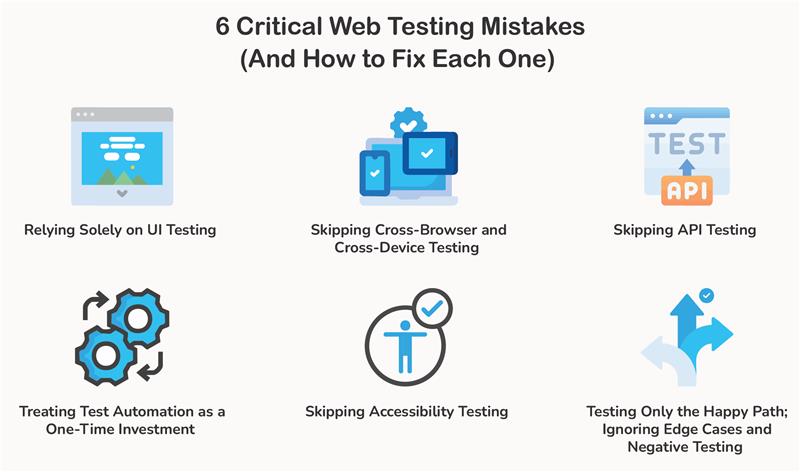
1. Relying Solely on UI Testing
Many teams treat passing UI tests as a green light for production. It’s an understandable assumption. Tools like Playwright, Cypress, and Selenium do a convincing impression of a real user, clicking through pages and finishing workflows from start to finish.
If all that passes, the app must be ready to ship, right?
The problem is that UI tests only see what’s happening in the browser. But they can miss issues deeper in the system.
Running a simple user action may involve several backend services.
APIs exchange data, validation rules run on the server, and caching layers decide what users get.
If something breaks in those layers, a UI test will often miss it entirely, unless the failure happens to surface in a full end-to-end workflow. That’s a big blind spot.
UI tests are essential, but they can’t do everything. The fix is to stop treating them as the whole strategy and start spreading tests across the stack.
Unit tests cover your core logic. API tests confirm that services are actually talking to each other correctly. Integration tests show how components behave once they’re working together. UI tests cover the user journeys.
When each layer has coverage, bugs show up earlier, and software quality automatically goes up.
2. Skipping Cross-Browser and Cross-Device Testing
Most developers build and test in a single browser on their own machine. Often, that means Chrome on a laptop. If everything works there, the feature is ready to ship.
But people access web applications through different browsers like Chrome, Safari, Firefox, and Edge. Some are on desktops, others on phones or tablets. Operating systems and screen sizes vary. Even small differences in how browsers interpret code can affect page behavior.
A layout that looks perfectly aligned in Chrome may shift in Safari. A JavaScript feature might behave differently in another browser. Touch interactions that work smoothly on a desktop can break on real mobile devices.
These issues don’t show up if testing happens in only one environment. Instead, they show up after release, when users start accessing the app from devices and browsers the team never tested.
Cross-browser and cross-device testing prevents this by verifying that the application works across multiple environments. Teams can ensure the experience stays consistent for everyone, no matter what browser or device they use.
3. Skipping API Testing
Most teams either test the UI and assume the API is fine, or they test the API in isolation and assume the integration holds together. Neither is true.
The UI is just a face. The API is where the actual work (payment processing, business rules, data persistence) happens.
When API testing gets skipped, the failures are quiet but high impact.
A missing auth header returns a 401. A changed field name causes the frontend to render a blank screen. A race condition in a POST endpoint creates duplicate records that nobody notices until a data audit. Users don’t report these things. They just leave.
Tools like Pact catch breaking API changes before deployment by enforcing agreements between services. Use Postman, REST Assured, or Supertest to validate status codes, response schemas, error handling, and auth on every endpoint.
Assert responses against a JSON Schema or OpenAPI spec. Unintentional breaking changes get caught automatically.
Test authorization explicitly. Try accessing another user’s resource by manipulating an ID in the request. This vulnerability is nearly invisible from UI testing and one of the most exploited on the web.
4. Treating Test Automation as a One-Time Investment
Often, this pattern plays out in web testing and operations in the real world. A quality codebase is pushed, a solid test suite is built, and then the suite quietly disappears.
Selectors go stale. New features ship without tests. Failures are not fixed. Six months later, the suite is slow, brittle, full of false positives, and completely untrustworthy.
This happens when web testing isn’t treated as infrastructure. While code is maintained continuously, test suites are not.
Once developers stop trusting a test suite, they stop acting on it. They run it, see failures, assume it’s noise, and merge code anyway. At that point, it becomes easier for bugs to slip through.
To prevent tests from becoming an afterthought, place red lines for software quality. No feature gets shipped without tests. Run audits quarterly to cut out slow, redundant, and outdated tests.
All flaky tests get quarantined. Set a simple rule: any test that fails flakily more than twice in two weeks gets flagged for immediate repair or deletion.
5. Skipping Accessibility Testing
Accessibility testing generally ends up being the last item on the checklist. It is also the first thing cut when time runs short.
1.3 billion people worldwide live with some form of disability. When your application isn’t accessible, those users will leave and find something that works for them.
Accessibility lawsuits in the US have increased sharply year over year, and the EU’s European Accessibility Act now mandates compliance for digital products. Skipping accessibility testing can lead to legal liability.
Automated tools only catch a certain percentage of WCAG violations. Axe and Lighthouse are useful, but they can’t tell you whether a reading order makes sense, whether an error message is actually helpful, or whether a focus indicator is visible enough. The rest requires human eyes.
Integrate accessibility directly into your test suite. Verify that every interactive element is reachable by keyboard, focus order is logical, and modals trap focus correctly.
Run the WebAIM Contrast Checker during design review, before any code gets written. Use NVDA (Windows), VoiceOver (Mac/iOS), or TalkBack (Android) on the most critical flows.
Wrong ARIA is worse than no ARIA. It actively misleads assistive technologies.
6. Testing Only the Happy Path; Ignoring Edge Cases and Negative Testing
Every developer tests the happy path. Valid inputs, logged-in user, server responding, everything working as intended. But you can’t stop here.
Real users are unpredictable. They submit empty forms, paste emojis into phone number fields, open the same checkout tab twice, hit the back button mid-payment, or lose signal right when your app is writing to the database.
If you’ve never tested for these scenarios, your application has no idea how to handle them.
To fix this, ask one question before you ship it: What happens when this goes wrong? Then test those answers.
- Form validation: Empty fields, inputs that exceed max length, invalid email formats, SQL injection strings, and special characters.
- Authentication flows: Wrong passwords, expired sessions, two devices logged in simultaneously, and account lockout.
- Network conditions: Use Chrome DevTools Network Throttling and Toxiproxy to simulate slow responses, timeouts, and partial failures without touching your infra.
- State corruption: Refresh mid-process. Navigate away and come back. Hit the back button during a transaction. If your app can’t handle these gracefully, UX will suffer.
FAQs About Web Testing
1. What is Web Testing?
Web testing is the process of checking whether a website or web application works the way it’s supposed to. Testers verify features, performance, security, and compatibility across different browsers and devices before real users interact with the UI.
The goal is to catch bugs, broken workflows, and performance problems before they reach production.
2. Why is Web Testing Important?
Web testing protects user experience. A broken checkout flow, slow page loading, or a form that fails on a specific browser can turn off users within seconds.
By comprehensively testing web applications before release, QA teams can find problems early and avoid production failures that disappoint users and damage trust.
3. What are the main types of web testing?
Web testing covers several different areas of an application. Each type focuses on a different risk.
The common types of web testing include:
- Functional testing to verify that features like login, forms, and payments work correctly.
- Performance testing to see how the application behaves under heavy traffic.
- Cross-browser testing to ensure the site works on Chrome, Safari, Firefox, and other browsers.
- Security testing to flag vulnerabilities that attackers could exploit.
- Accessibility testing to make sure that people with disabilities can use the website.
4. What tools are commonly used for web testing?
Generally, QA teams use a combination of tools, depending on the website under test.
For example:
- Playwright, Cypress, and Selenium for browser automation and end-to-end testing.
- Postman or REST Assured for testing APIs.
- Lighthouse or WebPageTest to measure performance..
- Axe or Lighthouse accessibility audits to detect accessibility issues.
- BrowserStack or Sauce Labs test across multiple real browsers and devices.
If possible, use multiple tools to test different parts of a web application more effectively.
5. What is the difference between web testing and website testing?
No, these terms are not interchangeable; there are subtle differences.
Website testing focuses on simpler sites to verify content, layout, and basic functionality.
Web testing, on the other hand, refers to testing complex web applications, including APIs, authentication systems, databases, and dynamic user interactions.
6. How often should web testing be performed?
Web testing should be performed continuously. It is not something you only perform before a release.
In modern development workflows, automated tests are typically run during every CI/CD build. Additional manual testing happens before major releases or new features go live.
Continuous web testing is highly effective at catching problems early instead of discovering them after users do.
7. What are the biggest challenges in web testing?
Modern web applications are complex and constantly changing. Testing them comes with quite a few challenges, like:
- Supporting many browsers, devices, and screen sizes.
- Maintaining automated tests as the application evolves.
- Testing integrations between APIs and services.
- Reproducing real-world network conditions and user behavior.
Effective web testing usually involves multiple layers of testing. Just relying on UI automation is not enough.