-
April 3, 2026
- Share:
-

-

-

-

A developer ships what looks like a minor change. It could be a two-line fix or a config update.
Suddenly, the checkout flow is broken. Or the password reset emails stop sending.
That’s regression.
In real-world software development, every change to a codebase carries risk. Code is woven into a network of dependencies, shared utilities, and inherited logic.
Regression testing protects the network. Done correctly, it catches bugs, glitches, and anomalies before users do.
What is Regression Testing?
Regression testing is the practice of re-running previously validated tests after a code change to confirm that nothing broke. It checks that all functions work as intended, and that changes do not disrupt them.
Regression testing isn’t just about software function.
A page that loads correctly but now takes four seconds instead of 400 milliseconds is a regression.
A UI that renders correctly on Chrome but starts clipping on Safari after a CSS refactor is a regression.
Also, regression testing is not the same as retesting.
Retesting involves checking that a specific bug is actually fixed. A defect was logged, and a developer addressed it. You run that exact test again to confirm the fix holds.
Regression testing means checking that the fix didn’t break something else in the process.
Why Regression Testing Matters for Fast Releases
Ship faster, and you risk missing something.
Test everything, and you slow the pipeline to a crawl.
Sprints end, code merges, and the next cycle starts. When teams are pushing to production weekly or even multiple times a day, there isn’t room for a full manual regression cycle between each deployment.
Teams under delivery pressure start trimming the regression suite. They skip the edge cases and focus on the core paths. It works until the failure lands in production.
A 2022 study compared four Java-based regression test selection tools and reported an average 40.49% reduction in end‑to‑end processing time.
There’s also this 2025 industry case study (Cursion) that reports “over 100 hours” saved in testing cycles across a few releases after integrating automated regression testing into the workflow. Simultaneously, the pipeline also improved perceived product quality.
CI/CD pipelines can change this equation, but only if regression testing is built in. When automated regression runs on every commit or pull request, the tests run continuously in the background as development moves forward.
Types of Regression Testing (and When to Use Each)
Not every code change requires the same level of scrutiny.
It’s overkill to run your full test suite after fixing a typo in a tooltip.
On the other hand, running only a smoke test before a major release is a gamble.
What’s necessary is to know which type of regression testing to apply and when. That way, you don’t over-test and slow down or under-test and regret later.
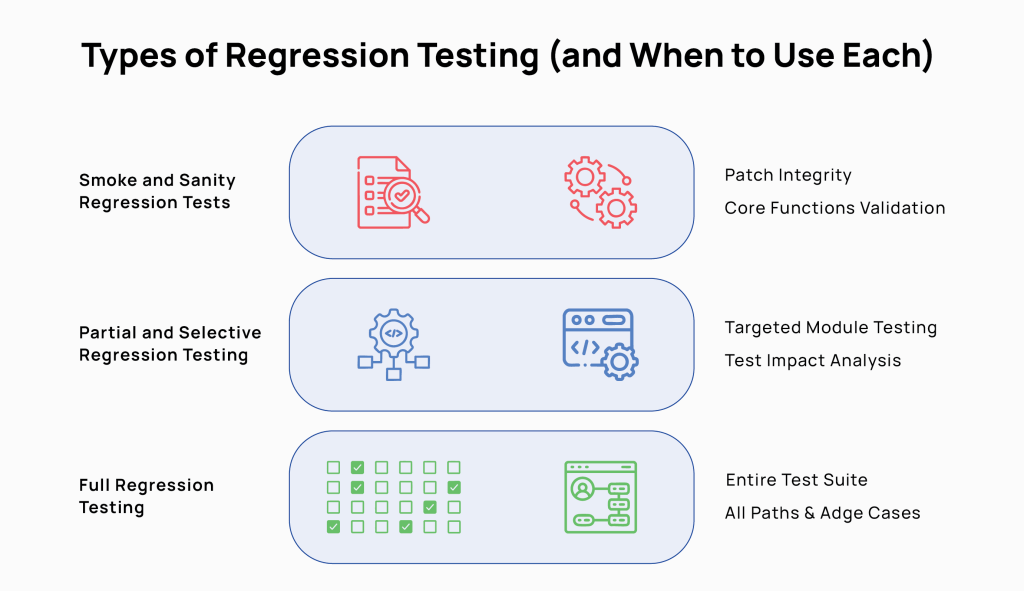
Smoke and Sanity Regression Tests
Smoke tests ask: Is the build stable enough to test further?
It checks that the login works, the dashboard loads, and core navigation doesn’t throw errors. If the smoke test fails, nothing else runs.
After a specific fix, a sanity test checks one thing: did this change do what it was supposed to do, and did it stay in its lane? It’s narrow by design.
Sanity tests belong after minor patches, hotfixes, or changes scoped to a single module.
Partial and Selective Regression Testing
Rather than running the full suite, partial regression targets the areas most likely to feel the impact of a recent change.
A developer touches the checkout flow. You run checkout, payment processing, order confirmation, and anything with a known dependency on that path.
Selective regression uses test impact analysis or historical failure data to decide which tests to run. It maps the code change to test dependencies and runs only what’s logically connected to the current modification.
A 2023 study on CI/CD strategies reports that incremental and prioritized regression testing reduces testing time and speeds up the CI/CD process while maintaining software quality.
Both approaches work within a suite in which tests are tagged by feature area, risk level, and component dependency. Without that structure, partial regression offers flawed results.
When to use them: sprint releases, pull request validation, and any deployment that touches a defined, bounded area of the codebase.
Full Regression Testing
Full regression means running the entire test suite. Every test, every path, every edge case. It’s the most thorough and most expensive option.
These tests are needed before a major release or version milestone, and after significant architectural changes. These suites should also run when multiple features have been developed in parallel, and their interactions are unknown.
Finally, full suites should be deployed after a period of accumulated technical debt, where smaller regression cycles may have left gaps.
Full regression test suites are not a substitute for the other types of tests. It should be the final validation layer, not the primary one.
Building a Regression Test Strategy for Better Coverage
A regression test strategy is a structured and intentional plan for deciding which tests to run, when to run them, and how to balance coverage against real-world constraints of time and effort.
Here’s how to build an effective and practical regression test strategy for maximum coverage without blowing up release deadlines.
Risk-Based Regression Test Selection
Risk-based regression test selection prioritizes which tests to run based on the possibility and impact of failure. Instead of treating all tests equally, more effort goes into code that is business-critical, has been recently changed, is historically fault-prone, or is tightly coupled to other systems.
The approach answers three questions before every release: Which areas did we touch? Which areas break most often? Which areas, if broken, would cause the most damage?
Risk profiles aren’t static. A stable module can become high-risk when refactored. A low-traffic feature often becomes critical after a product push. You have to review risk classifications at least once per quarter.
Mapping Regression Tests to Requirements and Defects
Mapping regression tests to requirements and defects creates a traceable link between each test and the specific requirement it validates or the bug it wants to catch.
Every requirement should have at least one corresponding regression test. When the requirement changes, the test changes.
Defect mapping works the same way in reverse. Every production bug is a gap. When a fix is shipped, a test goes with it and is tagged back to the original defect.
This approach seeks to answer: which requirements lack coverage? Where are the gaps most likely to hurt us?
Get Started with Smarter Software Testing Today
Improving Regression Test Coverage Without More Scripts
Better coverage doesn’t just translate to writing and running more tests. It also has to close real quality gaps.
If you map your regression tests to requirements and defects, you’ll probably find:
- strong coverage on early-built features.
- thin coverage on everything added later.
- near-zero coverage on integration points.
Adding tests in those gaps delivers more value than doubling down where coverage already exists.
Don’t forget to look at test granularity. Broad end-to-end scripts that walk through fifteen steps to validate one behavior are brittle and hard to diagnose.
Break them into smaller, focused tests so you get more precision without increasing the number of paths covered. When something breaks, a focused test tells you exactly where it happened.
Test for boundary values, empty fields, special characters, and large payloads on the same code paths. You’ll find different failures emerge without having to create new scripts.
Automating Regression Testing Without Slowing Down CI/CD
Automated regression testing means using scripts and tooling to re-run validated test cases automatically after each code change, without any human intervention.
If implemented accurately, this practice can accelerate CI/CD pipelines and make them more trustworthy. Here’s an automation case study reporting 70% reduction in time spent on regression testing and 50–60% reduction in QA costs after introducing automated regression suites, enabling faster releases.
What to Automate vs. Keep Manual in Regression
| Category | Automate | Keep Manual |
|---|---|---|
| Test types | Core user flows, API contracts, data validation, smoke suites | Usability testing, exploratory testing, visual QA, complex interaction patterns |
| When it applies | Tests that are stable, run frequently, and have deterministic outcomes | Tests that require judgment |
| Why | High volume, repeatable, no human interpretation needed | Scripted tests only find what they were written to find. Humans catch unanticipated bugs. |
| The risk of getting it wrong | Under-automating creates manual bottlenecks at scale | Over-automating removes the human eye that catches what scripts miss |
Pro-Tip: If a test needs a human to decide whether something is a bug, it shouldn’t be fully automated.
Choosing the Right Regression Testing Tools
The right regression testing tool must essentially:
- fit the application architecture.
- integrates cleanly with the existing CI/CD stack.
- doesn’t require more maintenance than it saves.
Every tool should be evaluated in light of two questions:
- How well does the tool handle test failures (clear reporting, actionable output)?
- How much maintenance do the test scripts require when the application changes?
Integrating Automated Regression Tests into CI/CD
Automated regression tests should be embedded inside the pipeline and triggered by code events.
For most teams, it’s best to have a set of tiered tests.
- A fast smoke suite, under five minutes, runs on every commit.
- A broader targeted suite runs on pull request merge.
- A full regression runs overnight or before a release.
Tests must be fast enough not to create a queue and stable enough not to generate noise. Look out for flaky tests. Before integrating a test into CI/CD, it should pass cleanly at least ten consecutive times in a stable environment.
All tests should be independent: no shared state, no assumed execution order, and isolated test data per run.
Benefits and Challenges of Regression Testing
Benefits
- Catches unintended consequences before users do. Code changes break software functions in ways that devs cannot always anticipate. Regression tests catch these issues early enough that they can be fixed without huge cost and effort.
- Makes frequent releases safer. With regression coverage, teams can ship more often because a safety net runs automatically on every change.
- Builds institutional knowledge into the suite. With AI-powered test pipelines, every production bug becomes data to improve the test suite on the go.
- Reduces manual testing overhead. Automated regression tests in CI/CD replace hours of repetitive manual verification, freeing QA engineers for exploratory testing and new feature validation.
- Creates shared accountability. When tests are mapped to requirements and user stories, there’s a clear record of what’s covered and what isn’t. That maintains a clear record of who owns what failure.
Challenges
- Suites grow faster than they get maintained. Tests accumulate. Deprecated features and outdated data pile up. Left unmanaged, the suite becomes bloated and slow.
- Flaky tests erode trust. A test that fails intermittently trains teams to ignore red builds. Eventually, bugs get through.
- Automation requires upfront investment. Building a stable automated suite takes engineering time and budget before the first test runs. Teams have to be able to push through that cost to get results.
Using AI to Optimize Regression Testing
AI in regression testing means applying machine learning and predictive analytics to decisions that testing teams currently make manually. The right AI engines can help determine which tests to run, which scripts need updating, and where coverage gaps are most likely to cause failures.
AI-Driven Test Case Prioritization and Selection
AI-powered test prioritization uses historical test data, code change patterns, and failure rates to rank which tests are most likely to catch a defect in a given build. Those are the tests that run first.
Traditional test prioritization relies on human judgment.
AI models learn which tests have historically failed after similar code changes, how often each test catches real defects, and which areas of the codebase are statistically most fault-prone.
With every build, it runs test prioritization based on these inputs.
Self-Healing Regression Test Scripts
Self-healing test scripts use AI to automatically detect and fix broken test locators and selectors when the UI changes. Again, no human intervention.
UI tests break constantly. A developer renames a CSS class or shifts an element’s position. Suddenly, twenty automated tests fail, because the script can’t find the element it’s looking for, even though the feature works fine.
Fixing those selectors is tedious, time-consuming work.
Self-healing tools like Testwheel monitor test execution. When a locator fails, it scans the DOM for the closest matching element based on surrounding attributes, text content, and position.
If a predefined confidence threshold is met, the script updates automatically, and the test continues. The change is logged for human review.
Predictive Analytics to Improve Test Coverage
Predictive analytics in regression testing uses production data, usage patterns, and historical defect data to highlight areas where the test suite is most likely to be missing meaningful coverage.
Most coverage gaps cluster around areas that were built quickly, changed frequently, or sit at the intersection of multiple systems. Predictive tools analyze code complexity, change frequency, defect history, and real-world usage telemetry to find those clusters.
Note: Predictive analytics is only as good as the data feeding it. Teams without structured defect tracking, consistent test result logging, or production monitoring instrumentation will get limited value from this technology.
Best Practices for Effective Regression Testing
Effective regression testing comes down to disciplined habits around how tests are written, maintained, selected, and integrated into development.
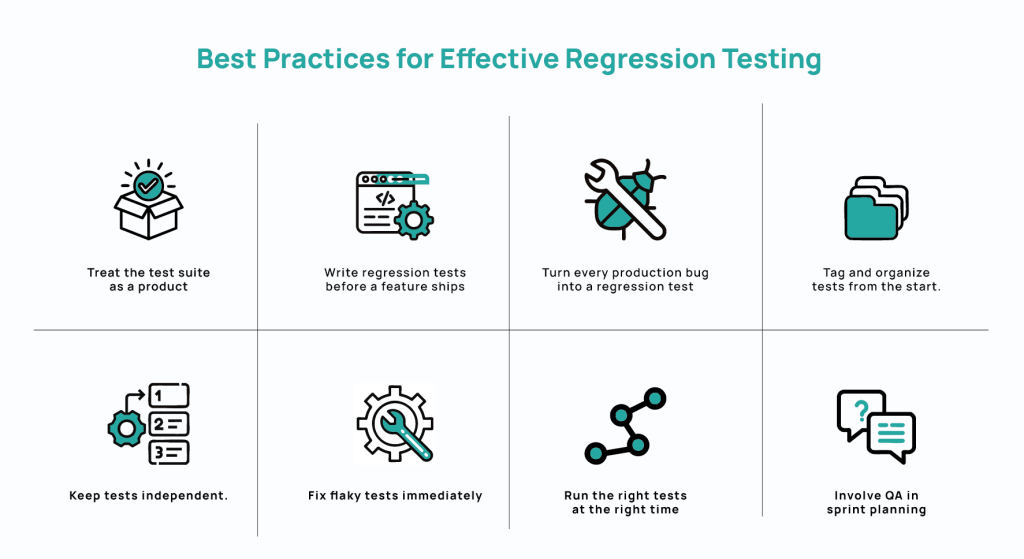
- Treat the test suite as a product. Just like production code, tests need ownership, maintenance schedules, and retirement criteria. Audit regularly, remove stale cases, and refactor brittle ones.
- Write regression tests before a feature ships. Don’t retrofit tests onto existing code.
- Turn every production bug into a regression test. If a defect reaches production, it means the suite missed it. The fix isn’t complete until you create a test that would have caught it.
- Tag and organize tests from the start. Put in clear labels: feature area, risk tier, component. A well-tagged suite enables targeted execution, faster triage, and precise reporting.
- Keep tests independent. Tests that share state or assume execution order fail unpredictably. They are also hard to parallelize.
- Fix flaky tests immediately. Every intermittent failure makes the next real failure easier to dismiss. Quarantine flaky tests on discovery, find the root cause, fix or delete.
- Run the right tests at the right time. Smoke tests on every commit, targeted regression on every merge, full suite before release.
- Involve QA in sprint planning. Generally, coverage decisions made before development starts are better than those made under release pressure. If QA leaders are included in test planning, many gaps will be identified before they become production risks.
Frequently Asked Questions About Regression Testing
How Often Should You Run Regression Tests?
Regression tests should run automatically on every code change. The practical structure should be tiered:
- a smoke suite on every commit.
- a targeted regression suite on every pull request merge.
- a full regression run before each release candidate.
Teams deploying daily need regression feedback in minutes. Teams on longer cycles tend to batch all regression tests into a single pre-release event. But this means that failures show up when fixes will be the most disruptive, i.e., right before release.
What Triggers Regression Testing?
Regression testing is triggered by any change to the codebase that could affect existing functionality. The change could be bug fixes, new feature releases, performance improvements, third-party dependency updates, configuration changes, and infrastructure migrations.
Don’t treat only large changes as regression triggers. A two-line patch to a shared utility can break behavior. In a CI/CD pipeline, regression testing should trigger automatically on every commit.
What is the Difference Between Regression Testing and Retesting?
Retesting confirms that a specific bug has been fixed. Regression testing confirms that fixing the bug didn’t break something else.
Retesting focuses on one defect, one fix, one verification. Regression testing asks: since a change was made, what else might have broken?
What is the Difference Between Smoke Testing and Regression Testing?
Smoke testing checks whether a build is stable enough to test at all. Regression testing validates whether recent changes broke something that previously worked.
A smoke test is fast and shallow: Can users log in? Do core screens load? Does the application start without errors?
Regression testing goes deeper, validating that specific features, workflows, and integrations still behave correctly after code changes.
Should Regression Testing Be Manual or Automated?
Regression testing should be automated wherever tests are stable, repeatable, and deterministic. It should be manual where human judgment is required.
Generally, teams automate the majority of regression tests and reserve manual effort for exploratory testing, visual QA, and complex interactions.
It is practical to automate smoke suites, core user flows, API contracts, and data validation. Run manual tests for new features and significant UI changes.
How Can Small Teams Do Regression Testing Efficiently?
Small teams should automate the highest-risk flows first, keep the suite lean, and run it in CI/CD.
The automation priority should ideally be smoke suite → core user flows →API-level tests for critical integrations. Identify the flows that would cause the most damage if they are broken in production. Make sure those are covered, automated, and run cleanly on every merge. Expand from there as much as possible