-
March 11, 2026
- Share:
-

-

-

-

Most Playwright teams hit the same wall eventually when running tests at scale.
When you start, the workflow is clean. You add Playwright to CI, enable parallel workers, and your suite finishes in a few minutes.
The test runner is fast and reliable. Debugging is simple because everything runs on a single machine, and the execution model is easy to understand.
But the suite starts to grow.
You are now running multiple browsers with environment variants. CI pipelines have to split the suite across runners to keep build times under control. Some tests take seconds while others take minutes.
Suddenly, one slow shard blocks the entire pipeline while other machines sit idle.
You’re now looking at a failure of coordination while trying to figure out:
- Which worker should run which tests?
- How do you distribute work across machines efficiently?
- What happens when a node fails halfway through execution?
These are the problems that a Playwright MCP-style orchestration layer is meant to address. Unlike traditional pipelines, it does not treat test execution as a single CI job, but rather as a distributed workload that needs scheduling, resource management, and coordination.
To decisively answer if you need Playwright MCP orchestration, it’s best to look at what problems it solves in real-world test infrastructure.
What is Playwright MCP Orchestration?
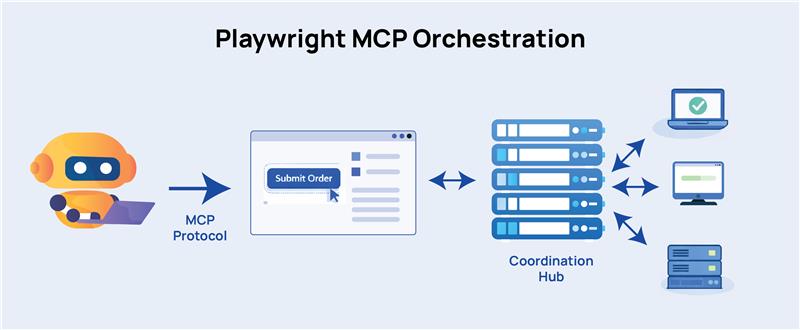
Model Context Protocol (MCP) is a communication standard. It gives AI agents a structured, predictable way to talk to a browser.
For instance, instead of taking a screenshot and asking a model “what do you see?”, an MCP-connected agent reads the browser’s accessibility tree so it understands the same structured data that screen readers use.
Now, the AI knows that there’s a button labeled “Submit Order,” where it sits in the DOM hierarchy, whether it’s currently disabled, and what’s around it.
In essence, MCP gives the AI a clean, structured representation of the browser’s state rather than a raw image.
In Playwright’s context, MCP orchestration acts as a central coordinator that knows which tests haven’t run yet, which worker machines are free, how long recent tests have been taking, and where to send the next task.
Workers connect to the coordinator, ask for a test, run it, report the result, and ask for the next one.
“Playwright MCP orchestration” refers to this coordination layer built on top of or alongside MCP’s browser communication layer. The MCP handles how a single agent talks to a single browser. The orchestration handles how dozens of agents and machines work together without getting in each other’s way.
Why this matters more than sharding
Playwright’s built-in –shard flag is the default tool for most teams. It works, too.
Before any test runs, it looks at test files, divides them into equal chunks, and assigns each chunk to a runner. Shard 1 gets files 1-25, shard 2 gets files 26-50, and so on.
But a test file with four heavy end-to-end flows that each take 90 seconds is not the same as a file with twenty quick unit-level checks that need two seconds each.
When those land in the same shard, that one takes longer than the others. Even though other runners finish and go idle, your total pipeline time depends on the slowest shard.
Orchestration, on the other hand, never commits to a fixed assignment. If one worker is stuck on a slow test, every other worker keeps pulling from the queue and making progress. When the slow test finally finishes, that worker picks up whatever is left.
All your machines stay busy until the last test is done, and you get the maximum throughput you’re paying for.
When Does Playwright Hit Its Scaling Limits?
Playwright’s test runner supports parallel execution through worker processes. Each worker runs tests in its own protocols and browser context for efficient CPU utilization and isolation between tests.
It’s also easy to scale horizontally using sharding; the suite is split across multiple CI machines, and each runner executes a portion of the tests.
However, once the suite grows past a few hundred tests, the execution model becomes hard to control. At that point, it has to coordinate multiple CI runners, several browser configurations, multiple deployment environments, hundreds or thousands of test files, and tests with highly variable runtime.
At this stage, you start seeing operational problems that do not exist in smaller suites.
Uneven Test Distribution
Playwright’s native sharding usually splits tests by file count. However, test files rarely take the same time to execute.
If one shard ends up with several slow tests, that machine creates a pipeline bottleneck while other runners sit idle, resulting in wasted compute and unpredictable CI duration.
Resource Contention on CI Runners
Every Playwright worker launches browser instances, opens pages, executes scripts, records traces, and captures screenshots. On top of this, if you configure CI machines for parallel execution, you’ll almost always see:
- browser crashes due to memory pressure.
- timeouts caused by CPU starvation.
- slower execution because machines are overloaded.
You can initially fix this by tweaking the workers setting. But over time, there will be too many tweaks, and you’re now drowning in configuration guesses tied to specific CI machine sizes.
Environment Coordination Problems
Large test suites run against multiple environments. Pipelines target staging, preview deployments, or temporary review apps.
When dozens of workers run concurrently, you’ll see environment-focused issues like:
- Multiple tests competing for shared accounts or test data.
- rate limits on APIs.
- temporary environments that are not ready when tests start.
CI Configuration Becomes Hard to Maintain
Once you start scaling Playwright execution, CI pipelines balloon up into large matrix configurations.
For example:
- Chrome, Firefox, and WebKit.
- staging and preview environments.
- smoke and regression suites.
- multiple shards per combination.
Now anytime a change occurs in the suite structure, QAs have to update the CI logic. The test suite is no longer a set of automated checks, but effectively a distributed workload.
This is where orchestration comes into the picture in order to intelligently handle scheduling, worker management, and execution coordination.
What Problems Does Playwright MCP Orchestration Solve?
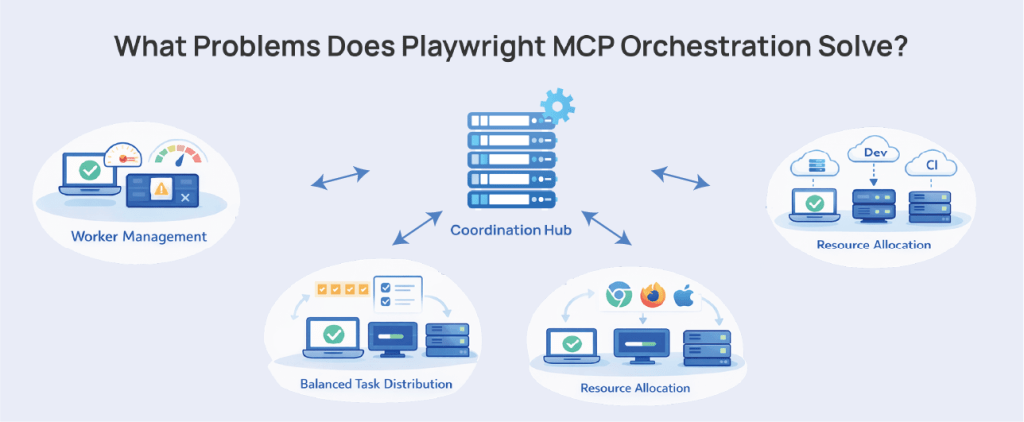
Here are the issues that Playwright MCP Orchestration can practically solve in real-world pipelines:
Worker Management at Scale
When running on a single machine, Playwright manages workers automatically. It spins up as many as you configure, assigns tests, and restarts workers after failures.
But it doesn’t make decisions about how many workers to allocate based on actual machine capacity.
You’ve seen this in tests that pass reliably with four workers, and start flaking with fifteen. At this point, the tests aren’t wrong. The CPU is saturated, the OS scheduler is context-switching constantly, and Playwright’s timing-sensitive operations start missing their windows.
An orchestration layer resolves this ceiling by monitoring actual resource utilization and adjusting worker allocation per node. This keeps you from over-subscribing to machines that can’t handle the load you’re throwing at them.
In effect, a more capable runner gets more work while a smaller one gets less, without you manually putting in configuration work.
Distributed Runs Without a Coordination Brain
Before a single test runs, each Playwright shard is assigned a slice of your test files based on alphabetical file order. Shard 1 gets files 1 through 10, shard 2 gets 11 through 20, etc. Shards run in complete isolation with no idea what the other shards are doing.
This is a problem because in the real world, shards are not uniform in duration. Let’s say, you have 100 tests split across two runners and the longer tests cluster in the first half alphabetically. That shard can take nearly two and a half times longer than the second one.
The pipeline is only as fast as its slowest shard, and the other runner just sits idle. You’ve paid for two machines and gotten the benefit of maybe one.
An MCP-style orchestrator sets up a dynamic work queue in which workers connect to the manager, request a test, run it, and request the next one when done. Short tests don’t block the queue. Long tests don’t lead to idle runners.
The load balances in real time, and you get the most out of every machine you pay for.
Compute Resource Allocation Across Environments
Generally, teams run Playwright tests in at least local development and CI. Sometimes, it also includes staging environments, pre-prod, and cross-browser runs targeting Chromium, Firefox, and WebKit separately.
Each Playwright worker launches browser instances and consumes CPU, memory, and network bandwidth. Given the number of ecosystems to target in testing, there will be too many workers for a single machine to handle. This will make the environment unstable.
Playwright can natively help to an extent via its workers setting, which determines how many parallel processes run simultaneously. But large-scale test systems need to:
- Allocate heavier tests to dedicated workers.
- reserve machines for specific browsers.
- scale compute capacity during peak CI hours.
- Limit concurrency when running on expensive cloud infrastructure.
Without orchestration, teams have to hard-code worker counts in CI configuration. This only works until the test suite or infrastructure changes, and then the CI has to be manually updated.
Coordinating Parallel Execution Across Environments
Modern Playwright pipelines typically execute the same test suite against multiple targets: staging, preview environments, production-like environments, and multiple browser configurations.
Playwright supports this through projects, so tests can run against different environments or configurations within the same suite.
However, as tests scale, coordinating these runs across distributed infrastructure becomes fairly complex.
Again, an orchestration layer can coordinate environment provisioning, parallel execution across environments, test artifact aggregation, and centralized reporting. It prevents CI configurations from becoming large, difficult to maintain, and repetitive matrices.
What Are the Limitations of Playwright MCP Orchestration?
Advanced orchestration can streamline a Playwright pipeline by distributing tests across machines, managing workers, and keeping execution times under control. Basically, it solves the infrastructure problems.
But it cannot solve deeper issues. It’s important to understand these limitations, so teams are clear on what they cannot expect after scaling their test execution.
Learn How to Master Cucumber Testing Using BDD & Gherkin
Parallelism Does Not Improve Coverage
Just running tests faster does not mean you are testing better.
In many large Playwright suites, you’ll see the same UI flows repeated across multiple tests. Assertions check that a page loads or a button appears, but don’t go down to deeper system behavior. Edge cases and failure paths remain fragile.
Hundreds of UI tests that all follow a similar pattern. Log in, navigate through a feature, verify that something renders, and exit. As the suite grows in size, it becomes harder to pin down the few tests that will actually show bugs.
You can throw 200 workers at that suite and finish the run in a few minutes. But if most of those tests are exercising the same happy paths, the quality signal you get from these runs is still in question.
Once you’ve scaled, you also need to focus on test design. One speeds up the pipeline. The other makes tests more trustworthy.
Parallel Infrastructure Increases Maintenance
Running Playwright tests across multiple machines will help tests finish faster, and the suite scales beyond a single runner’s capacity.
But distributed execution also requires someone to operate the system that runs the tests.
Once tests are split across multiple runners, QAs will start seeing these problems:
- collecting artifacts from multiple runners.
- keeping environment data consistent across shards.
- ensuring proper test isolation between workers.
- stitching together reports from separate executions.
When tests run sequentially, they can reuse the same accounts, orders, or database records without much issue. When tests are running in parallel, two tests might try to update the same user account. Another test may depend on data that a different worker just deleted.
These problems start showing up as flaky failures that are difficult to reproduce locally.
Parallelization reveals these weaknesses in test design. Once you run tests concurrently at scale, your assumptions about ordering, shared data, and environment state will be challenged.
Flaky Tests Multiply Faster
Parallel execution exposes instability much faster than sequential test runs.
When tests run in order, the environment is relatively quiet, requests happen predictably, and the system is not under much pressure. A fragile test might pass most of the time.
Start running dozens or hundreds of tests in parallel, and the game changes. Multiple workers are hitting the same services, creating data at the same time, and working through the application simultaneously.
In Playwright suites, you’ll start seeing problems with:
- slow or unstable network calls.
- test data generated in non-deterministic ways.
- tests relying on implicit timing instead of explicit conditions.
Playwright retries can help keep CI pipelines from failing if tests are occasionally unstable. But retries only make the suite pass while the underlying problem remains in the test or the application.
An orchestration layer does not solve this. All it does is increase concurrency and execution pressure to reveal flaky tests faster than sequential pipelines would.
FAQs
What is Playwright orchestration in test automation?
Playwright orchestration is a coordination layer that manages how automated tests run across multiple machines, workers, and environments. By default, Playwright runs tests in fixed shards inside a CI job.
But an orchestrator dynamically schedules tests, distributes them across available workers, and runs them based on real-time system load.
This approach prevents machines from sitting idle. It also minimizes uneven test distribution and helps large Playwright suites run faster and more efficiently.
What is Playwright MCP orchestration?
Playwright MCP orchestration acts as a coordination layer that plans, schedules, and executes distributed Playwright test runs across multiple machines. It uses the Model Context Protocol (MCP) to enable AI agents to communicate with browsers using structured accessibility data.
A central orchestration system dynamically assigns tests to worker nodes, monitors resource usage, and balances load in real time. While native Playwright sharding divides tests into fixed chunks before they run, orchestration routes work so that no runner sits idle while another is overworked.
What problems does distributed Playwright execution solve?
Distributed Playwright execution helps QA teams scale test automation while managing:
- long pipeline execution times.
- inefficient use of CI runners.
- uneven test distribution.
- infrastructure bottlenecks in large test suites.
It spreads test execution across multiple machines, which reduces feedback time and supports wider automation coverage.
When should you use Playwright MCP orchestration?
Playwright MCP orchestration is most effective when a test suite has grown so large that native sharding produces measurable imbalances. Large suites typically carry several hundred tests or more with highly variable execution times, multiple browser targets, or tests running across several environments simultaneously.
For smaller suites with relatively uniform test durations, native sharding with pre-configured worker counts is usually enough for operational success.
Does Playwright MCP orchestration improve test coverage?
No. Orchestration improves how fast and efficiently your existing tests run, but doesn’t change what what those tests cover. A suite with shallow assertions that only verify UI states will still produce shallow coverage, just faster.