-
December 29, 2023
- Share:
-

-

-

-

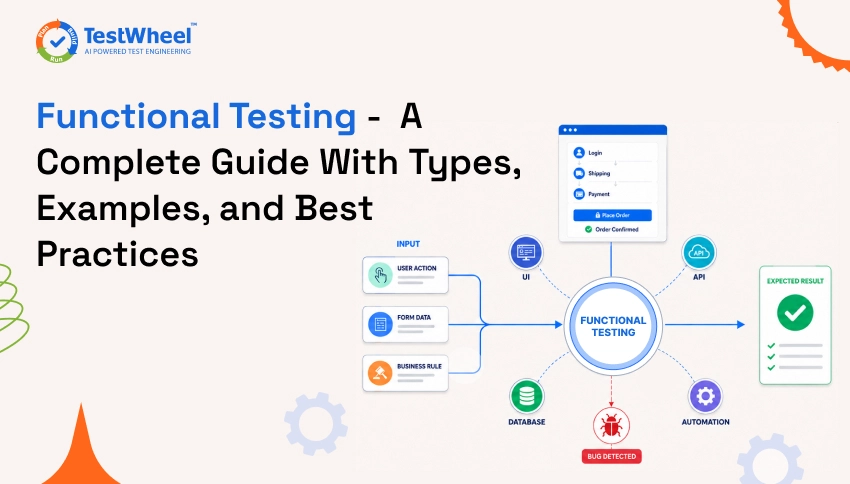
In a food delivery app, the user opens it, picks a restaurant, adds food to cart, applies a coupon, and pays. If the order goes through, the receipt shows the right amount, and the kitchen gets the correct ticket, the app “worked.” If the coupon doesn’t apply, or payment succeeds but the order never reaches the kitchen, the app is broken.
Functional testing exists to find issues like this. It checks whether a system behaves the way it’s supposed to, based on what the business and the user need. Teams that automate this layer with a platform like TestWheel’s AI-powered test automation catch these issues before customers do.
This guide covers what functional testing means, the types you’ll run into, real examples, how it compares with non-functional testing, and how to do it well.
What is Functional Testing in Software Testing?
Functional testing is a type of software testing used to check whether an application works according to the requirements. It focuses on what the software is supposed to do and whether it gives the correct result for a given input.
For example, if you are testing a login page, you can enter a valid username and password and check whether the user is successfully logged in. You can also enter an incorrect password and check whether the system shows the appropriate error message.
Functional testing mainly focuses on the following points:
- Checks requirements: It verifies whether the software features work according to the business and functional requirements.
- Tests inputs and outputs: The tester provides different inputs and checks whether the system produces the expected output.
- Covers positive and negative scenarios: It checks both valid inputs, such as a correct password, and invalid inputs, such as an incorrect password.
- Focuses on user behavior: Testing is performed from the user’s point of view without needing to know how the application is developed internally.
- Black-box testing: Functional testing is generally considered black-box testing because the tester does not need to look at the source code or internal implementation.
- Checks individual features: Features such as login, registration, search, payment, logout, and form submission can be tested to make sure they work correctly.
- Verifies error handling: It checks whether the application responds properly when users provide incorrect, missing, or unexpected information.
- Ensures expected results: The actual result from the application is compared with the expected result defined in the requirements.
Examples of Functional Testing
Here’s what functional testing looks like in real applications people use every day.
Example 1: Logging Into a Banking App
A tester checks that a correct username and password lets the user in, that three wrong attempts locks the account, and that a locked account shows a clear message. It protects both the user’s money and the bank’s reputation.
Example 2: Applying a Discount Code at Checkout
An online store runs a “SAVE20” campaign. A functional test checks that the code applies a 20% discount, doesn’t apply twice if entered twice, gets rejected after expiry, and that the price shown matches what’s actually charged.
Example 3: Filing a Leave Request in an HR Tool
An employee applies for three days of leave. The test verifies the request reaches the correct manager, the leave balance updates only after approval, and the employee gets notified either way.
Types of Functional Testing
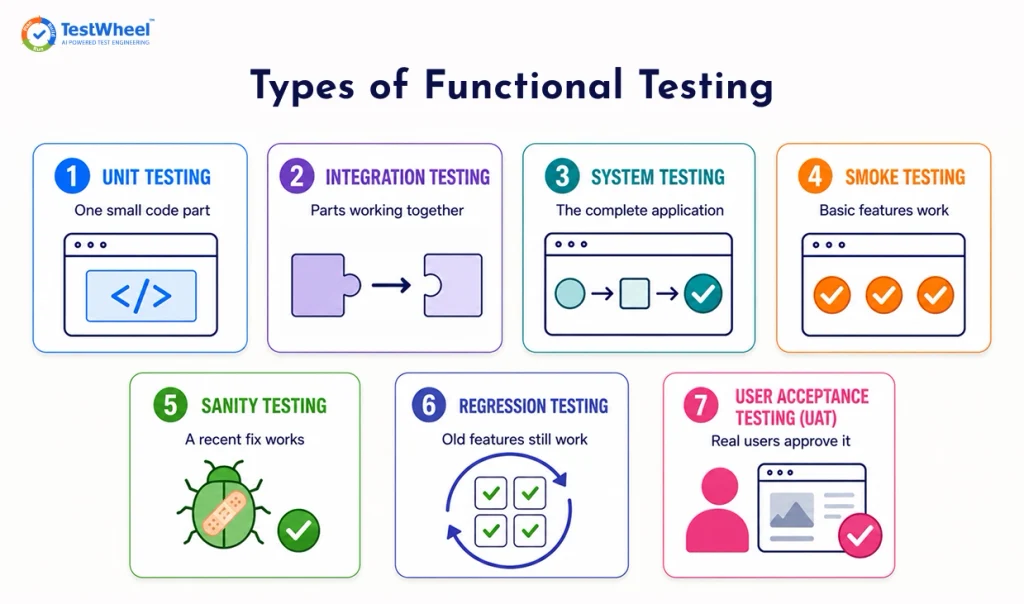
Functional testing occurs in layers, from the smallest piece of code up to the whole system. Each layer catches a different kind of mistake.
Unit Testing
This checks one small piece of code in isolation, like a function that calculates tax. Developers usually write these. They are fast and precise.
Integration Testing
Once individual pieces work, integration testing checks if they work together. Does the cart correctly send order data to the payment service? A lot of real bugs exist at this handoff point.
System Testing
This looks at the entire application as one connected unit, testing complete workflows start to finish. For example, a user browsing, adding items, checking out, and getting a confirmation email in one continuous test.
Smoke Testing
Smoke testing checks the basics: Does the app open? Can a user log in? Does the homepage load? It’s a quick health check to decide whether the build is stable enough for deeper testing.
Sanity Testing
After a bug fix, sanity testing checks that the fix works and didn’t break anything related to it. It is narrow and fast, unlike smoke testing, which is broad and shallow.
Regression Testing
When new code ships, regression testing re-runs existing test cases to make sure old features still work. For eg., a team fixes a bug in the shipping calculator and accidentally breaks the discount logic that used to work fine. Regression testing will catch this.
Explore the difference regression strategies in regression testing.
User Acceptance Testing (UAT)
This is the final check before release, usually done by real end users. It verifies software the way an actual customer would, to make sure it meets real user needs.
Features of Functional Testing (Purpose)
Functional testing exists to meet specific demands and goals of software testing:
- Confirms the software meets business requirements: Every feature is checked against what it’s supposed to do. A checkout button that opens a payment page still fails if the payment page charges the wrong amount.
- Uses black-box methods: Testers only need to know expected behavior, not the source code. So non-developers, like product managers or actual end users, can run tests effectively too.
- Focuses on inputs and outputs: Give the system a value, check what comes back. A tax calculator either returns the correct number for a given income, or it doesn’t.
- Can be manual or automated: Early or exploratory tests are often manual. Stable, repeated tests are usually automated. A brand-new feature usually gets tested by hand first, then automated once its behavior is set in place.
- Covers the full user journey. One test might touch the UI, the database, and a third-party API in one flow. A single “place order” test can verify that five different systems are talking to each other correctly.
- Finds business-impacting defects early: Catching a broken discount code in testing costs a few minutes; catching it after launch costs refunds, unhappy customers, and a scramble to fix it.
Functional Testing vs Non-Functional Testing
Quick answer: Functional testing checks what the software does (does the login work?). Non-functional testing checks how well it does it (does the login stay fast when 10,000 people try it at once?).
Quick Comparison: 5 Core Differences
| # | Feature | Functional Testing | Non-Functional Testing |
|---|---|---|---|
| 1 | What it checks | What the system does | How well the system does it |
| 2 | Based on | Functional requirements | Quality attributes (speed, security, usability) |
| 3 | Example question | Does checkout complete correctly? | Does checkout stay fast under heavy traffic? |
| 4 | Testing type | Mostly black-box | Mostly black-box, but performance-focused |
| 5 | Common types | Unit, integration, system, regression, UAT | Performance, load, security, usability, compatibility |
Detailed Comparison: 15 Feature-by-Feature Differences
| # | Feature | Functional Testing | Non-Functional Testing |
|---|---|---|---|
| 1 | Primary goal | Verify correct behavior against requirements | Verify attributes like speed, safety, and stability |
| 2 | Core question | “Does it work?” | “How well does it work?” |
| 3 | Requirement source | Functional Requirement Specification (FRS) | Non-functional requirements (SLAs, performance targets) |
| 4 | Test basis | Business rules and user workflows | Quality benchmarks (response time, uptime, load limits) |
| 5 | Testing approach | Black-box | Mostly black-box, sometimes infrastructure-level |
| 6 | Execution style | Manual or automated | Usually automated (load generators, scanners) |
| 7 | Timing in SDLC | Early, continues through release | Once functionality is stable |
| 8 | Example test types | Unit, integration, smoke, sanity, regression, UAT | Performance, load, stress, security, usability |
| 9 | Sample test case | “User can reset their password” | “Reset page loads under 2 seconds at 5,000 users” |
| 10 | Defects it finds | Broken workflows, wrong calculations | Slow responses, crashes, security gaps |
| 11 | Tools commonly used | Selenium, TestWheel, Cypress, Playwright | JMeter, LoadRunner, OWASP ZAP |
| 12 | Environment needs | Realistic test data | Production-like environment |
| 13 | Who typically writes it | QA engineers, SDETs | Performance engineers, security testers, SREs |
| 14 | Business risk if skipped | Users can’t complete core tasks | App frustrates, crashes, or gets breached |
| 15 | Relationship to release readiness | Confirms the feature is correct | Confirms it survives real-world conditions |
Functional Testing vs Integration Testing
Here’s a bird’s-eye view to save you time:
| Dimension | Integration Testing | Functional Testing |
|---|---|---|
| Primary question | Do these components communicate correctly? | Does the system behave as the business expects? |
| Core focus | Technical interaction between modules, services, or APIs | Observable behavior from a user or business perspective |
| Typical scope | Two or more integrated components | One or more end-to-end workflows |
| Validation criteria | Correct data exchange, protocol adherence, error handling | Correct outcomes, rules, and user-visible results |
| Level of abstraction | Technical | Business-facing |
| Who designs it | Developers or SDETs | QA engineers, SDETs, product or domain experts |
| Common failure types caught | Schema mismatches, API contract breaks, serialization issues | Broken workflows, incorrect business logic, invalid states |
| Example assertion | “Service A returns a valid response when called by Service B” | “The user can complete checkout and receives confirmation” |
| Environment sensitivity | Often mocked or partially integrated | Typically requires realistic environments and data |
| Risk addressed | System components cannot talk to each other reliably | Users cannot complete critical tasks |
Integration tests fail because a technical contract breaks. Functional tests fail because the outcome is wrong, even if all integrations technically work.
For instance, an integration test may confirm that an app’s pricing service responds accurately. A functional test confirms that the correct price is shown to the user, persisted correctly, taxed properly, and accurately charged at checkout.
Functional Testing vs Regression Testing
First, the high-level distinctions:
| Dimension | Functional Testing | Regression Testing |
|---|---|---|
| Primary question | Does this feature work as intended? | Did this change break anything that already worked? |
| Core intent | Validate correctness of behavior | Protect existing behavior from unintended impact |
| When it is performed | During feature development or validation | After code changes, fixes, or releases |
| Scope | New or modified functionality | Previously tested and stable functionality |
| Typical trigger | New feature, enhancement, or requirement | Code change, refactor, bug fix, or configuration update |
| Who uses it most | Product, QA, and engineering teams | Release managers, QA, and operations |
| Failure impact | Feature does not meet requirements | Existing features stop working |
| Common failure types caught | Missing logic, incorrect flows, unmet acceptance criteria | Side effects, dependency breakage, unintended behavior |
Functional and regression tests frequently use the same test cases. But they are not interchangeable.
Functional test cases verify app behavior. When the same test case is re-executed to ensure nothing has changed unexpectedly, it becomes a regression test.
Functional test cases are best designed with regression flows in mind. Select high-value workflows that are stable, business-critical, and sensitive to change.
Unit Tests vs Functional Tests
At a high level:
| Dimension | Unit Tests | Functional Tests |
|---|---|---|
| Primary purpose | Validate internal logic and correctness | Validate real-world system behavior |
| Core question | Does this piece of code work as intended? | Does the system behave correctly for users? |
| Focus | Individual functions or classes | Complete features or workflows |
| Perspective | Developer-centric | User and business-centric |
| Built by | Developers | QA engineers, SDETs, sometimes product teams |
| Environment dependency | Minimal, often fully isolated | High, requires realistic environments and data |
| Failure types caught | Logic errors, edge cases, incorrect calculations | Broken workflows, incorrect business rules, integration failures |
| Example validation | “The pricing function returns the correct value” | “The user sees the correct price at checkout” |
| Best suited for | Continuous developer feedback and refactoring safety | Release confidence and production risk control |
There are no real “unit tests vs functional tests”. You need both to solve different problems.
Unit tests offer fast, reliable feedback so that devs can change code quickly and confidently. Functional tests ensure that those changes still deliver the correct responses once the system is used in real conditions.
Methods of Functional Testing
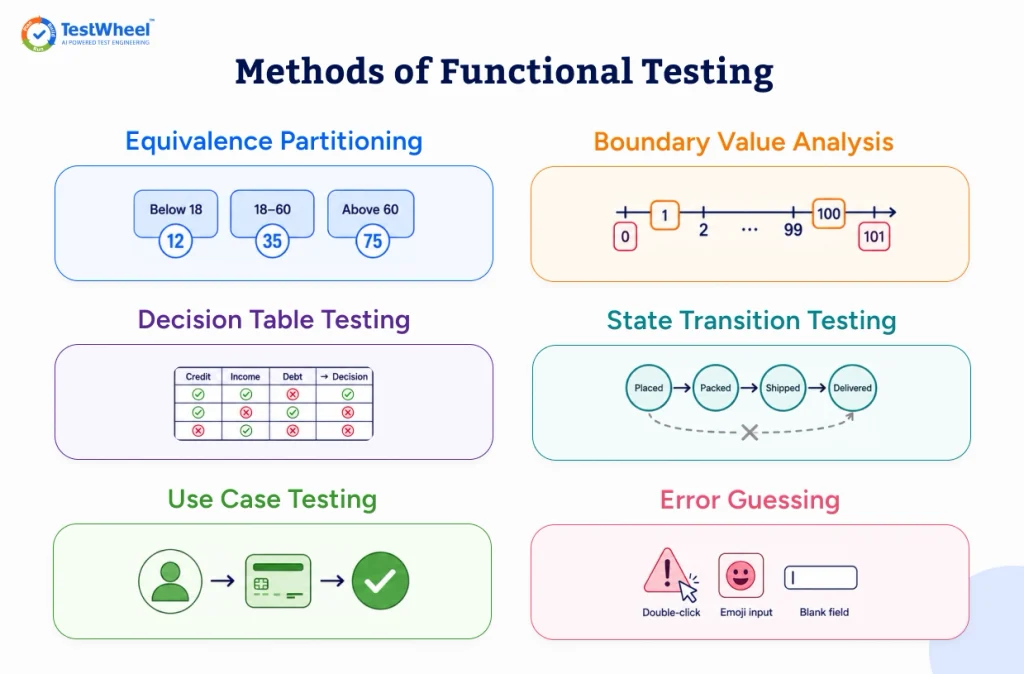
Structured methods are important for good test design. These methods are commonly used to run functional tests, each one catching a specific kind of mistake with the fewest test cases.
Equivalence Partitioning
Group similar inputs together and test one representative from each group. For an age field that accepts 18 to 60, test one value from “below 18,” one from “18 to 60,” and one from “above 60.”
Boundary Value Analysis
This is about finding bugs that show up in edge cases. If a field accepts 1 to 100, test 0, 1, 2, 99, 100, and 101. Off-by-one errors are a common coding mistake, and this method can catch them.
Decision Table Testing
This method is useful when business rules depend on combinations of conditions. A loan approval system might combine credit score, income, and existing debt. A decision table lays out every meaningful combination so nothing is missed during tests.
State Transition Testing
This method works best for test cases when a system’s behavior depends on its current state. An order might move from “Placed” to “Packed” to “Shipped” to “Delivered.” Testing confirms only valid transitions are allowed, so an order can’t jump straight to “Delivered” status without ever shipping.
Use Case Testing
These tests are structured around real user journeys. For example, “a returning customer buys a product using saved payment details.” It keeps tests grounded in how real people use the product.
Error Guessing
Experienced testers use judgment and past bugs to guess where problems hide, like double-clicking a submit button or entering emojis into a name field. This method is less structured than the others, but it consistently finds issues that formal techniques miss.
How to Do Functional Testing (Step-by-Step Flow)
Here’s the general flow that most QA teams follow. This applies to manual tests, automated testing via tools like TestWheel, or a mix of both.
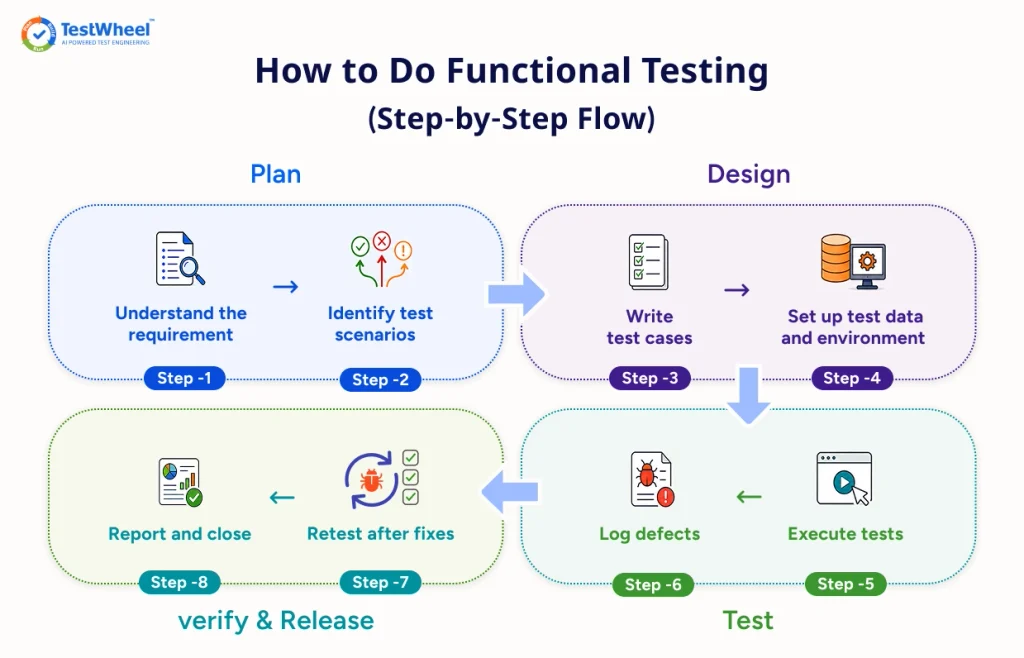
Step 1: Understand the requirement
Read the user story, business rule, or spec. An unclear requirement will lead to an unclear test.
Step 2: Identify test scenarios
List what needs checking: happy path, failure paths, edge cases. For example, if you’re testing a signup form, that should include valid signup, duplicate email, weak password, and empty fields at minimum.
Step 3: Write test cases
Turn each scenario into a specific, repeatable test case. Clearly define input, action, and expected result.
Step 4: Set up test data and environment
Bad or missing test data is a common cause for functional tests to fail for the wrong reason. An environment that doesn’t replicate production won’t find every bug in the software application.
Step 5: Execute tests
Run the test cases manually or through automation, and record what happened vs what was expected.
Step 6: Log defects
When results don’t match expectations, log the defect clearly enough that a developer can reproduce it without having to guess or contact the tester for clarity.
Step 7: Retest after fixes
Once a defect is fixed, re-run the original test and see if it meets expected results. Don’t forget to check other functionalities to confirm the fix didn’t break something else, i.e., a regression test.
Step 8: Report and close
Summarize what was tested, what passed, what failed, and what bugs need further analysis. This is needed so that the team has a clear picture before they approve the release.
Best Practices for Functional Testing
Good functional testing isn’t about writing more test cases but writing the right ones.
- Test business rules along with screens. A test that only checks “the button is clickable” is incomplete. Test what happens after the click: is the order actually saved correctly?[Text Wrapping Break]
- Cover failure paths along with success paths. A checkout test should also simulate a failed payment. Real payments fail, and users need a clear message when it happens.[Text Wrapping Break]
- Design tests around outcomes instead of just steps. Don’t assert “a success message appears”; assert “the order exists, inventory is updated, and no duplicate charge occurred.”[Text Wrapping Break]
- Keep tests independent of the UI where possible. A test that breaks every time a button moves two pixels left is focusing on layout not functionality. Use stable identifiers or the API layer.[Text Wrapping Break]
- Use realistic test data. Testing a form with “test123” everywhere hides bugs that show up with real names, special characters, or long addresses.[Text Wrapping Break]
- Prioritize by business risk. A password reset flow deserves more scrutiny than a rarely used settings toggle. Base your test scenarios on risk analysis.[Text Wrapping Break]
- Automate what’s stable and repeated. Manual testing suits new features. Generally, automated testing is best for regression tests.[Text Wrapping Break]
- Don’t wait until pre-release to automate. Wiring automated functional tests into every pull request catches regressions while they’re still cheap to fix.
How Do Functional Testing Tools Work?
Fundamentally, functional testing tools perform three tasks: simulate a user action, capture the system’s actual response, and compare it to the expected result.
Traditional tools like Selenium require testers to write scripts that “click,” “type,” and “verify” through code. This takes a lot of engineering time to build and maintain, especially once the UI changes and scripts break.
A no-code, cloud-based platform such as TestWheel with its web application testing tools lets teams record a real user flow once, like logging in and submitting a form. It then generates a repeatable automated test from it. When the UI changes slightly, self-healing logic adjusts the test instead of breaking it, reducing the maintenance work that eats QA time.
Self-healing is especially important because a test that needs fixing every time a button gets renamed defeats the purpose of automating in the first place.
Automated Functional Testing in CI/CD Pipelines
Most teams run functional tests as gates inside the CI/CD pipeline, triggered every time a developer pushes code. A pull request opens, the pipeline spins up, and a functional test suite runs against the build before it can merge. If login or checkout breaks, the pipeline fails and the code stops there.
This approach is also called shift-left testing. Functional checks move toward the start of development instead of sitting at the end.
AI platforms can generate a regression suite from a recorded user flow, then flag which tests are most likely to catch a regression based on what changed in the latest commit. No need for a QA engineer manually guessing between few hundred tests to prioritize before a deadline.
For QA functional testing, this means less time writing repetitive scripts, more time deciding what’s worth testing and investigating what automation flags.
Platforms like TestWheel run automated functional test suites inside CI/CD pipelines across web, API, and mobile builds. A broken checkout flow gets caught on a pull request, early on.
Make Functional Testing Part of Every Release
Functional testing is the filter that determines if software that looks finished also works when a real person opens it. Every type, method, and best practice covered here comes down to testing what the business and the user actually need day to day.
QA teams should run functional tests continuously on every pull request, not just before a release. Automation lets them keep pace without losing coverage. Use a platform like TestWheel across web, mobile, and API layers.
Understand the requirements, cover the failure paths, and prioritize what breaks user trust when it goes wrong.
Does TestWheel fit your current QA process? Start a free trial and run it against your own application. See how functional testing plays out in a specialized context, and how much it can do for you as part of the QA pipeline.
Frequently Asked Questions (FAQs)
Functional testing checks whether the system behaves the way the business expects, from a user’s point of view. Integration testing checks whether individual components or services communicate correctly with each other. A functional test might confirm “the user sees the correct price at checkout.” An integration test confirms “the pricing service correctly returns data when called by the checkout service.”
Functional testing checks whether a feature works as intended, usually when it’s new or the code changes. Regression testing checks whether existing, previously working features still work after a code change. They often reuse the same test cases. If you run a test case to confirm a feature works, that’s functional testing. If you re-run that same test case later to make sure nothing broke, it is regression testing.
Unit tests check a small, isolated piece of code, usually a single function, without needing the rest of the system running. Functional tests check complete features or workflows, which usually requires the whole system to be running. Unit tests catch logic errors early and cheaply. Functional tests catch the mistakes that only show up once everything is connected.
It’s a type of testing that checks whether a software application behaves the way it’s supposed to, based on business and user requirements. Testers give the system an input and compare the actual output against the expected one.
Functional testing checks what the system does, like whether login works. Non-functional testing checks how well it does it, like whether login stays fast and secure under heavy load. Both are needed for a release-ready software product.
Common examples include checking that a login form accepts the right password and blocks the wrong one, that a discount code takes money off the bill at checkout, that a search filter shows only matching results, and that a leave request only updates an employee’s balance once a manager approves it.
Yes. Automated functional testing works best for stable, repeated test cases like regression suites and core user journeys. New or frequently changing features are often tested manually or through exploratory testing first, then automated once they stabilize.
QA engineers and SDETs tend to design and execute most functional tests. Developers often write unit-level functional tests. Business stakeholders or actual end users run user acceptance tests, which is the final functional gate before release.
Functional testing is mostly done using black-box techniques, meaning testers don’t see the source code. But not all black-box testing is functional. Usability testing, for example, is black-box but focuses on the user experience rather than how the app works.
It should happen continuously. It’s best to run functional tests during development, after every integration, during regression cycles before releases, and any time a code change impacts a business-critical workflow.