-
November 7, 2025
- Share:
-

-

-

-


A couple of decades building, breaking, and testing software will show you one unchangeable truth: you’ll always be under pressure to test more, faster, and smarter.
This is true for waterfall QA teams writing scripts in Excel and for full-blown automation suites running CI/CD on steroids.
But AI is proving to be equal to that challenge. It is pioneering unprecedented progress in how we create, maintain, and scale testing in the real world. Testers are no longer focused on writing thousands of scripts; they’re teaching machines to think like testers. They’re now asking “How to write test cases using AI?”
This article will show why AI is the inevitable innovation on the map, why manual or scripted test automation doesn’t scale, how to generate test cases with AI, and why tools like TestWheel can transform your test pipelines.
Why Test Scripting or Manual Test Automation isn’t Scalable in the Long Run
Any experienced tester will tell you about endless broken test suites, hearing “all tests passed — except they didn’t,” and drowning in maintenance hell.
Maintenance Overload
Most software testing projects, especially those building SaaS, start with a few hundred test scripts and balloon to thousands within months. Often, QA teams have to devote approximately 30% (anecdotal experience) of every sprint purely to test repair and triage. They no longer have time to write new tests or explore risk.
Here’s an experience every tester can relate to: the dev team relocates a button, renames CSS classes, and reorganizes some element IDs. Immediately, nearly 50% of regression scripts fail. Over the next 48 hours, said tester is in debugging mode, patching locators, rewriting flows, and rerunning retests.
Scripted automation is fragile. Every UI or minor structural change triggers a cascade of broken tests.
- 20% of layout-based GUI test methods and 30% of visual test methods had to be modified at least once per release. Each release, on average, induced fragility in 3–4% of test methods.
- Across 235 flaky UI tests across 62 projects, it was found that nearly 45.1% of flaky tests were caused by asynchronous wait issues.
But the experience changes completely when testers figure out how to automate test case generation with AI.
Manual Scripting Slows Down Test Coverage
Once a new feature is developed, it should ideally be tested within days or even hours. But manual scripts rarely allow this speed.
Realistically, QA spends 2–3 days just writing basic test skeletons, and another day sorting out data seeding, mocks, and test environments. The devs end up merging features before the test suites are fully stabilized, and the cycle begins again.
Human Bias
The most veteran testers still rely heavily on intuition and past experience. Some classes of bugs will always slip through. Most script-based suites never cover edge cases like malformed data payloads, or concurrency conflict scenarios. These issues are often only found post-production.
AI, by contrast, can explore permutations, negative flows, and boundary combinations that humans often omit. Human bias goes towards obvious paths. Write test cases using AI, and you can actually bypass these biases entirely.
Browser, OS, and Device Fragmentation
Even a few years ago, most testers only had to worry about Internet Explorer and a couple of other browsers. Now, tests have to cover:
- Web browsers (Chrome, Firefox, Safari, Edge)
- Mobile devices and OSes (iOS, multiple Android versions and devices)
- APIs / microservices/backend
- Desktop apps / embedded systems / IoT
- Cloud infrastructure, containers, DB variants
Here’s some math: 4 browsers × 3 mobile OS versions × 2 environments = 24 permutations. Now add data variants, feature toggles, localization, and roles…the combinations to test easily go into thousands.
No surprise that testers always end up spending more time adjusting scripts than actually testing.
But it is human nature to solve problems, and these problems are all set for solution.
Enter AI, and here’s how to use AI to generate test cases.
What is AI-Based Test Case Generation?
At its core, AI-based test case generation uses machine learning and large language models (LLMs) to write, adapt, optimize, and scale test cases automatically. For instance, TestWheel only requires users to describe what an application should do. They can upload Excel-based test cases, and TestWheel’s AI engine turns them into test steps.
Here’s what it means to use AI to write test cases:
- Turning Jira stories or acceptance criteria into executable test cases automatically. Most AI test case generators (like TestWheel) can read user stories, acceptance criteria, or even plain-English requirements. It automatically converts them into detailed, structured test cases with preconditions, test data, and validation steps.
- Analyzing requirement text, user flows, and past defects. The AI engine studies historical data and current markets to automatically suggest edge cases and negative scenarios.
- Observing DOM and API behavior patterns, detecting locator or structure changes, and auto-updating broken tests as they emerge.
- Continuously learning from historical pass/fail data, execution logs, test coverage, redundancy, and defect patterns.
- Integrating with Jira, Azure DevOps, Jenkins, and CI/CD pipelines in order to sync generated tests and execution results automatically.
Why AI-Based Test Case Generation Scales Better
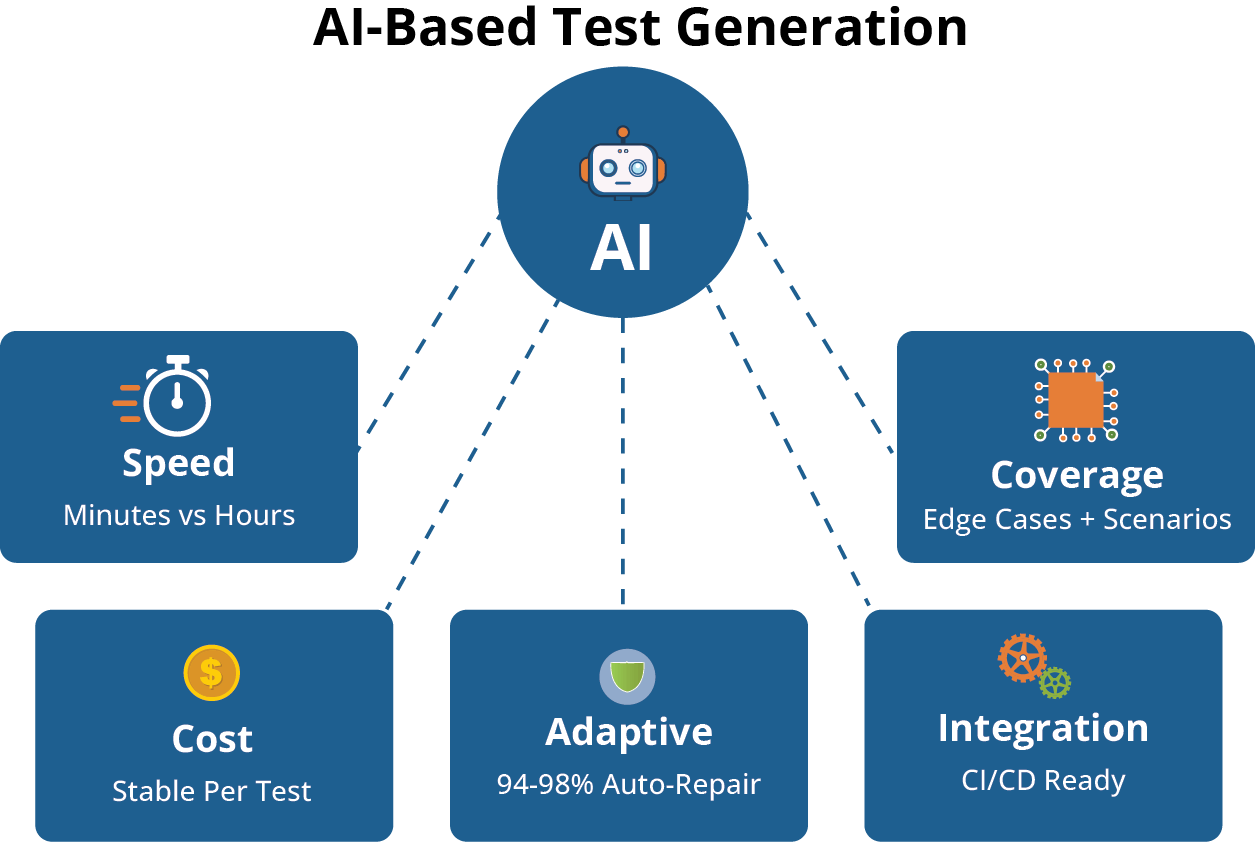
Before talking about how to use AI to generate test cases, let’s sweep over the quantifiable efficacy it brings in real-world contexts. Its benefits are expansive in terms of volume, coverage, adaptability, and integration.
Speed & Throughput
A refined AI test case generator like TestWheel can turn one Excel test case, Jira story or user requirements into multiple test case drafts within minutes. This would normally take human testers a couple of hours, at least. QA teams can spin up full test suites within 30 minutes rather than multiple days, keeping pace with development of new features.
Broader & Deeper Coverage
Humans generally tend to stick to obvious paths, such as login, usual flows, and positive cases. AI doesn’t have this bias. It can predict edge / negative / combination scenarios outside the “happy path”.
These engines explore permutations of invalid input formats, SQL injection attempts, multi-threaded race conditions, boundary values, and cross-field interactions. It can analyze specs, generate boundary tests, equivalence partitions, and even corner-case permutations.
With TestWheel, testers get AI-generated test variants (negative, boundary, variation flows) automatically. Regression suites are updated with quality tests without increasing headcount.
Scale without Rising Costs
Script-based testing requires new code, locators, and data sets for testing every new feature or variant. For AI-based test generation, the cost of creating one or a thousand tests is nearly the same.
Even though product footprint, user journeys, test flows, and permutations grow, AI keeps the cost-per-test stable. It keeps writing new tests as features are developed, with only a marginal increase in resources.
Adaptability & Self-Healing
AI-powered test case generators use dynamic locator identification, anomaly detection, and machine learning to detect, diagnose, and repair broken tests automatically. No longer will dozens of tests break with a single change in a UI layout or API parameter.
TestWheel’s AI engine can adapt to web element changes, re-map locators, and prevent test suites from collapsing.
Research has found that fuzzy locator-matching algorithms achieved ~94–98% success rates in element recovery, with repair decisions being made in milliseconds.
This is because broken tests don’t break sprint momentum. They get repaired automatically or flagged with minimal human effort.
Integrates with Modern Pipelines & Tools
AI-driven tests can sync directly to Jira and pipeline tools (like Jenkins and Azure DevOps). Test scripts can be converted to AI-powered tests with no human effort. AI stays true to the shift-left / continuous testing flow.
TestWheel connects with Jira/Jenkins/Azure DevOps in order to link AI-generated test cases back to tickets. It can then trigger runs via CI/CD, import results, and maintain traceability.
In practice, this looks like “write a Jira ticket” → “auto-generate test cases” → “execute tests in pipeline”.
Scripted Tests vs AI + TestWheel
| Metric | Scripted Tests | AI + TestWheel |
|---|---|---|
| Test authoring time (per feature) | ~8–12 hours | 1–2 hours (major portion auto-generated) |
| Maintenance overhead (per sprint) | 30–50% of QA time | 10–20% or less (self-healing support) |
| Broken test management | High risk with every UI/API change | Mostly auto-repaired or flagged for review |
| Cost scaling | Roughly linear with complexity/features | Additional features cost very little to test |
| Coverage blind spots | Missed negative / edge scenarios | Proposes gaps automatically |
| Integration friction | Manually managed in pipelines | Near-seamless push to pipeline with precise traceability |
How to Generate Test Cases with AI: Step-By-Step Guide
Here’s how to automate test case generation with AI using TestWheel:
How TestWheel can help Automation Teams switch to AI-based Test Case Generation
TestWheel is built specifically to help QA teams shift from scripting to AI-powered end-to-end test execution. If you’re already using Selenium or manual test cases, this tool has your back.
Upload your existing scripts, and the platform will convert them into no-code templates using a refined, trained AI engine.
Tests also self-heal as the engine adjusts scripts and locators to adapt test steps as the UI changes.
A few more features that might convince you to make the shift:
- Enables cross-browser testing.
- Enables functional testing, performance testing, compatibility testing, and accessibility testing.
- Reuses test scripts across all stages of your Agile Development Cycle.
- Built-in QA testing dashboards.
- Centralized features for software testing strategy management.
- Real-time reporting and analytics with insights on test results.
- Compatible with existing CI/CD pipelines.
- Simple setup with no coding required. Users can just sign up and start automating API tests & validating responses.
- Capabilities for customizing & automating API call sequences to match application workflows.
- XML and JSON formats to exchange data in API testing.
- Fast, visual insights for managers and stakeholders with charts, screenshots, and video record playback of test steps.
- Supports project tracking, test records, and team coordination.
- Allows test authoring in plain English and natural language.
- Integrates with Jira, Azure DevOps, and other dev tools.
- Traditional record-and-playback tools like Selenium IDE force testers to start from scratch whenever workflows change. With TestWheel, just open the test case and edit only the affected steps.
TestWheel lets automation teams tap into the best of AI-driven test creation: no-code, scalable, integrable, and adaptive. It is a real-world answer to the question “How to generate test cases with AI”.