-
September 9, 2026
- Share:
-

-

-

-

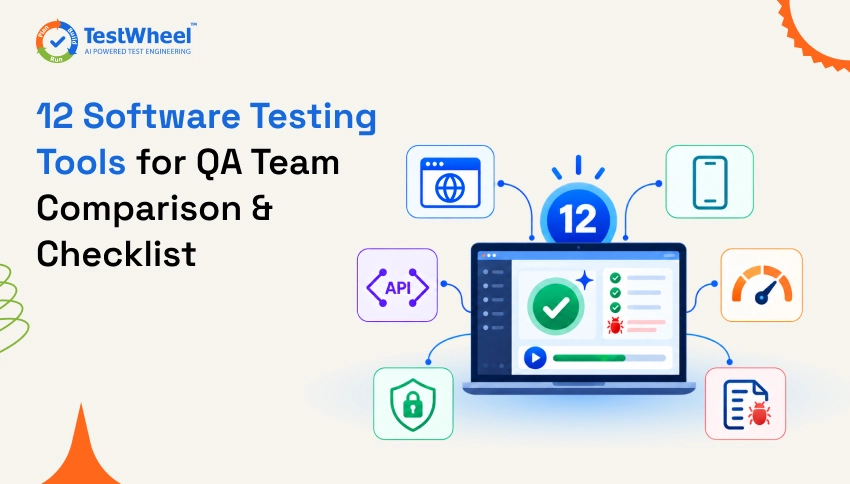
Imagine a five-person QA team releasing a new build every two weeks. Each sprint, they manually test the login page, checkout flow, three API endpoints, and two mobile screens.
By the third release, someone misses Safari testing. A bug reaches production, frustrating users and potentially causing some to abandon the app.
This is where software testing tools can help. They automate repetitive tasks such as checking forms, running API requests, testing user flows, and performing regression tests. This helps QA teams improve test coverage, catch bugs earlier, and spend more time on testing that requires human judgment.
TestWheel is one test automation platform worth considering. It supports web, mobile, API, and performance testing from a single account. However, the right tool depends on factors such as your tech stack, testing needs, team skills, integrations, and budget.
In this guide, we compare 12 software testing tools for QA teams in 2026. We’ll cover their key features, strengths, limitations, and best use cases, helping you choose QA testing software based on your team’s actual requirements.
What Are Software Testing Tools?
A software testing tool is a program that helps you check if a software application (website or app) works correctly, without testing everything by hand every time.
Software testing tools run the same checks over and over, exactly the same way, and flag anything that breaks.
These tools run across the entire software development lifecycle. Some are built for developers writing unit tests inside an IDE. Others are built for QA testers who’ve never written code. A solid stack of QA testing software tools usually combines both.
Quick answer: Software testing tools are programs that help QA teams check whether an app works the way it’s supposed to, before real users start using it. The best software testing tools for 2026 include TestWheel, Selenium, Playwright, Cypress, Appium, Postman, JMeter, Katalon Studio, BrowserStack, TestRail, OWASP ZAP, and Cucumber. Each tool is built for a different piece of the testing puzzle.
Why are Software Testing Tools?
Testing an application manually every time a new build is released can quickly become repetitive and time-consuming. As applications grow, QA teams also need to test more browsers, devices, APIs, features, and user scenarios. This is where software testing tools become useful.
Software testing tools help QA teams automate repetitive checks, run tests consistently, and identify bugs earlier in the development process. Instead of manually repeating the same regression tests after every release, testers can automate them and spend more time on exploratory testing and scenarios that need human judgment.
Some key benefits of using software testing tools include:
- Better test coverage: Test web, mobile, API, and other application areas across different environments.
- Faster testing: Run hundreds of automated tests in less time than manual testing.
- Earlier bug detection: Find defects before they reach production.
- Consistent results: Automated tests follow the same steps every time.
- Lower maintenance effort: Modern tools can reduce the work needed to maintain repetitive test cases.
- Faster releases: Automated regression testing fits into CI/CD workflows and helps teams release with greater confidence.
In short, software testing tools help QA teams test more, test faster, and reduce repetitive manual work without replacing the human judgment that good software testing still requires.
Types of Software Testing Tools
Before comparing individual products, it helps to know the categories they fall into. Most software testing tools on this list belong to one or more of these types:
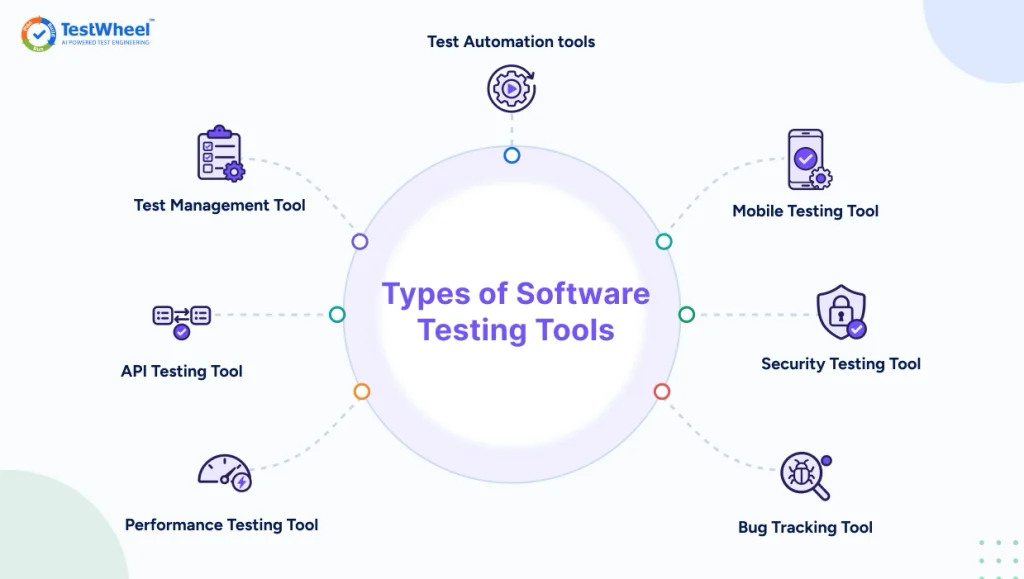
- Test automation tools run pre-written or AI-generated tests automatically instead of a person clicking through the app by hand. Selenium, Playwright, and Cypress fall under this type.
- Test management tools organize test cases, track what’s been tested, and report results to the team. TestRail is an example of this.
- API testing tools send requests to an API and check whether the response is correct, fast, and secure. Postman is a well-known name in this group.
- Performance testing tools simulate hundreds or thousands of users hitting an app at once to see if it holds up under this pressure. JMeter is the go-to open-source option.
- Mobile testing tools test apps on real or simulated Android and iOS devices. Appium is the best-known name here.
- Security testing tools scan an application for vulnerabilities like SQL injection or exposed data. OWASP ZAP is widely used for this purpose.
- Bug tracking tools log defects and keep developers and testers informed on what’s broken and who owns the fix.
Again, most QA teams run several automated testing tools in software testing side by side, unless they choose an all-in-one platform like TestWheel.
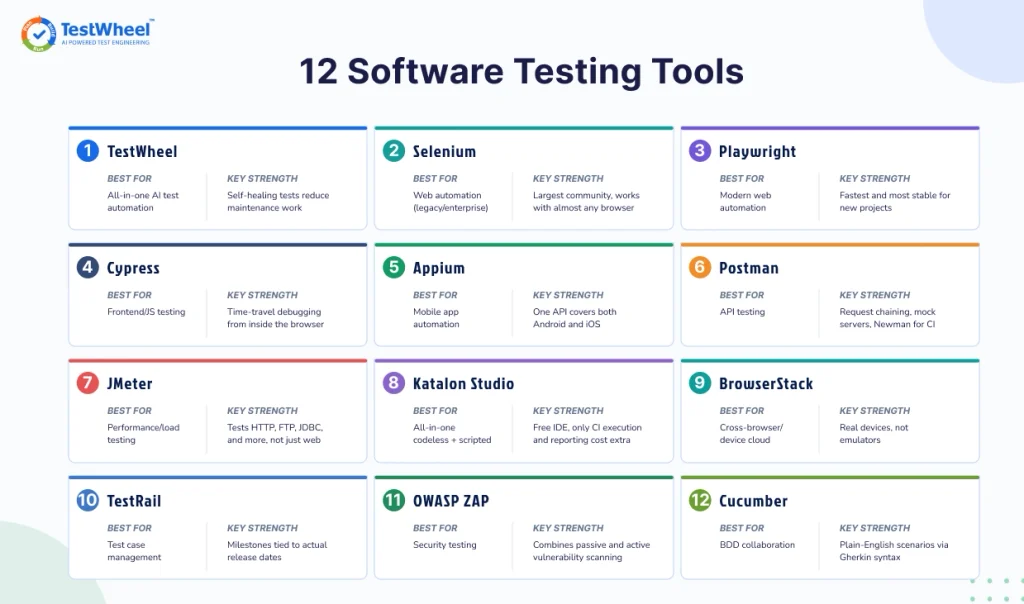
Comparison Table: 12 Software Testing Tools at a Glance
| Tool | Best For | Key Strength | Coding Needed |
|---|---|---|---|
| TestWheel | All-in-one AI test automation | Self-healing tests cut down maintenance work | No |
| Selenium | Web automation (legacy/enterprise) | Largest community, works with almost any browser | Yes |
| Playwright | Modern web automation | Fastest and most stable for new projects | Yes |
| Cypress | Frontend/JS testing | Time-travel debugging from inside the browser | Yes |
| Appium | Mobile app automation | One API covers both Android and iOS | Yes |
| Postman | API testing | Request chaining, mock servers, Newman for CI | Minimal |
| JMeter | Performance/load testing | Tests HTTP, FTP, JDBC, and more, not just web | Minimal |
| Katalon Studio | All-in-one codeless + scripted | Free IDE, only CI execution and reporting cost extra | No/Yes |
| BrowserStack | Cross-browser/device cloud | Real devices, not emulators | No |
| TestRail | Test case management | Milestones tied to actual release dates | No |
| OWASP ZAP | Security testing | Combines passive and active vulnerability scanning | Minimal |
| Cucumber | BDD collaboration | Plain-English scenarios via Gherkin syntax | Yes |
12 Best Software Testing Tools for QA Teams
The list below combines open-source software testing tools with paid platforms. So whether you’re a solo developer or running a QA testing software stack for a large enterprise, you’ll find something here.
1. TestWheel
TestWheel is a cloud-based, AI-driven software testing tool covering web, mobile, API, performance, and desktop testing from one account. Testers write test cases in plain English, and TestWheel’s AI converts them into automated tests. No scripting language or coding required.
Features:
- Testers write test cases in plain English, and TestWheel’s AI converts them into automated scripts. Someone who has never touched code can still build test coverage.
- AI self-healing for when a button moves or an element’s ID changes after a UI update. TestWheel finds the new match and repairs the test automatically.
- In-app chatbot so testers can ask questions about failures or platform features directly inside the tool, without waiting for support or documentation.
- Native mobile testing for iOS and Android so you get native, hybrid, and mobile web apps from the same account.
- Built-in load testing to simulate real-world traffic against a URL with as many users and loops as needed, without writing JMeter XML or learning Gatling’s scripting language.
- OWASP ZAP-powered security scans that run on the same trusted open-source engine used by dedicated security tools, checking for issues.
- Integrations with Jira and Azure DevOps so that test results sync directly into the tools QA and dev teams already use.
- Desktop application testing for testing legacy desktop software from the same account.
Pros:
- One platform for web, mobile, API, and performance testing. No separate subscriptions.
- Non-technical testers can build automation without a developer.
- Self-healing cuts down the maintenance work that eats up most QA time.
- Listed on the DoD’s Iron Bank, the Department of Defense’s repository of security-vetted software.
Cons:
- Newer than Selenium, so the community is still growing.
- Deep custom scripting for edge cases so as to include technical QA input.
Pricing: Basic plan from $10/month, team plan around $30/month, 14-day free trial.
Sign up for a free trial of TestWheel. Run your first test in minutes.
2. Selenium
Selenium is the open-source framework favored for browser automation back in 2004. It still runs a huge share of the world’s regression suites, especially in legacy-heavy organizations.
Features:
- Supports Java, Python, C#, JavaScript, and Ruby.
- Works across Chrome, Firefox, Safari, and Edge through WebDriver.
- Massive plugin ecosystem.
Pros:
- Free and open source, no vendor lock-in.
- Enormous community, so most error messages already have an answer online.
- Works with nearly every CI/CD pipeline.
Cons:
- Requires real coding skill to write and maintain tests.
- Tests break easily when the UI changes, and someone has to fix each one manually.
- No built-in reporting.
Pricing: Free.
3. Playwright
Playwright is Microsoft’s browser automation framework. It is becoming quite popular among teams starting new automation projects in 2026, largely due to its speed and built-in auto-waiting capabilities.
Features:
- Supports Chromium, Firefox, and WebKit from one API.
- Auto-waits for elements instead of depending on manual timeouts.
- Built-in test runner, screenshots, and failure videos.
Pros:
- Faster and more stable than older automated software testing tools for modern web apps.
- Excellent fit for JavaScript and TypeScript teams already on Node.js.
- Free and open source.
Cons:
- Requires developers or SDETs familiar with writing code.
- Younger tool, so some enterprise integrations still need to catch up.
Pricing: Free.
4. Cypress
Cypress is a JavaScript testing tool that runs inside the same browser window as your app, instead of controlling the browser from the outside as Selenium does. That inside view lets you see what’s happening on the page in real time.
Features:
- Real-time reloading while writing tests.
- Automatic waiting and retry logic.
- Built-in dashboard for recording runs (paid add-on).
Pros:
- Fast feedback loop for frontend developers.
- Simple, readable syntax, easier to learn than Selenium.
- Automatic retries and waiting built in, so tests don’t need manual sleep statements.
Cons:
- Limited to JavaScript.
- Historically weaker with multiple browser tabs and cross-origin testing.
- Doesn’t support Safari as well as Chromium browsers.
Pricing: Framework is free; Cypress Cloud starts around $67/month.
5. Appium
Appium is the standard open-source software testing tool for native and hybrid mobile apps. Alongside Espresso (Android) and XCUITest (iOS), it is one of the most used automated testing tools in software testing for mobile.
Features:
- Works across Android and iOS from one API.
- Supports native, hybrid, and mobile web apps.
- Compatible with most major languages.
- Supports gestures like swipe, tap, pinch, and scroll for touch-based testing.
- Works with common test frameworks like TestNG, JUnit, Mocha, and pytest.
- Plugs into cloud device farms like BrowserStack and Sauce Labs for testing across real devices.
Pros:
- One tool covers both major mobile platforms, unlike Espresso or XCUITest, which are locked to a single OS.
- Free, with strong community support.
Cons:
- Setup means configuring SDKs, emulators, and drivers, which takes technical effort.
- Test execution can run slower than platform-native frameworks.
Pricing: Free.
6. Postman
Postman is the tool most developers use when testing an API. It’s grown from a request-sender into one of the most complete API testing tools available.
Features:
- Send and organize API requests into collections.
- Write automated test scripts in JavaScript per request.
- Built-in mock servers and API documentation.
- The same collection runs against dev, staging, and production.
- Newman, Postman’s command-line tool, runs collections inside CI/CD pipelines.
- Offers request chaining, so the response from one call can feed into the next request in the same collection.
Pros:
- Approachable for beginners with a clean interface.
- Strong for both manual exploration and automated API test suites.
- Free tier covers most small teams.
Cons:
- Automated scripts need JavaScript knowledge to build.
- Collections get messy on large projects with hundreds of endpoints.
- Limited load testing compared to dedicated tools.
Pricing: Free for small teams; paid plans generally start around $9 per user, per month.
7. JMeter
Apache JMeter is the open-source standard for performance testing. It is most often used to check how an application holds up when thousands of users try to use it at once.
Features:
- Simulates heavy traffic across web apps, APIs, and databases.
- Supports distributed testing across multiple machines.
- Generates detailed reports on response time and error rate.
- Tests protocols beyond HTTP, including FTP, JDBC for databases, SOAP, and LDAP.
- Parameterizes tests using CSV data files, so a load test can simulate thousands of different users instead of using the same login every time.
- Runs in command-line, non-GUI mode for large-scale load tests, which uses less memory than running through the interface.
Pros:
- Tests more than just websites: works for FTP servers, message queues over JMS, and databases through JDBC.
- The plugin ecosystem enables advanced capabilities like percentile-based response time graphs and better dashboards.
- Long track record in enterprise load testing.
Cons:
- Dated interface, configured through XML.
- Steep learning curve.
- Resource-heavy on the local machine during large simulated loads.
Pricing: Free.
8. Katalon Studio
Katalon Studio is an all-in-one automation platform covering web, API, mobile, and desktop testing, built on top of Selenium and Appium.
Features:
- Offers record-and-playback creation as well as scripting for advanced users.
- Built-in test management through Katalon TestOps.
- Cross-platform coverage in one tool.
- Object Spy and Object Repository capture and reuse UI element locators across tests, cutting down repeated setup work.
- Supports Groovy and Java scripting for teams that need custom logic.
- Built-in keyword-driven and data-driven testing, so the same test can run against many data sets.
Pros:
- Katalon Studio itself is free to download and use, including record-and-playback, scripting, and the object repository. The subscription cost only kicks in with Runtime Engine or TestOps.
- A tester can turn an existing manual test case into an automated one the same day.
Cons:
- Paid tiers for Runtime Engine, needed for CI/CD and parallel runs, get pricey.
- Some users report slowdowns on large suites.
Pricing: Studio is free; execution and reporting plans go well into three figures per user, per month.
9. BrowserStack
BrowserStack gives QA teams instant access to thousands of real desktop browsers and real mobile devices in the cloud. You don’t have to set up and maintain a physical device lab for testing.
Features:
- Real device and browser cloud, not emulators.
- Works with Selenium, Playwright, Cypress, and Appium suites.
- Live manual testing sessions in the cloud.
- Percy, BrowserStack’s visual testing tool, catches pixel-level UI changes across browsers.
- Local testing tunnel lets you test apps still running on localhost or behind a firewall against real devices in the cloud.
- Parallel test execution across many browser and device combinations at once.
Pros:
- Real devices catch issues emulators miss.
- Huge browser and OS coverage.
- Strong documentation and CI/CD integrations.
Cons:
- Pricing splits across separate products (Live, Automate, App Automate, Percy), which can be confusing.
- Entry plans cap parallel sessions, which becomes a bottleneck as suites grow.
Pricing: Live plans range from around $29 to $39/month; Automate plans start at $99/month, which gets more expensive once add-ons are included.
10. TestRail
TestRail is a dedicated test management tool for organizing test cases, planning test runs, and reporting results. But it doesn’t execute any tests itself.
Features:
- Centralized test case repository.
- Test run planning and progress tracking.
- Integrates with Jira, Selenium, Appium, and most bug trackers.
- Custom fields and templates let different test types, like exploratory, regression, or security, capture the exact information needed.
- Milestones track testing progress against actual release dates.
- REST API pulls automated test results from CI/CD pipelines into TestRail.
Pros:
- Clean way to manage thousands of test cases as a software application grows.
- Gives you reports that are easy to share with non-QA stakeholders.
Cons:
- Doesn’t execute tests, so you need to pair it with an automation tool.
- SSO and version control only come with the pricier Enterprise tier.
Pricing: Professional Cloud from around $37 per user, per month, billed annually.
11. OWASP ZAP
OWASP ZAP (Zed Attack Proxy) is a free, open-source security testing tool used to scan for and detect vulnerabilities in web applications. It helps prevent attackers from stealing data and disrupting software functionality and user integrity.
Features:
- Automated scanning for issues like SQL injection and cross-site scripting.
- Manual penetration testing tools for security specialists.
- Runs inside CI/CD pipelines for continuous scanning.
- Active scanning runs injection attacks to confirm a vulnerability is real.
- Built-in fuzzer tests how the app handles unexpected or malformed input.
Pros:
- Completely free, backed by a large open-source community.
- Largely effective at finding common, high-impact vulnerabilities.
- Great for shift-left security testing.
Cons:
- Not a full replacement for dedicated commercial application security testing tools, especially for advanced vulnerabilities.
- Needs some security know-how to avoid chasing false positives.
Pricing: Free.
12. Cucumber
Cucumber is a behavior-driven development tool that lets teams write test scenarios in plain, structured English, called Gherkin syntax, which map to automated test code underneath.
Features:
- Plain-language scenarios that can be read by non-technical stakeholders.
- Works alongside Selenium, Appium, and other frameworks.
- Encourages collaboration between developers, testers, and product owners.
- Step definitions map plain-English lines to actual code. So a line like “Given I am logged in” can be reused across dozens of scenarios.
- Scenario Outlines with data tables run the same scenario against multiple sets of input data without duplicating the test.
- Tags let teams group and selectively run scenarios, like @smoke or @regression, instead of running the entire suite every time.
Pros:
- Connects business requirements and technical test scripts.
- Strong fit for agile testing teams.
- Open source.
Cons:
- Needs technical discipline to keep Gherkin scenarios from becoming as brittle as raw code.
- Doesn’t run tests on its own. It needs an automation framework underneath for that.
Pricing: Free.
Key Criteria to Evaluate Before Choosing a Software Testing Tool
Picking a software testing tool depends on the following attributes when comparing options for your team.
- Your team’s coding comfort: SDETs can do more with Playwright or Selenium’s flexibility. Manual testers moving toward automation can get started faster with a no-code platform like TestWheel or Katalon.
- What you’re testing: A pure API product doesn’t need a mobile testing tool. A consumer app with heavy mobile traffic needs Appium or native mobile support along with browser automation.
- CI/CD and pipeline fit: Pick the software testing tool that plugs into your existing GitHub Actions, Jenkins, or Azure DevOps setup as seamlessly as possible.
- Maintenance overhead: Ask how much time your team spends fixing broken tests after every UI change. Then, look for self-healing tools that reduce effort.
- Total cost, not sticker price: Open-source software testing tools are free to download but not free to run. Someone still writes, debugs, and maintains the scripts. That engineering time and work can get expensive.
- Reporting and visibility. Can a product manager open a report and understand what passed and failed, without asking an engineer?
Benefits of Software Testing Tools
Good software testing tools tend to offer these benefits once a team relies on them daily:
- Finds and flags bugs earlier, when they’re cheaper to fix, instead of after a customer reports them.
- Frees up human testers for exploratory and usability work that cannot happen without a real person’s judgment.
- Runs software checks consistently via automation, reducing the human error that often creeps into repetitive manual testing.
- Speeds up releases, since automated regression suites run in minutes instead of hours.
- Gives the team visibility into test coverage and quality trends via shared dashboards.
QA Tool Selection Checklist
Use this checklist when comparing software test automation tools for your QA team:
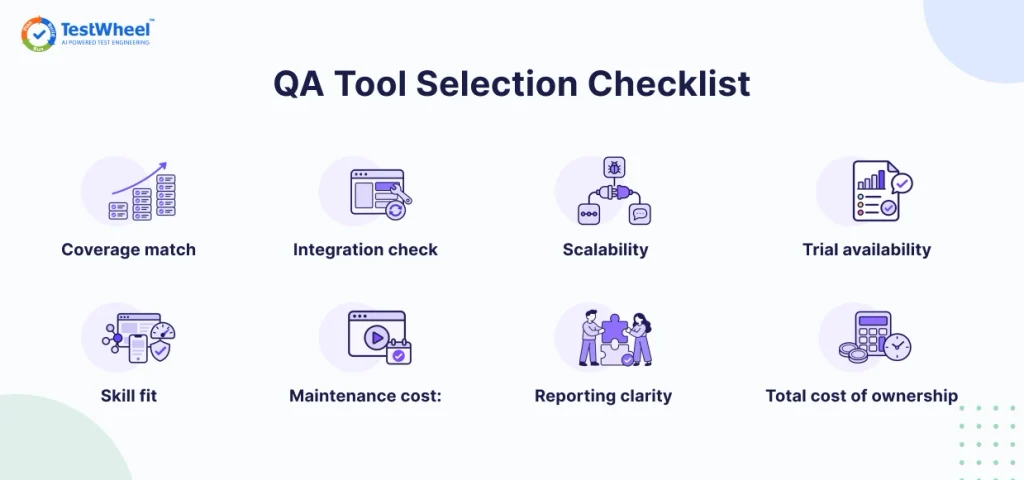
- [ ] Coverage match: Does the tool test what your product needs (web, mobile, API, performance, security)?
- [ ] Skill fit: Can your current team use it effectively, or does it demand hiring or heavy retraining first?
- [ ] Integration check: Does it connect cleanly with your bug tracker, CI/CD pipeline, and tools like Slack or Jira?
- [ ] Maintenance cost: How much rework does the tool demand every time the UI or API changes?
- [ ] Scalability: Will it hold up once your test suite grows from 60 tests to 4,000?
- [ ] Reporting clarity: Can non-technical stakeholders read the results without help from a developer or tester?
- [ ] Trial availability: Can you test the tool against your own application before buying a plan?
- [ ] Total cost of ownership: Have you counted engineering time along with the license fee when calculating costs?
How TestWheel Fits as a Software Testing Tool
Most teams use one tool for web, another for mobile, a third for APIs, and a test management tool to stitch it together. That’s four subscriptions, four logins, and four sets of test cases you have to keep in sync.
With TestWheel, that number drops to one.
This cloud-based, AI-driven software testing tool lets a tester write what they want to check in plain English. The platform builds the automated test, whether that’s a checkout flow on the web, a login screen on an Android app, or an API endpoint returning the right status code.
When the UI changes, TestWheel’s self-healing feature adjusts the test automatically instead of needing a QA engineer to fix ten broken scripts before Tuesday’s first coffee.
For a small team without a dedicated automation engineer, check the full pricing breakdown and try the free trial before deciding.
Explore Software Testing Tools by Category
Depending on what you’re testing, one of these focused guides might fit your search better than the broad list of 12 in this article.
- Best API testing tools
- Best web application testing tools
- Best mobile application testing tools
- Best cross-browser testing tools
- Best application security testing tools
Which Software Testing Tool Should You Pick?
No single best software testing tool fits every team. A large enterprise with dedicated SDETs will probably need Selenium, Postman, and TestRail together. A lean startup without deep automation experience will move faster with an AI-driven, no-code platform like TestWheel that covers more with less setup.
Sign up for a free trial of TestWheel. Run your first test in minutes.
Match the tool to your team’s skill set, your product’s testing needs, and how much time you’re willing to spend on maintenance versus new coverage. Start with the checklist above, test two or three shortlisted software testing tools against your application, and let the results make the final call.
Frequently Asked Questions
Software testing tools are applications that help QA teams and developers check whether software works correctly. They automate the process so QAs don’t have to manually click through every screen or send every request by hand. These tools range from free open-source frameworks like Selenium to all-in-one platforms like TestWheel.
Manual testing requires a person to click through the app and check behavior and function by eye. Automated testing tools in software testing run pre-written or AI-generated scripts that repeat the same checks every time, faster and without human error.
Postman for API testing and TestWheel for broader, no-code automation are excellent software testing tools for beginners. Neither requires writing test scripts to get useful results.
Many frameworks like Selenium, Playwright, Cypress, Appium, JMeter, and OWASP ZAP, are free and open source. Paid platforms like TestWheel, Katalon, BrowserStack, and TestRail charge for hosting, AI features, cloud device access, or test management, usually with a free trial first.
Selenium remains one of the most widely used web automation frameworks, particularly among teams with established test suites and enterprise applications. Playwright is also gaining attention for newer web testing projects because of its modern browser automation features, but there is not enough reliable industry-wide data to say that it has overtaken Selenium in 2026.
Yes. All-in-one platforms like TestWheel and Katalon Studio cover web, mobile, and API testing from a single account. They help reduce the tool sprawl that comes from running separate frameworks for each.
It depends on the tool. Selenium, Playwright, Cypress, and Appium require coding knowledge. No-code and low-code platforms like TestWheel and Katalon Studio let testers build automation using plain English or record-and-playback. No coding required.
Match the tool to what you’re testing (web, mobile, API, performance), your team’s coding comfort, your existing CI/CD setup, and how much ongoing maintenance you can realistically handle.
A test management tool like TestRail organizes and tracks test cases and results but doesn’t run tests itself. A test automation tool like Selenium or TestWheel executes the tests against your application.
Yes, Selenium is quite relevant, especially in large enterprises with existing Selenium suites and legacy applications. However, note that an increasing number of projects in 2026 start with Playwright or AI-driven, no-code platforms instead.