-
August 7, 2026
- Share:
-

-

-

-

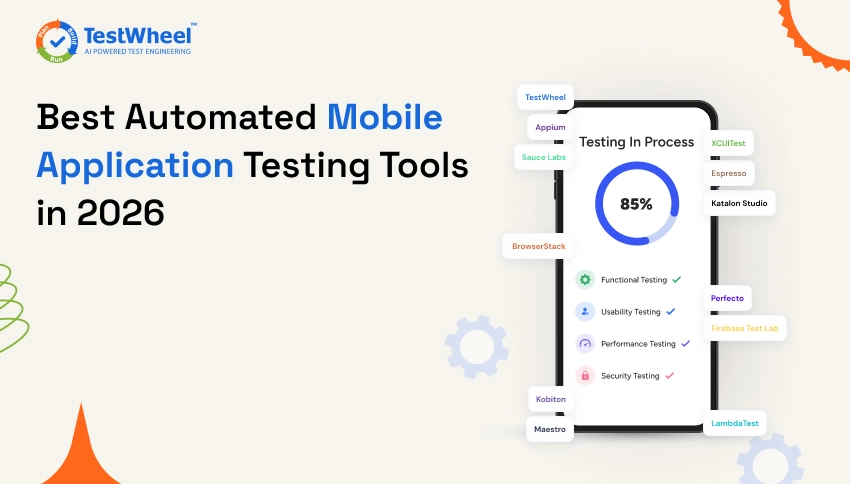
In 2026, markets are so competitive that an app can lose a chunk of its users simply because a “Confirm Payment” button is half-hidden behind the keyboard on some older Android phones.
The QA team forgot to test the app on those older phones. And that one gap, on one screen size, costs real money in real time.
This is the kind of problem mobile application testing tools are meant to solve. The only way to know your app actually works is to test it the way real people use it: on real devices, real networks, and real operating system versions.
In this guide, we will walk through the best mobile application testing tools in 2026, the frameworks behind them, and a checklist to pick the right tool for your team.
If you want to see how a modern, low-code approach to this handles native and hybrid apps, TestWheel’s mobile testing platform is a good place to start.
What Is Mobile Application Testing?
Mobile application testing is the process of checking how a mobile app behaves across different phones, tablets, operating systems, and network conditions before real users access it.
Mobile testing tools check whether the app installs correctly, whether buttons respond the way they should, how the app reacts during a dropped Wi-Fi signal, and whether it looks right on a five-year-old phone as well as the newest model.
Mobile app testing covers functional testing, usability testing, performance testing, security testing, and compatibility testing. Good mobile app testing tools help teams check all this without having to buy scores of real devices every quarter.
Importance of Mobile Application Testing
A bad app experience can cause a user to uninstall the app for good. Studies on app store behavior consistently show that users uninstall apps within days of hitting a crash or a slow screen. Most never come back.
Then there’s the sheer number of device and OS combinations in the market today. Android alone spans hundreds of device models. If you don’t run mobile app tests on enough of these devices, chances are the app will fail on one or more of their phones.
Automated mobile app testing also saves engineering time. A regression suite that takes a human tester two days to run manually can finish in under an hour when automated. The whole suite can also run every single time new code ships instead of once or twice a sprint.
In short, here is why it matters:
- Keeps users from leaving. Most people uninstall an app when it crashes or slows; they rarely give it a second chance.
- Covers device fragmentation. With hundreds of Android models and multiple iOS versions in daily use, an app that works on one phone can fail on another.
- Protects app store ratings. A handful of one-star reviews about bugs can easily push an app down in search results.
- Catches costly bugs early. A bug found before release is cheaper to fix than one found after thousands of people have already installed the update.
- Guards revenue. For apps tied to payments, bookings, or subscriptions, a broken checkout flow translates straight into lost sales.
- Reduces security risk. Testing how the app stores data and talks to servers helps catch leaks before a real breach.
- Saves engineering time. Automated tests can run on every release, freeing developers to focus on building new code instead of firefighting bugs.
Best Mobile Application Testing Tools in 2026
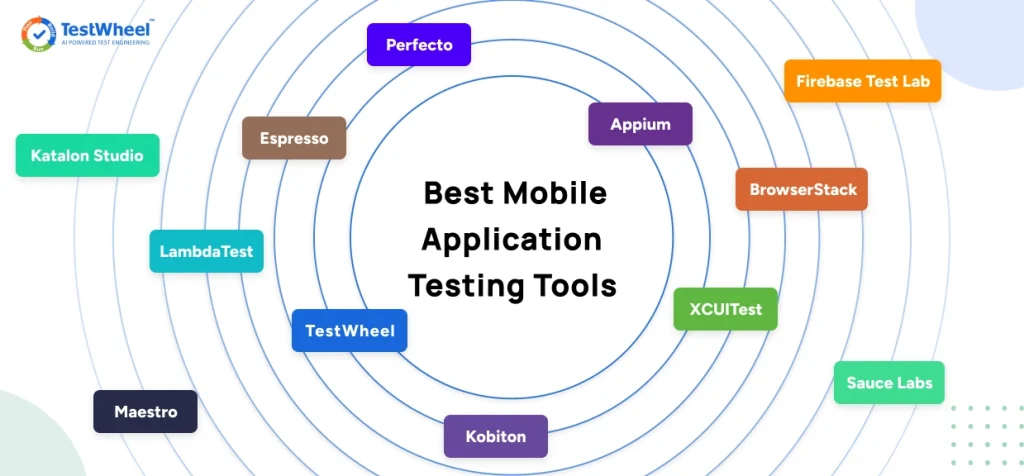
Here you’ll find a rundown of the best mobile application testing tools available today. The list starts with TestWheel, followed by open-source frameworks, device clouds, and enterprise platforms.
Pick the right tool based on your team’s size, budget, and coding comfort level.
1. TestWheel
TestWheel is a cloud-based, AI-driven test automation platform that covers mobile, web, API, performance, and security testing from one account.
For mobile app automation testing, TestWheel lets you write test steps in plain English, such as “open the login screen, enter the username, tap sign in,” instead of writing code in a scripting language.
TestWheel runs those tests on real Android and iOS devices via its integration with AWS Device Farm. That means you get to test the app on actual hardware to gauge its behavior (camera, GPS, fingerprint sensors, battery drain).
What makes TestWheel stand out in a crowded field of mobile testing tools is that it lets non-technical testers build a full regression suite in plain English, while the platform still runs true parallel execution across multiple real devices at once.
Key Features
- Enables test authoring in plain English instructions.
- If your team already has old manual test cases sitting in a spreadsheet, TestWheel’s AI can also convert them into automated scripts directly.
- When an app’s UI shifts (a button moves, a label changes), TestWheel’s self-healing feature automatically adjusts the test instead of leaving your whole suite broken until someone manually fixes every locator.
- Reporting is built in. Every test run generates a video recording alongside a step-by-step pass and fail summary.
- Folds in API testing, performance testing, and security testing into the same subscription.
Best For
Teams that want mobile, web, and API testing in one platform without hiring dedicated automation engineers.
Pricing
Plans start at $10 per month for a single app, with a Pro/Team plan at $30 per month for up to 5 apps and 5 users.
Enterprise pricing is custom. A free trial is available with no credit card required.
Full details are on the TestWheel pricing page.
Supported platforms
Native, hybrid, and mobile web apps on Android and iOS, as well as web and desktop applications.
2. Appium
Appium is the most widely used open-source framework for test automation of mobile apps. It lets you write tests in multiple programming languages like Java, Python, or JavaScript and run the same test logic across both Android and iOS with a few small adjustments.
Key Features
- Cross-platform support, so one script can run both Android and iOS tests.
- Large open-source community with plenty of documentation and third-party plugins.
- Works with most programming languages, including Java, Python, and JavaScript.
Best For
Development teams with in-house coding skills who want full control over their test scripts.
Pricing
Free and open source, but you still need to pay for devices or a device cloud to run tests on.
Supported Platforms
Android and iOS, native and hybrid apps.
3. Espresso
Espresso is Google’s own testing framework built specifically for Android apps. It runs inside the Android toolchain, so it is fast and tightly connected to how Android apps are built from the backend.
Key Features
- Deep integration with Android Studio, so tests exist alongside the app’s own code.
- Fast test execution, since it runs inside the native Android toolchain.
- Automatic synchronization with the app’s UI thread, which reduces flaky, timing-related failures.
Best For
Teams building Android-only apps who want native-level reliability in testing.
Pricing
Free, as part of the Android developer tools.
Supported Platforms
Android only.
4. XCUITest
XCUITest is Apple’s answer to Espresso. It is built directly into Xcode and gives you the standard way to test native iOS apps written in Swift or Objective-C.
Key Features
- Native integration with Xcode; tests run in the same environment as development.
- Direct access to iOS-specific UI elements, including gestures and system dialogs.
- Strong support from Apple, which means it stays current with every new iOS release.
Best For
Teams building iOS-only apps who are already working inside Apple’s developer ecosystem.
Pricing
Free with Xcode.
Supported Platforms
iOS only.
5. BrowserStack App Automate
BrowserStack is a real-device cloud that provides on-demand access to thousands of real Android and iOS devices, without having to buy and maintain them. It works alongside frameworks like Appium, Espresso, and XCUITest.
Key Features
- Access to thousands of real devices, from older models to latest releases.
- Support for major automation frameworks like Appium, Espresso, and XCUITest.
- Parallel test runs, so a full suite finishes faster by running on many devices at once.
- Network simulation, so you can switch between 2G, 3G, and 4G, or set a custom profile by specifying bandwidth, latency, and packet loss.
- GPS and IP geolocation testing to simulate a device’s exact coordinates or route its traffic through an IP address in one of 45+ countries.
Best For
- Teams that already write Appium or Espresso scripts and need real devices to test on at scale.
Pricing
- Plans generally start around $29 per month for individuals. For teams, you start with $150/month for five testers, depending on live versus automated testing needs.
Supported Platforms
- Android and iOS, plus desktop browsers.
6. Sauce Labs
Sauce Labs is one of the older names in the industry. It enables testing on real devices, virtual devices, and AI-assisted analytics for both mobile and web testing.
Key Features
- Real and virtual device cloud, available on-demand for testing.
- Parallel test execution, so large regression suites can run much faster.
- CI/CD integrations, including Jenkins and GitHub Actions, to trigger automatic test runs.
- Biometric authentication testing, simulating fingerprint or Face ID scenarios on real devices.
- Sauce AI agents to auto-triage failures and highlight likely root causes from build through production.
Best For
- Larger organizations looking for a scalable device lab with solid enterprise support.
Pricing
- Live testing plans start at $39 per month. Real device cloud plans start at $199 per month.
Supported Platforms
- Android, iOS, and desktop browsers.
7. Kobiton
If your app needs to scan an ID, unlock with Face ID, or check a delivery zone by location, Kobiton lets you test all of that on real hardware in the cloud. It eliminates the need to juggle physical devices for each scenario.
Key Features
- Real-device testing lab, built to feel close to manual testing.
- AI-assisted script generation from manual test sessions.
- Visual test reports, so you can spot exactly where a test failed.
- Biometric and image injection testing, simulating fingerprint or Face ID authentication and feeding in mock images to test flows like receipt scanning or ID verification.
- GPS location mocking and real-time device metrics, so you can set a device’s location anywhere in the world to test geofencing or region-locked features.
- Tracking memory, CPU, battery, and temperature live during the test.
Best For
- Teams that want to run manual and automated testing to live on the same real device platform.
Pricing
- Custom pricing, similar to other mid-market device clouds.
Supported Platforms
- Android and iOS.
8. Katalon Studio
Katalon Studio offers choices between low-code and full-code. The hybrid platform that covers web, mobile, API, and desktop testing from a single tool, built on top of Appium and Selenium under the hood.
Key Features
- Record-and-playback test creation, so a tester can capture a flow by clicking through it.
- Keyword-driven testing to reuse common steps across multiple test cases.
- Works for coders and non-coders, thanks to a mixed low-code and full-code editor.
- Offers StudioAssist, an AI assistant that turns plain-English prompts into test scripts and explains existing code; testers do not need to know Groovy to get started.
- Comes with Katalon TestOps, a cloud dashboard for orchestrating test runs across environments, spotting flaky tests, and tracking pass and fail trends over time.
Best For
- Mixed-skill QA teams who want one tool for web and mobile without deep scripting.
Pricing
- A free plan is available, with paid plans starting from $59 per seat per month.
Supported Platforms
- Android, iOS, web, and desktop.
9. LambdaTest (TestMu AI)
LambdaTest, now named TestMu AI, is a cloud testing platform combining real-device access with AI-assisted test generation for mobile and web apps.
Key Features
- Real-device cloud with on-demand access to physical Android and iOS hardware.
- Cross-browser and cross-device testing in one dashboard, covering both web and mobile.
- Local testing via encrypted tunnels to test staging or local builds without exposing them publicly.
- KaneAI, a natural-language test agent to plan, author, and evolve end-to-end tests by describing them across web and native apps.
- HyperExecute, an AI-native orchestration engine to run test suites faster than a standard grid. It gives you smart test distribution, automatic retries, and auto-heals broken locators.
Best For
Teams that need web and mobile device coverage in one subscription.
Pricing
Free trial available. Plans start at $19 per month.
Supported Platforms
Android, iOS, and multiple desktop browsers.
10. Perfecto
Perfecto is best for larger organizations that need governance, compliance, and detailed analytics on top of their real and virtual device testing.
Key Features
- Unified test execution and analytics dashboard, covering both real and virtual devices.
- Compliance-grade reporting for teams needing detailed audit trails.
- Support for major automation frameworks.
- AI-powered analytics with heatmaps and ML-based noise filtering to separate genuine bugs from flaky false positives.
- Real-world condition simulation, including network shifts (4G/5G), GPS location, and audio injection.
Best For
Enterprise teams in regulated industries requiring detailed audit trails.
Pricing
Custom pricing based on your needs.
Supported Platforms
Android, iOS, and web.
11. Firebase Test Lab
Firebase Test Lab is Google’s cloud-based testing infrastructure. It lets developers run tests on a range of physical and virtual Android and iOS devices hosted by Google.
Key Features
- Access to Google-hosted real and virtual devices, without buying or maintaining any hardware.
- Robo Test, an automated exploratory crawler that examines Android apps looking for crashes.
- Integration with Firebase’s broader app development tools, if your build already exists there.
- Robo Scripts to guide the crawler through specific steps like logging in with test credentials; helps it get past login screens.
- Game Loop tests, built for games that do not use standard Android UI widgets. It runs a demo mode to check performance across many devices without writing a full script.
Best For
Teams already using Firebase for app development who want device testing in the same ecosystem.
Pricing
You get a testing quota, which is included in the standard Spark and Blaze pricing plans. These quotas are based on your project’s usage of the testing resource, device resource or Cloud API.
Supported Platforms
Android (strongest support) and iOS.
12. Maestro
Maestro is a newer, lightweight, open-source mobile testing framework. Its appeal is that it is simpler to set up than Appium because it uses plain YAML files instead of code.
Key Features
- Simple YAML-based test flows, readable even without technical knowledge.
- Fast setup, often up and running in minutes.
- Built for modern mobile UI frameworks, including apps made in React Native and Flutter.
- Built-in flakiness tolerance. It automatically waits for elements and network calls to settle and retries actions under the hood.
- JavaScript support for dynamic logic within YAML flows.
- Maestro Cloud for running flows in parallel across many real devices.
Best For
Small teams or startups for whom Appium’s setup is too heavy.
Pricing
Free and open source.
Supported Platforms
Android and iOS, with strong support for apps built in React Native and Flutter.
Comparison Table: Mobile Application Testing Tools
| Tool | Features | Best For |
|---|---|---|
| TestWheel | Plain-English test steps, real devices, and AI that fixes broken tests on its own. | Teams that want mobile, web, and API testing in one platform without hiring automation engineers. |
| Appium | Works across Android and iOS from the same script, backed by a huge open-source community. | Development teams with in-house coding skills who want full control over test scripts. |
| Espresso | Built into Android Studio and synchronizes automatically with the UI thread. | Teams building Android-only apps that want native-level reliability. |
| XCUITest | Integrated with Xcode and understands native iOS gestures. | Teams building iOS-only apps already working inside the Apple development ecosystem. |
| BrowserStack App Automate | Large real-device cloud that integrates with Appium, Espresso, and XCUITest. | Teams with existing automation scripts that need scalable real-device execution. |
| Sauce Labs | Real and virtual devices with AI-powered insights across failed test runs. | Large organizations needing enterprise-scale device labs and support. |
| Kobiton | Real devices with biometrics, GPS mocking, and scriptless recording. | Teams wanting both manual and automated testing on a single real-device platform. |
| Katalon Studio | Record-and-playback automation with optional scripting for advanced scenarios. | Mixed-skill QA teams that want one tool for web and mobile testing. |
| LambdaTest (TestMu AI) | Cloud-based real-device testing with AI-assisted test creation from plain English. | Teams needing web and mobile device coverage under one subscription. |
| Perfecto | Enterprise dashboards with heatmaps, reporting, and noise filtering. | Enterprise teams in regulated industries requiring detailed audit trails. |
| Firebase Test Lab | Google’s device cloud with automated testing and app crawling. | Teams already using Firebase that want testing within the same ecosystem. |
| Maestro | Simple YAML-based automation requiring minimal setup. | Small teams or startups that find Appium too complex. |
Frameworks Behind Mobile Application Testing Tools
There are key differences between “tool” and a “framework”; the words are not interchangeable when it comes to test automation of mobile apps. A framework is the underlying engine that drives the app during a test, similar to how an engine drives a car regardless of which dashboard you use. A tool or platform sits on top, giving you the mechanism to write, run, and view those tests without touching the underlying code.
Here are some common mobile app automation testing frameworks:
- Appium: The most widely used cross-platform framework, supporting both Android and iOS from a shared test script.
- Espresso: Google’s native framework for Android, notable for speed and tight integration with Android Studio.
- XCUITest: Apple’s native framework for iOS, built directly into Xcode.
- Detox: A framework designed for React Native apps, standing out for reducing test flakiness.
- Maestro: A newer, simpler framework using plain text YAML files instead of full programming languages.
Platforms like BrowserStack, Sauce Labs, and Katalon do not replace these frameworks. They give you a cloud to run tests written using these frameworks on real devices at scale.
TestWheel, however, removes the framework layer by converting plain-English steps into automated actions on real devices. So teams do not need to learn Appium to get started with automated mobile app testing.
Mobile Application Testing Checklist
Before your next release, run through this mobile app automation testing checklist:
- Test on at least three different screen sizes, including one older or budget device. Smaller or lower-resolution screens often show layout problems that newer devices hide.
- Cover both Android and iOS, and at least two OS versions on each. Not every user updates their phone the day a new OS comes out.
- Test app behavior on a slow or unstable network connection. Many users have patchy mobile data.
- Check push notifications, deep links, and in-app permissions like camera, location, and contacts. These small features tend to break and go unnoticed until users complain.
- Test interruptions such as incoming calls, low battery warnings, and app switching. Phones get interrupted constantly, and the app should handle that.
- Confirm the app installs, updates, and uninstalls cleanly.
- Run a full regression suite before every release. A small change in one place can break something unrelated elsewhere.
- Include at least one security check for data storage and network calls. Even a simple app can leak sensitive data.
- Verify load and response times under normal and peak traffic. An app that runs fine with ten users can slow with two thousand.
- Keep a record of every test run so bugs can be traced back to a specific build. This saves hours when trying to figure out what broke and when.
Why Choose TestWheel for Mobile Application Testing?
Most mobile app testing tools are either a free open-source framework that needs coding skills and your own device lab, or an expensive enterprise device cloud that only handles test execution.
TestWheel does both.
A product manager or manual tester can build and run tests in plain English. Results come from real devices. A UI redesign does not mean rebuilding the whole suite from scratch.
Watch this youtube video to know how to use TestWheel Mobile application testing tool – Video link
You can explore the platform in more detail on the mobile testing page or read more about what mobile application testing involves on the mobile app testing overview.
Pick Based on Your Release Cycle. Forget the Feature List.
A solo developer testing a React Native side does not need to pay for an enterprise device cloud. Maestro or Detox and a couple of borrowed phones are enough. But a team shipping native Android and iOS updates every two weeks needs real devices, real automation, and to run both without stitching four separate tools, which is exactly what TestWheel does.
Pick based on what you are actually shipping and who is going to write the tests. Then run the checklist above before every release, not just the big ones.
If you want to see what a no-code, real-device approach looks like on your own app, TestWheel has a free trial and does not ask for a credit card to start.
Frequently Asked Questions
1. What are mobile application testing tools?
Mobile application testing tools are software platforms or frameworks used to check how a mobile app performs across different devices, operating systems, and network conditions before it reaches real users. They cover the app’s functionality, speed, security, and how it looks on different screen sizes.
2. What is the difference between mobile app testing and mobile app automation testing?
Mobile app testing can be done manually, with a person tapping through the app screen by screen. Mobile app automation testing uses scripts or plain-English instructions to run those same checks automatically, so the same test repeats every time new code is released.
3. Which is the best free mobile application testing tool?
Appium, Espresso, and XCUITest are free and open source. Appium works across both Android and iOS, while Espresso and XCUITest are limited to Android and iOS respectively. TestWheel also offers a free trial if you want a no-code option before committing to a paid plan.
4. Do I need real devices for mobile app testing, or are emulators enough?
Emulators and simulators are useful early in development for quick checks. But they cannot fully replicate real-world conditions like battery drain, GPS drift, camera behavior, or how an app works on an older, lower-powered phone. Real-device testing catches issues that emulators will miss.
5. What is the easiest mobile application testing tool for beginners?
TestWheel and Maestro are both considered easier starting points. TestWheel uses plain English instead of code, which suits non-technical testers. Maestro uses simple YAML files that are easier to read than a full programming language.
6. Can one tool test both Android and iOS apps?
Yes. Tools like TestWheel, Appium, BrowserStack, Sauce Labs, and Katalon Studio all support testing Android and iOS from a single platform or shared test script. That means you do not need separate tools for each operating system.
7. How much do mobile application testing tools cost?
Pricing varies widely. Open-source frameworks like Appium, Espresso, and XCUITest are free, though you still need devices to run tests on. Cloud platforms and low-code tools typically range from around $10 to $200 per month depending on the plan. Most paid tools offer custom enterprise pricing for larger teams.
8. What should be included in a mobile application testing checklist?
A mobile app testing checklist covers multiple screen sizes, major operating systems, network conditions, permissions like camera and location access, interruptions like phone calls, clean install and uninstall behavior, and a full regression filter before every release.