-
August 6, 2026
- Share:
-

-

-

-

A retail team pushes a last-minute build the night before Black Friday. QA flags it as risky. Management says ship it anyway.
By 8 AM, the checkout flow is broken on Samsung One UI, which is used by a large chunk of that user base. Cart abandonment shoots up. Support is overwhelmed. A hotfix goes out hours later, but by then most of those users have moved on to a competitor.
That is what happens when QA teams skip proper mobile app testing. If you are new to mobile app testing, start with TestWheel’s mobile testing overview to understand what the process entails before delving deeper into this guide.
What Is Mobile App Testing?
Mobile app testing is the process of checking that a mobile app works the way it should, across real devices, different operating systems, varying network conditions, and the unpredictable ways in which real people use phones.
It is very different from testing a website. On the web, you have a browser, a DOM, and a network connection. On mobile, you have to deal with hardware sensors like GPS and accelerometers, manufacturer-specific software layers (called UI skins), battery constraints, background process behavior, and OS-level interruptions. Using the right mobile application testing tools helps testers validate app functionality, performance, compatibility, and stability across different devices and operating systems.
Why Mobile App Testing Cannot Be Optional
Mobile app testing cannot be optional for these reasons:
The device landscape is fragmented
Android runs across thousands of device models from dozens of manufacturers. Each has its own screen size, memory limits, processor, and UI skin.
A layout that passes every test on a Pixel 9 can break on a Xiaomi Redmi due to MIUI’s aggressive policy of killing background apps. It’s not uncommon for devs to spend three to five hours per week just diagnosing issues caused by this kind of fragmentation.
OS updates break things without warning
When Android 14 enforced a new broadcast receiver flag requirement, apps built with React Native and Unity began crashing at launch with a runtime error. Teams with automated regression suites in their mobile app testing caught it before users did. Teams without them found out from crash dashboards after the fact.
Security failures are expensive
Published industry figures show that 62% of organizations suffered at least one mobile app security incident in the past year, at an average cost of nearly $7 million per breach. Skipping security testing moves the cost to a much worse place, i.e., after the incident.
Bugs caught late cost far more
A bug caught in a pull request review takes ten minutes to fix. The same bug caught two weeks after a release requires a hotfix build, an expedited App Store review, and you also lose users between discovery and the patch.
Google’s own developer documentation sets a threshold: if more than 1.09% of your daily active users crash, Google Play flags your app for “bad behavior” and reduces its discoverability. You cannot afford to have a bad app and retain users.
Types of Mobile Apps
A mobile app is a software program built to run on smartphones and tablets. Everything you download from the App Store or Google Play, such as Instagram, Spotify, or Snapchat, is an app. Today, people use apps across almost every industry, region, and economy in the world.
There are three major types of mobile apps. The kind of app decides what testing tools you use, what devices you test on, and where your biggest risks come from.
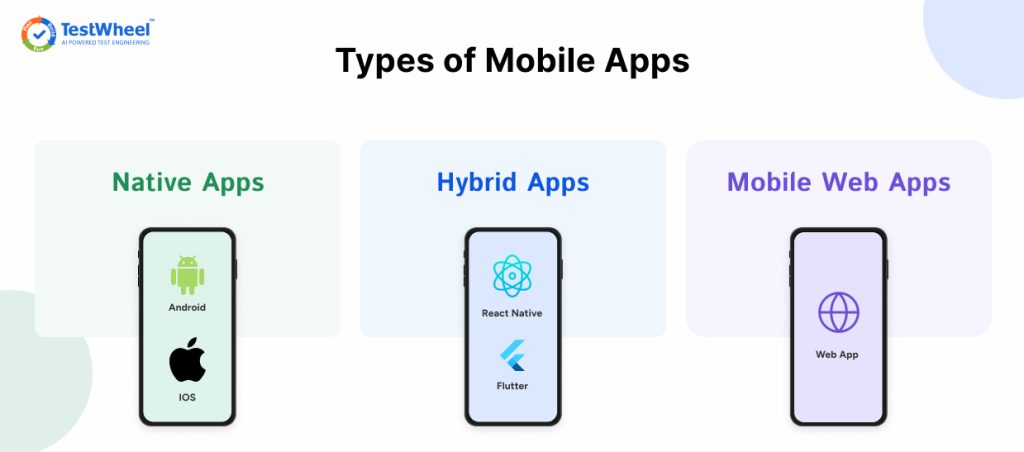
- Native apps are built for one platform. Android uses Kotlin or Java. iOS uses Swift. They get the best performance and full hardware access, but they need separate test suites: Espresso for Android, XCUITest for iOS. No shared code, no shortcuts.
- Hybrid apps run web technologies wrapped inside a native shell such as React Native and Flutter. One codebase, two platforms. The challenge comes from having a native layer on the outside and a web layer underneath. In the real world, things like gesture testing inside these WebViews, as well as swipe momentum and tap targets, often behave differently than in a fully native app.
- Mobile web apps run entirely in the browser. Safari on iOS uses the WebKit engine because Apple mandates it for all iOS browsers. Chrome uses Blink. Firefox uses Gecko. Each handles CSS, form inputs, and viewport behavior differently, and those testing differences produce disruptive bugs.
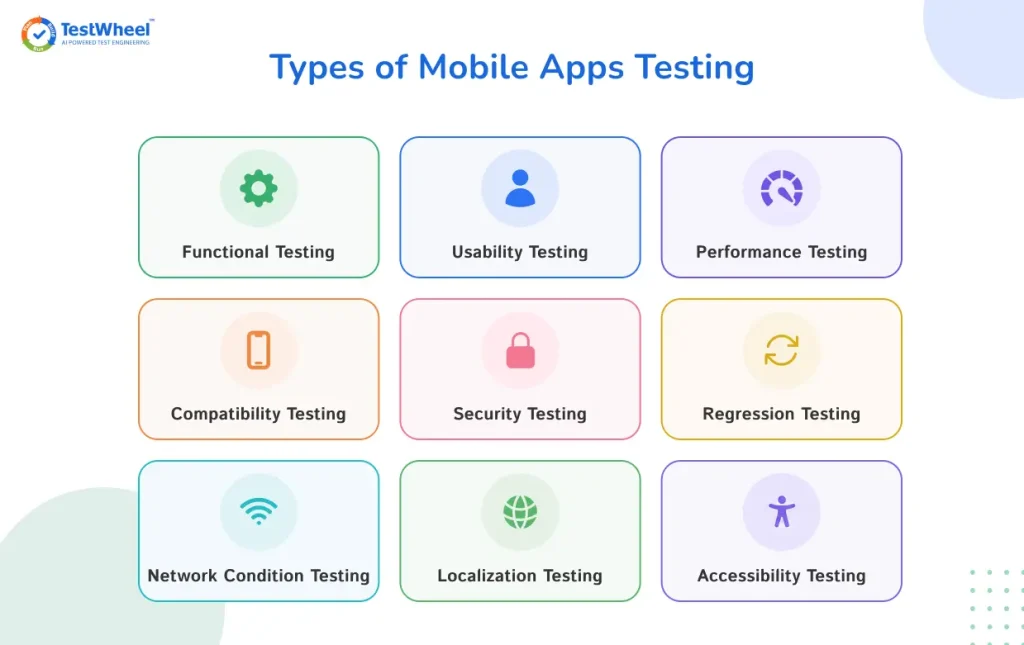
The Core Types of Mobile App Testing
A complete mobile testing strategy has to cover multiple test types and protocols. The core types to be covered are:
Functional Testing
Functional testing checks if the app performs the basic functions it is built for. On mobile, that includes forms, buttons, gesture inputs like swipe direction sensitivity, and long-press. It also needs to check for the Android hardware back button (no iOS equivalent), deep link routing, push notification handling, and what happens when the app comes back from the background.
Usability Testing
Usability testing tells you how users really feel about using an app, which is why it needs real sessions with real users on real devices. Automated tests can confirm a button exists and is tappable. They cannot tell you the button is hidden behind the iOS soft keyboard, or that users cannot find it because the navigation assumes Android familiarity that your iOS users do not have.
Performance Testing
Mobile performance testing covers API response times, memory usage, CPU behavior under GPS load, battery drain during video streaming, and how the app behaves when available RAM drops below a threshold.
Explore more about Performance vs Load vs Stress testing
Compatibility Testing
Compatibility testing verifies if apps perform equally well on different user devices. Your test device list should reflect your actual user base. A high-end phone with 12GB of RAM will mask performance problems that a real-world mid-range device exposes immediately. Pull device and OS data from Firebase Analytics or Google Play Console.
Security Testing
Security testing on mobile checks for common failure points like authentication tokens stored in plain text (instead of Android Keystore), insecure deep link handling, transport layer issues, and sensitive data leaking into system logs.
Regression Testing
Regression tests check that updates have not broken anything that was working before. On mobile, this risk is higher because OS updates ship on a schedule you do not control and can change behavior in builds that previously had no issues. Automated regression on real devices, triggered on every build, is the only way to catch these before users do.
Network Condition Testing
Network Condition Testing checks how apps perform on different network strengths. Users do not run your app on a stable office WiFi connection. They use it on subways, in parking garages, and on 2G connections when traveling abroad. Run the app on 5G, LTE, 3G, and in full offline mode. Then watch what actually happens when connectivity drops mid-action. Does it cache data locally so the user can keep going? Does it retry silently, or does it throw an error and make the user start over?
Localization Testing
Localization tests scan apps to validate their functionality, UI integrity, and relevance for different geographical audiences.
Apps created to be used by people in multiple regions need to handle different languages, date formats, and text placement. For example, German translations are often longer than English strings and will overflow button labels. Arabic text runs right to left. Date formats that mean different things in different markets can produce user confusion or errors. Test these with real locale settings on real devices.
Accessibility Testing
Accessibility testing verifies that people who use screen readers, switch access, or assistive touch can actually use your app. Automated mobile app testing tools can detect missing alt text, low contrast ratios, and tap targets smaller than the recommended 44×44 points.
They cannot catch broken focus order, custom components that trap navigation with no exit, or dynamic content that screen readers never announce. That requires manual testing on real devices.
Manual vs. Automated Mobile Testing
Pro-Tip: If you’re still deciding how to balance manual and automated coverage, the Agile Testing Quadrants framework is a useful model for categorizing what goes where.
| Testing Area | Manual | Automated |
|---|---|---|
| Best Used For | Exploratory testing, UX review, accessibility validation, new feature sign-off | Regression suites, smoke tests, API validation, performance benchmarking |
| Tooling | Real devices, Charles Proxy, ADB, screen recorders, session replay tools | Appium, Espresso, XCUITest, TestWheel, CI/CD pipeline integration |
| Where It Wins | Finding what no one thought to script: gesture edge cases, OEM skin quirks, keyboard layout failures | Running 300+ test cases across 20 device configurations overnight without human oversight |
| Where It Fails | Does not scale. Cannot run on every build in a CI/CD pipeline shipping daily or weekly. | Brittle against UI changes. Misses context-dependent failures and visual regressions that need human judgment. |
| Flakiness Risk | Low; human judgment filters noise in real time. | High; timing issues, permission dialogs, and network variability can cause false failures without self-healing locators. |
| Maintenance Cost | Low tooling overhead, high labor cost at scale. | High upfront script investment; grows with every UI change. |
| Practical Split | New features, release sign-off, UX walkthroughs, accessibility audits. | Every build: smoke suite. Every release: full regression. Continuous: API and performance testing. |
Explore more about Manual and Automation Testing
Mobile Automation Testing Frameworks
A mobile automation testing framework is the set of tools, rules, and scripts that tell your tests what to do, how to do it, and on which devices to run.
The framework you choose will determine your maintenance burden, execution speed, and how many of your target user devices you can realistically cover.
Here are the frameworks most widely in use:
- Appium is the dominant open-source cross-platform framework. It wraps Espresso and UIAutomator2 on Android and XCUITest on iOS under a single WebDriver protocol, so one test codebase runs across both platforms in Java, Python, JavaScript, Ruby, or C#.
Every Appium command travels over HTTP to the Appium server, gets converted into a native instruction, and then executes. That’s why Appium is slower than native frameworks on a per-command basis. - Espresso (Android) and XCUITest (iOS) are the native frameworks from Google and Apple, respectively. Espresso runs inside the Android app process and synchronizes automatically with UI operations, eliminating the timing delays that make Appium tests flaky.
XCUITest performs reliably but may not always match Espresso’s execution speed. You’ll have to maintain two separate test suites in two different languages: Kotlin or Java for Espresso, and Swift or Objective-C for XCUITest.
Flutter’s integration test package works for Flutter apps only, using a single Dart-based test layer across iOS and Android without a WebDriver layer in between.
Before choosing any framework, consider the infrastructure overhead. Device farms need configuration. CI/CD integration needs maintenance. Reporting needs aggregation across platforms.
This is where low-code platforms like TestWheel come in with record-and-playback authoring, self-healing locators that adapt to element changes automatically, and built-in real-device execution through AWS Device Farm. No need to manage that infrastructure separately.
P.S: You might like: Cypress vs. TestWheel: A Comparison
The Real Challenges in Mobile Testing
These are the challenges in mobile testing that slow teams down in practice.
Test flakiness
A flaky test passes sometimes and fails other times with no code change in between. On mobile, it usually happens because of element loading delays, network variability, and OS-level interruptions like push notifications or permission dialogs appearing mid-test. The real cost comes when teams start treating failed tests as normal, and real bugs escape unnoticed.
The Android back button
iOS has no hardware or gesture equivalent that behaves the same way as the Android back button. Teams that build and test primarily on iOS miss back-button handling on Android entirely. Users end up stuck on a screen or the app crashes.
Device lab maintenance
A physical lab of real devices needs constant charging, selective OS updates, and configuration management. A single dead device overnight can break an entire regression run.
CI/CD integration gaps
A test suite that only runs manually before major releases is not doing continuous testing. By the time a regression is caught that way, it is tangled up with a dozen other changes from the same release window and takes days to diagnose, let alone fix.
What to Look for in a Mobile App Testing Platform
When evaluating tools, these are the features that will get you through deployment without compromising quality or speed:
Real devices, not just emulators
Emulators are useful for quick sanity checks during development. They cannot replicate carrier-specific network throttling, manufacturer UI skins like MIUI’s background process management, or the edge cases that appear only on a three-year-old physical phone with 40% battery and twelve apps running. Release validation needs real hardware.
Parallel execution
If your platform tests one device at a time, your regression suite takes hours instead of minutes. Parallel execution across real devices finishes a 200-test run in twenty minutes.
Self-healing locators
A button ID changes, and every test referencing it fails. Someone has to spend an afternoon updating selectors instead of finding actual bugs. Good platforms handle minor UI changes automatically.
Detailed failure evidence
A failure notification that just says “test failed” is not useful. You need video of exactly what happened, screenshot-by-screenshot breakdowns, and device logs, so you can tell the difference between a real bug and a flaky test without manually re-running anything.
Real CI/CD integration
If the tool “supports Jenkins,” that should mean a webhook that triggers on every pull request. A manual export-import workflow that someone has to remember to run is not continuous testing.
A single platform
A tool that only does UI testing forces your team to stitch together separate tools for API testing, load testing, and security scanning, each with its own login and reporting format. That fragmentation wastes hours just moving data between systems.
Accessible to the whole team
Not every tester writes code. A platform that requires Java or Python fluency to contribute to the automated suite wastes your best exploratory testers. No-code and low-code tools let more people build coverage.
How TestWheel Handles Mobile App Testing
TestWheel is a low-code mobile app testing platform built around real-device testing through AWS Device Farm. Functional, UI, API, and load testing run in one environment rather than four separate tools with four logins and four reporting formats. Visit TestWheel mobile testing page to know the features.
Teams moving off Appium or manual-only workflows can use TestWheel’s AI-powered test conversion to turn existing manual test cases into automated scripts without rebuilding from scratch.
Record-and-playback converts real user flows directly into executable test cases. Every test run produces video evidence, so when something breaks, you see exactly where and why.
The AI engine takes a URL or app endpoint and suggests test cases you can select and customize. This helps catch edge cases that often get missed when a test suite is built manually under deadline pressure. The platform integrates with Jira, GitHub, and Azure DevOps so testing runs inside the development workflow your team already uses.
Building a Practical Mobile Testing Strategy
A mobile testing strategy should be built around risk analysis rather than tool features. Following mobile app testing best practices helps QA teams prioritize the right devices, optimize test coverage, and reduce production issues.
Build your device matrix from analytics. Android alone runs on thousands of devices. Pull device and OS data from Firebase Analytics, Mixpanel, or Google Play Console. Your top 15-20 device-OS combinations typically account for a large share of active sessions. Then add any devices showing disproportionately high crash rates, even if their traffic is low.
Build testing into the pipeline early. A bug flagged during a pull request review takes ten minutes. The same bug found two weeks after the merge takes much longer. It also leaves testers uncertain about which of a dozen other commits caused it.
Split smoke tests from full regression. A lean smoke suite of 15 to 30 critical-path tests should run on every commit. Full regression should run on a schedule or ahead of major releases. Running every test on every commit slows everyone down.
Do not let automation replace exploratory testing. Automation will not find the bug nobody thought to test for, like the gesture that triggers a weird state or the screen that looks fine until you rotate the device. Real device testing remains essential for performance, visual quality, and user experience.
Track performance over time. Memory leaks and battery drain are much harder to trace once they ship across two or three release cycles. Run performance baselines on a regular cadence and track trends rather than single snapshots.
Run a security audit before every major release. Confirm that tokens are not in plain-text local storage, validate that transport layer security is enforced, and check that no sensitive data is leaking into logs or crash reports.
Frequently Asked Questions
1. What is mobile app testing?
Mobile app testing is the process of verifying that a mobile application works correctly, performs reliably, and stays secure across different devices, operating systems, network conditions, and real-world usage patterns
2. What are the main types of mobile app testing?
The core types are functional, usability, performance, compatibility, security, regression, network condition, localization, and accessibility testing. A complete mobile QA strategy treats these as a stack that works together, not as options to pick from.
3. What is the difference between manual and automated mobile testing?
Manual testing is better for exploratory testing, UX evaluation, and failures nobody scripted for. Automated testing is better for regression coverage, smoke tests, and anything that needs to run repeatedly across a device matrix.
4. Which mobile automation framework should I use?
Start by asking whether you are testing one platform or two. Espresso and XCUITest are faster and more stable for single-platform native apps, but need separate suites. Appium supports both platforms from one codebase but is slower per command. Flutter apps have a built-in option through Flutter’s integration test package. Low-code platforms like TestWheel remove much of the framework overhead entirely.
5. Why is testing on real devices better than emulators?
Emulators are useful during development for quick checks. They cannot replicate carrier network throttling, manufacturer-specific OS behavior, or the edge cases that only appear on an aging physical phone. Release-stage validation needs real hardware.
6. How do I build a device testing matrix?
Pull device and OS distribution data from your own analytics tools. Prioritize the combinations that cover the bulk of your actual sessions, then add any devices with high crash rates even if their overall traffic share is small.
7. What should I look for in a mobile app testing platform?
Look for real device access, parallel execution, self-healing locators, detailed failure evidence including video and logs, genuine CI/CD integration, coverage across functional, API, and load testing in one place, and an interface accessible to testers who do not write code.