- October 9, 2026
- Share:
-

-

-

-

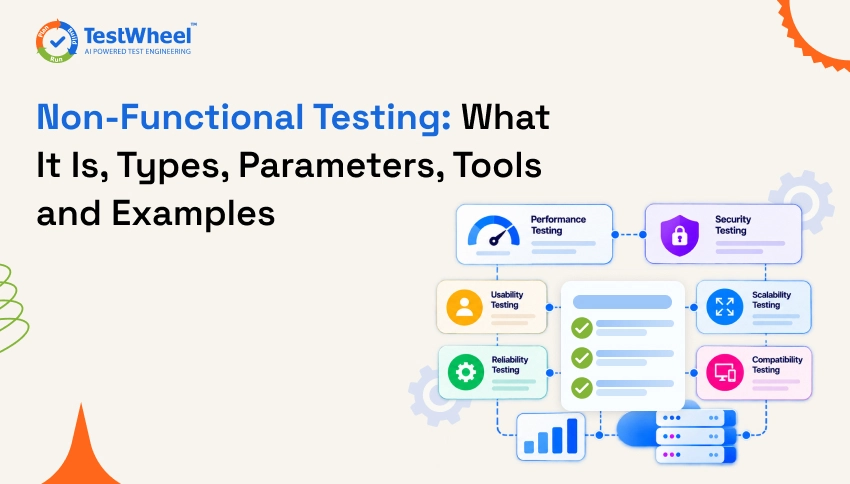
Non-functional testing checks how well software works, not only what it does. It tests qualities such as performance, security, usability, reliability, compatibility and scalability against measurable targets. The ISTQB glossary defines it as testing that evaluates whether a component or system meets its non-functional requirements.
The main types are performance testing (load, stress, spike and soak), security testing, usability testing, accessibility testing, compatibility testing, reliability testing and recovery testing.
A simple example: a login feature that accepts the right password passes functional testing. If the same login takes 12 seconds when 2,000 people sign in at once, it fails a non-functional requirement such as ‘login completes in under 2 seconds for 95% of users.’
This guide explains what non-functional testing is, its types and parameters, tools, example test cases and a worked example with sample numbers, followed by best practices and FAQs.
What Is Non-Functional Testing?
Non-functional testing is a type of software testing that evaluates the quality attributes of a system, such as performance, security, usability, reliability, scalability and compatibility, rather than its specific features. It checks the system against non-functional requirements (NFRs), which describe how the system should behave instead of what it should do.
Functional testing asks, ‘Does this feature do the right thing?’ Non-functional testing asks, ‘How well does the system do it, and under what conditions?’ This is a handy shorthand. Formally, the two are separated by the type of requirement being tested.
Take an online checkout page as an example:
- Functional check: The customer clicks Pay and the order is created.
- Non-functional check: The page loads in under two seconds, handles 5,000 shoppers at once, protects card data, works on a small phone screen, and recovers if the payment server fails.
Both matter. Users rarely praise software for simply working. They leave it when it is slow, confusing, unstable or unsafe.
Non-functional testing is also called quality attribute testing. Many teams organize it around the quality characteristics in the ISO/IEC 25010 model, such as performance efficiency, reliability, security, maintainability, compatibility and usability. It starts with requirements and design, and it runs in stages (see ‘When to Run Non-Functional Tests’ below).
Objectives of Non-Functional Testing
The main goal of non-functional testing is to confirm that the software meets the quality expectations of users and the business, not just the feature list. In practice, tests aim to:
- Measure performance under real conditions, such as 10, 1,000 or 100,000 users.
- Find the breaking point and see how the system behaves when it fails.
- Protect data and access by checking that unauthorized users are blocked.
- Confirm stability over time, so the app does not leak memory or slow down after hours of use.
- Validate usability and accessibility for all users, including people with disabilities.
- Verify compatibility across browsers, devices, operating systems and integrations.
- Check recovery after a crash, outage or network failure.
- Produce evidence for standards, contracts and regulations.
Characteristics of Non-Functional Testing
Non-functional testing has a few traits that set it apart from feature testing:
- It is measurable. Results are numbers, such as response time in milliseconds, error rate in percent or requests per second. ‘Fast’ is not a result. ‘95% of requests finish in under 500 ms’ is.
- It needs clear targets. Measured values are compared with agreed thresholds. Without them, nobody can say whether a result is good or bad.
- It depends on the environment. Results change with hardware, network, data volume and configuration. A test on a laptop says little about production.
- It often needs specialized tools. Load generators, security scanners and monitoring tools are common.
- It can be repeated. Many tests can be automated and rerun on every release to spot regressions.
- It focuses on qualities, not feature correctness. The same feature can pass a functional check and fail a non-functional one.
- It involves more roles. Developers, QA engineers, DevOps, security and product teams all contribute.
Why Non-Functional Testing Is Important
Non-functional testing is important because users judge software by its speed, stability, security and ease of use, and a product that fails on these loses customers even when every feature works.
- Slow software costs users. Laggy pages and dashboards frustrate people. For a SaaS product, that shows up as churn and support tickets. For public web pages, Google’s Core Web Vitals set targets for loading (LCP of 2.5 seconds or less), responsiveness (INP of 200 milliseconds or less) and visual stability (CLS of 0.1 or less), measured at the 75th percentile of page loads.
- Security failures are expensive. A data breach brings legal trouble, lost trust and recovery costs that are far larger than the cost of testing.
- Outages hurt revenue and reputation. If your platform goes down during a launch or a customer’s busiest week, they remember it.
- Scale surprises are painful. A system that works for 100 customers can fall apart at 10,000. Testing shows this before customers do.
- Enterprise buyers ask for proof. Uptime commitments, security evidence and accessibility reports often come up before a contract is signed.
Non-Functional Requirements (NFRs)
A non-functional requirement is a statement that defines how a system should behave, rather than what it should do. It sets measurable quality targets such as speed, availability, security level or capacity.
Non-functional tests are only as good as the requirements behind them. If nobody wrote down what ‘fast’ means, testers can only guess.
Examples of weak vs strong NFRs
| Weak Requirement | Strong, Testable Requirement |
|---|---|
| The app should be fast. | The dashboard must load in under 2 seconds for 95% of requests with 2,000 concurrent users. |
| The system should be secure. | All data is encrypted in transit and at rest. No critical or high severity vulnerabilities are open at release. |
| The platform should be available. | Monthly uptime of at least 99.9% in production. |
| The app should be easy to use. | A new user can create their first project in under 5 minutes without help. |
| The system should scale. | The API handles 3x the current peak traffic with p95 response time within 20% of the baseline. |
How to write good NFRs
- Make each one specific and measurable, with a percentile where it applies.
- Tie it to a user action or business goal.
- State the conditions: load, device, network and data size.
- Agree on it with product, engineering and operations before development starts.
- Review it as the product and customer base grow.
The numbers above are examples. Your real targets should come from your own users, contracts and traffic data.
Non-Functional Testing Parameters
Non-functional testing parameters are the measurable attributes that show whether a system meets its quality goals. These are the ones teams track most often.
| Parameter | What it measures | Typical metric |
| Response time | Total time from sending a request to receiving the complete response, which is what the user waits for | Average and 90th, 95th and 99th percentile, in ms |
| Latency | The delay before the first part of a response arrives, often measured as time to first byte. It is one component of response time. Definitions vary between tools, so check each tool’s documentation | ms |
| Throughput | Work completed in a time period | Requests or transactions per second |
| Concurrency | Users or requests active at the same time | Number of concurrent users |
| Resource utilization | How much CPU, memory, disk and network the system uses | Percent usage |
| Error rate | Share of failed requests | Percent |
| Scalability | How performance and capacity change as load or resources increase | Throughput and response time at each load level |
| Availability | Share of time the service is usable | Uptime percent, often tied to an SLA |
| Reliability | Ability to run without failure over a period | Failure rate, MTBF (for repairable systems), MTTR |
| Recoverability | Speed of returning to normal after a failure | Recovery time objective (RTO), recovery point objective (RPO) |
| Security | Resistance to attacks and misuse | Vulnerabilities by severity |
| Usability | Ease of completing tasks | Task success rate, time on task |
| Accessibility | Usability by people with disabilities | WCAG conformance level |
| Compatibility | Behavior across environments | Pass rate across browsers and devices |
| Maintainability | Ease of changing and fixing the system | Time to fix, code quality measures |
Two notes on reading these numbers:
- Look at percentiles, not just averages. An average response time of 400 ms can hide the fact that 5% of users wait 6 seconds. A p95 of 800 ms means 95% of requests finished within 800 ms.
- Use MTBF carefully. Mean time between failures is the average operating time between failures of a repairable system. It needs a lot of observed run time to be meaningful, so it suits long-running services better than short test cycles. Pair it with mean time to repair (MTTR), because availability depends on both: roughly MTBF divided by the sum of MTBF and MTTR.
Types of Non-Functional Testing
There are many types of non-functional testing. Most teams use a few regularly and the rest when risk calls for them. Each type below stands on its own.
1. Performance Testing
Performance testing checks how fast, stable and scalable an application is under a given workload. It is an umbrella term with several sub-types:
- Load testing: Checks behavior under expected, normal and peak traffic. Example: 3,000 users logging in on Monday morning.
- Stress testing: Pushes the system beyond its limits to see where and how it breaks, and whether it recovers cleanly.
- Spike testing: Applies a sudden, sharp rise in traffic, such as a marketing email that sends thousands of users to your app within minutes.
- Endurance (soak) testing: Runs a steady load for hours or days to find memory leaks and slow degradation.
- Volume testing: Checks behavior with large amounts of data, such as millions of database records.
- Scalability testing: Measures how response time, throughput and capacity change as load or resources increase, for example when you add servers. It shows where scaling stops helping. More servers do not always give proportional gains, because a shared part such as the database can become the limit. The results feed capacity planning and cloud cost decisions.
2. Security Testing
Security testing finds weaknesses that could let attackers steal data, take control or disrupt the system. It covers vulnerability scanning, penetration testing, authentication and authorization checks, session handling, input validation and encryption checks. The OWASP Top 10:2025 is a widely used awareness list of the most critical web application security risks, with broken access control at the top, and it is a good starting point for test planning. Our web application testing guide shows where security checks fit in the wider process.
3. Usability Testing
Usability testing evaluates how easily real users can learn and use a product to complete tasks. Testers watch users, measure task success and time, and collect feedback. Common issues include confusing navigation, unclear error messages and too many steps in key workflows.
4. Accessibility Testing
Accessibility testing checks whether people with disabilities can use the software, including with screen readers, keyboard-only navigation and high-contrast modes. The Web Content Accessibility Guidelines (WCAG) 2.2, a W3C Recommendation published in October 2023, are the standard reference. Automated tools catch many issues, but manual checks are still needed for things like logical focus order and meaningful labels.
5. Compatibility Testing
Compatibility testing verifies that the software works correctly across browsers, operating systems, devices, screen sizes and third-party integrations. A feature that looks perfect in Chrome on a laptop may break in Safari on an older iPhone. For tool options, see our comparison of the best cross browser testing tools, and for apps, our mobile app testing guide.
6. Reliability Testing
Reliability testing checks whether the system performs consistently without failure for a specified period under stated conditions. It often involves repeated transactions or long runs while tracking failure frequency. Common measures are failure rate, MTBF for repairable systems and MTTR.
7. Recovery and Disaster Recovery Testing
Recovery testing checks how well the system recovers from crashes, hardware failures, network loss or corrupted data. Disaster recovery testing applies the same idea at a larger scale, such as restoring services after a data center outage. Teams stop a server on purpose, cut a database connection or restore from backup, then measure recovery time and data loss against their RTO and RPO. Chaos engineering extends this idea, usually with safeguards and often in production-like environments.
8. Compliance Testing
Compliance testing confirms that the software meets laws, regulations, industry standards or internal policies. Depending on your market, this may involve data protection rules, payment security standards or accessibility requirements. Confirm which rules apply to you with your legal or compliance team.
9. Localization and Internationalization Testing
Localization testing checks that the product works properly for a specific language and region, including text, date formats, currencies and layout. Internationalization testing checks that the product is built to support those variations in the first place. Common bugs include cut-off text in longer languages and wrong date formats.
10. Maintainability Testing
Maintainability testing evaluates how easy it is to change, fix and extend the software. It looks at code quality, documentation, modularity and how safely new changes can be released.
11. Portability and Installation Testing
Portability testing checks whether software can move between environments, and installation testing checks that it installs, upgrades and uninstalls cleanly. This matters for desktop clients, mobile apps, on-premise deployments and multi-cloud setups.
Functional vs Non-Functional Testing
Functional testing verifies behavior against functional requirements, while non-functional testing verifies quality attributes against non-functional requirements.
| Point | Functional testing | Non-functional testing |
| Focus | Features and business logic | Quality attributes such as speed and security |
| Question | Does it do what the requirements say? | How well does it behave, and under what conditions? |
| Based on | Functional requirements | Non-functional requirements |
| Result type | Pass or fail against expected behavior | Measured values compared with agreed thresholds, which also lead to pass or fail |
| Examples | Login, search, payment | Load, security, usability, compatibility |
| Test levels | Component, integration, system, acceptance | The same levels. Test type and test level are separate choices, so you can run a performance test on one component or on the whole system |
| Common tools | Selenium, Cypress, Playwright | JMeter, k6, OWASP ZAP, Lighthouse |
The two work together. A feature can be correct and unusable. A system can be fast and wrong. You need both views to call software ready.
When to Run Non-Functional Tests
Non-functional testing starts at the requirements stage and continues after release. It does not have to wait until functional testing is finished. Cheap checks run early, and full-scale tests run once a stable, integrated build exists in a production-like environment.
| Stage | Non-functional activities |
| Requirements and design | Write measurable NFRs, review the design for scaling and security risks, set performance and accessibility targets |
| Development (component level) | Check slow queries and critical functions, run static security analysis and dependency scans, lint for accessibility issues |
| Integrated build (system level) | Run load tests, security scans, compatibility checks and usability reviews |
| Before release | Run full-scale load, stress and recovery tests, plus penetration testing and compliance checks for high-risk releases |
| After release | Monitor production, track real user metrics, run synthetic checks and repeat tests on a schedule |
How to Perform Non-Functional Testing: Step by Step
This process works for most teams, whether you are testing a new SaaS feature or a full release.
- Define the quality goals. Write measurable NFRs with product and engineering. Decide which types matter most for this release. A clear software testing strategy makes this choice easier.
- Use real data to set targets. Check production analytics for peak traffic, device mix and common user paths.
- Prepare a production-like environment. Match infrastructure size, configuration and data volume as closely as you can. Use anonymized data, never raw customer data.
- Design test scenarios. Pick realistic user journeys, not just single endpoints. Include peak and unusual conditions.
- Choose tools. Select tools that fit your stack and skills (see the tools section below).
- Create a baseline. Run the first test, record results, and use them as the reference for later releases.
- Execute the tests. Monitor server metrics, logs and errors while the test runs, not only client-side results.
- Analyze the results. Look at percentiles, error patterns and resource usage. Find the bottleneck, not just the symptom.
- Fix and retest. Fix the root cause, then rerun the same test to confirm the improvement.
- Automate and monitor. Add stable tests to your CI/CD pipeline and keep watching production metrics after release. If you are new to automation, this automated testing tutorial for beginners is a simple way in.
Non-Functional Testing in a SaaS Environment
SaaS products face extra pressure because many customers share the same platform and updates ship often.
- Multi-tenancy: One heavy customer should not slow down everyone else. Test with uneven tenant workloads to check isolation.
- Frequent releases: Weekly or daily deployments need automated performance and security checks, or regressions slip through. See how continuous testing in CI/CD pipelines works at enterprise scale.
- Integrations and APIs: Customers connect your product to other tools. Test API rate limits, timeouts and failure handling. Our list of the best API testing tools is a good place to start.
- Data growth: An account that is small in month one may hold millions of records in year three. Volume tests catch slow queries early.
- Uptime commitments: If your contract promises a certain uptime, recovery and failover tests are not optional.
- Customer trust: Enterprise buyers often ask for security and accessibility evidence during procurement.
The next section walks through one scenario with sample numbers.
Worked Example: Load Testing a SaaS Dashboard
All numbers in this example are illustrative. They are not from a real test, product or customer. They show how to plan, run and read a non-functional test.
Scenario and targets
A project management SaaS is about to release a redesigned dashboard. The team writes this NFR: at 2,000 concurrent users, p95 response time is under 2 seconds, p99 is under 4 seconds, the error rate is under 1%, and CPU on application and database servers stays under 75%.
Workload
- User journey mix: open dashboard (50%), open a project (25%), create a task (15%), upload a small file (10%).
- Load shape: 10 minute ramp-up, then 30 minutes at 2,000 virtual users, with about 4 seconds of think time between actions.
- Environment: production-like, with an anonymized copy of data holding about 5 million tasks.
- Baseline: the current release at 500 users, which is today’s typical peak.
Results
| Metric | Target | Baseline (500 users) | Before fix (2,000 users) | After fix (2,000 users) |
| Throughput (requests per second) | Record only | 115 | 330 | 440 |
| p95 response time | Under 2 s | 0.6 s | 3.8 s | 1.3 s |
| p99 response time | Under 4 s | 1.1 s | 7.9 s | 2.2 s |
| Error rate | Under 1% | 0.1% | 4.6% | 0.2% |
| Application server CPU | Under 75% | 38% | 63% | 58% |
| Database CPU | Under 75% | 41% | 96% | 54% |
| Verdict | Pass | Fail | Pass |
Bottleneck and fix
Users grew 4 times, but throughput grew only about 2.9 times. That gap points to a shared bottleneck. Application servers had spare CPU, while the database sat at 96%. The slow query log showed that the dashboard’s recent activity query scanned a large table, and slow queries used up the database connection pool, which caused timeouts and the 4.6% error rate.
The team added a composite index on workspace and last updated time, and limited the query to the latest 50 items.
Retest
The team reran the same script with the same load. In this example, p95 fell from 3.8 s to 1.3 s, p99 from 7.9 s to 2.2 s, and errors from 4.6% to 0.2%. Database CPU dropped to 54%. All targets were met, and the new run became the baseline for the next release.
What this example shows
- Server metrics told the team where the problem was. Response times alone would not have.
- The p99 figure showed the worst experiences that an average would have hidden.
- Retesting with an identical script is what proves the fix worked.
- Throughput that does not rise in step with users is an early warning sign.
Tools for Non-Functional Testing
Disclosure: TestWheel publishes this article and sells the TestWheel platform, so we have a commercial interest. TestWheel is listed first for that reason, and the order is not a ranking. The other entries are described from each tool’s public documentation. Features, editions and pricing change, so confirm details on each vendor’s site before you decide.
| Tool | Primary use | Test areas | How tests are created | Licensing | Trade-offs to consider |
| TestWheel | Cloud, no-code test automation platform | Web, mobile, API and load testing. TestWheel’s own documentation says its load testing is JMeter-based and its security scans use the OWASP ZAP engine | Test steps in plain English, or recorded flows | Commercial, per-user pricing, with a free trial | One platform with little scripting, but specialist tools may offer finer control for advanced performance or security work |
| Apache JMeter | Load and performance testing | Performance, across web, REST and SOAP, JDBC, JMS, LDAP and other protocols | GUI test plans, with a command-line mode for CI | Open source (Apache 2.0) | It is not a browser, so it does not run page JavaScript or render pages |
| k6 | Developer-focused load testing from Grafana Labs | Performance, including spike, stress and soak tests | JavaScript scripts run from the command line or CI. k6 Studio can generate scripts visually | Open source (AGPL-3.0). Grafana Cloud k6 is a managed option | Code-first, so it suits teams comfortable with scripting |
| Gatling | Code-first load testing | Performance | SDKs for Java, JavaScript, TypeScript, Kotlin and Scala | Community Edition is open source (Apache 2.0). Enterprise Edition is commercial | Per Gatling, distributed load generation and advanced analytics are Enterprise features |
| OWASP ZAP | Web application security scanner (DAST) | Security | Intercepting proxy, spider, passive and active scans, with command-line and Docker automation | Free and open source (Apache 2.0), supported by Checkmarx | Focused on web applications, and findings need human review. Only scan systems you have permission to test |
| Lighthouse | Automated page audits from Google | Performance, accessibility, SEO and best practices | Run in Chrome DevTools, from the command line or as a Node module | Free and open source | Audits single pages in lab conditions. It is not a load test and does not replace manual accessibility review |
| BrowserStack | Cloud of real browsers and devices | Compatibility | Interactive sessions, or automation with Selenium, Playwright and Appium | Commercial | Automation needs an existing test framework or scripts |
How to choose:
- Match the tool to the quality you need to test. A load tool will not check accessibility.
- Pick tools your team can learn and maintain, and that fit your CI/CD pipeline.
- Check protocol and technology support, such as REST, GraphQL, WebSockets and mobile.
- Start with one or two tools. A small, well-used toolset beats a large unused one. For broader comparisons, see the best web application testing tools and the best mobile application testing tools.
Non-Functional Testing Best Practices
- Start early and write measurable requirements. Replace ‘fast’ and ‘secure’ with numbers and standards, and plan tests during design.
- Test in a production-like environment. Use masked or synthetic data, and follow your privacy rules.
- Model realistic user behavior. Use real journeys, think times and data, not a single endpoint hit in a loop.
- Change one variable at a time. When you tune something, change one thing, then retest, so you know what helped.
- Monitor the server side too. CPU, memory, database, queue depth and network explain why a result happened.
- Automate repeatable tests. Run smoke-level performance and security checks on every build, and heavier tests on a schedule or before major releases. Our guide to regression testing strategies explains how to decide what to rerun and when.
- Combine automated and manual testing. Automation finds known patterns. Humans find confusing flows and subtle accessibility problems.
- Keep a baseline and trend it. Compare each release with the last one so slow decline is visible.
- Share results in plain language. Explain what the numbers mean for users and the business.
- Test failure on purpose. Check timeouts, retries and fallbacks. Real systems fail in messy ways.
- Turn incidents into tests. After every production outage, add a test that would have caught it.
Common mistakes to avoid
- Testing only at the end of the project, when there is no time to fix anything.
- Using unrealistic data, such as a nearly empty database.
- Running load tests from the same network as the servers, which hides real-world latency.
- Ignoring third-party services that your app depends on.
- Treating a single passing run as proof. Run tests more than once to check consistency.
- Skipping accessibility until a customer or regulator raises it.
Example Test Cases for Non-Functional Testing
The thresholds below are sample values. Use your own requirements and data.
| ID | Type | Test case | Expected result |
| NFT-01 | Load | Simulate 2,000 concurrent users running the login and dashboard flow for 30 minutes | 95% of responses under 2 seconds, error rate below 1% |
| NFT-02 | Stress | Increase users gradually until the system fails | System degrades gracefully, shows controlled errors, and recovers after load drops |
| NFT-03 | Spike | Jump from 100 to 3,000 users in one minute | No crash, response times return to normal within a few minutes |
| NFT-04 | Endurance | Run steady load for 12 hours | No memory growth trend, no rise in error rate |
| NFT-05 | Security | Try to access another user’s data by changing an ID in the URL | Access is denied and the attempt is logged |
| NFT-06 | Security | Submit SQL injection and script payloads in form fields | Input is rejected or sanitized, no data exposure |
| NFT-07 | Usability | Ask five new users to create a project without help | Most complete it within the target time without confusion |
| NFT-08 | Accessibility | Complete the signup form using only a keyboard and a screen reader | All fields are reachable, labeled and announced correctly |
| NFT-09 | Compatibility | Open the main workflow on the latest two versions of major browsers and on common mobile devices | Layout and functions work consistently |
| NFT-10 | Recovery | Stop the primary database during active use | Failover completes within the recovery time target, with no data loss beyond the agreed limit |
| NFT-11 | Scalability | Run the same load at 1, 2 and 4 application servers | Throughput rises with each step, and the team records how close the gain is to proportional. Weak gains point to a shared bottleneck such as the database |
| NFT-12 | Localization | Switch the interface to a long-text language such as German | No cut-off text or broken layout, dates and currency formats are correct |
Advantages of Non-Functional Testing
The main advantage of non-functional testing is that it protects user experience and reputation by catching speed, security and stability problems before customers do. It also gives teams:
- Capacity confidence. You know how much traffic you can handle and when to scale.
- Lower cost over time. Fixing a design weakness before launch is cheaper than firefighting in production.
- Fewer and shorter incidents. Recovery and reliability tests reduce the damage from failures.
- Wider reach. Compatibility, accessibility and localization testing open the product to more users and markets.
- Evidence for audits and sales. Test reports support compliance reviews and enterprise procurement.
- Trend visibility. Baselines show whether each release is getting faster or slower, and help with infrastructure budgets.
Disadvantages and Limitations of Non-Functional Testing
Non-functional testing is valuable, but it has real challenges. Knowing them helps you plan better.
- It can be expensive. Realistic environments, load generation and specialist tools cost money.
- It needs skilled people. Good performance and security testing needs specific knowledge, not only general QA skills.
- Environment differences affect accuracy. A test environment that differs from production can give misleading results.
- Requirements are often vague. Without measurable NFRs, results are hard to judge.
- It takes time. Setup, scripting, execution and analysis can slow a release if not planned.
- Test data is hard to manage. Realistic data is useful, but privacy rules limit what you can copy.
- Results can vary. Network conditions and shared resources can change numbers between runs.
- It cannot prove perfection. Tests cover chosen scenarios, and real users will always do something unexpected.
The answer is not to skip it. Start with the highest-risk areas, automate what you can, and expand over time.
Final Takeaway
Functional testing tells you whether your software works. Non-functional testing tells you whether it is good enough to trust, use and keep paying for. Speed, security, reliability, usability and compatibility are not extras. For many users, they are the product.
Start small. Write measurable requirements, pick the two or three types that match your biggest risks (often load testing, security testing and compatibility testing), build a baseline, and run those tests on every important release. Then grow from there. Teams that treat non-functional quality as part of everyday delivery, not a last-minute check, ship with more confidence and fewer surprises.
Frequently Asked Questions About Non-Functional Testing
Non-functional testing checks how well software works instead of what it does. It looks at qualities like speed, security, ease of use, stability and compatibility. For example, it checks whether a page loads quickly under heavy traffic, not just whether the page opens.
The main types are performance testing (load, stress, spike, endurance, volume and scalability), security testing, usability testing, accessibility testing, compatibility testing, reliability testing, recovery and disaster recovery testing, compliance testing, localization testing, maintainability testing and portability testing.
Functional testing checks behavior against functional requirements, such as login, search or payment. Non-functional testing checks quality attributes against non-functional requirements, such as speed, security and capacity. Both can end in pass or fail. Non-functional results are usually measured values compared with agreed thresholds.
Plan it from the requirements stage and run it in stages. Early checks include unit-level performance checks, security scans and accessibility linting. Full load, security and compatibility tests need an integrated build in a production-like environment, so they usually run before release. After release, keep monitoring production. Functional testing does not have to finish first.
No. Performance testing is one type of non-functional testing. Non-functional testing is the wider category, and it also includes security, usability, accessibility, compatibility, reliability and other quality areas.
Yes, many parts can. Load tests, security scans, accessibility scans and cross-browser checks are commonly automated and run in CI/CD pipelines. Some parts still need human judgment, such as usability, visual quality and complex accessibility issues, so most teams combine automated and manual testing.
Non-functional requirements describe how a system should behave. Examples include ‘the dashboard loads in under 2 seconds for 95% of requests,’ ‘the platform has 99.9% monthly uptime,’ and ‘all personal data is encrypted in transit and at rest.’ Good requirements are specific and measurable.
Common tools include TestWheel for no-code testing across web, mobile, API and load testing, Apache JMeter, k6 and Gatling for performance, OWASP ZAP for security, Lighthouse for page audits, and BrowserStack for compatibility across browsers and devices. TestWheel publishes this article, so see the disclosure in the tools section. The best choice depends on your stack, budget and team skills.
It is a shared effort. QA engineers and performance testers usually lead it. Developers fix issues and write checks, DevOps and SRE teams support environments and monitoring, security specialists handle penetration testing, and UX and product teams help with usability. Larger teams may have dedicated specialists.
It is often skipped because it needs extra time, tools and skills, and because the software looks fine in small tests. The risk is that problems appear in production, when real users hit slow pages, crashes or security gaps. Those failures cost more to fix and damage trust.