-
January 26, 2024
- Share:
-

-

-

-

You open DoorDash and tap Reorder. Pay. Done in ten seconds. Behind that one tap, a bunch of systems talk to each other: your phone, the restaurant, the payment company, the driver app. They talk through APIs. Here’s the scary part. One broken API and the screen still looks fine. But your food never shows up. API testing catches that before customers do. This guide breaks it down in plain English, with examples, steps and tools.
Quick answer: API testing checks that an API application programming interface sends back the right data, handles mistakes, runs fast and stays secure. It skips the screen and talks straight to the app’s backend.
What Is API Testing?
API testing is a part of the software testing process that focuses on testing Application Programming Interfaces (APIs) to verify that they work as expected and meet the required quality standards. Unlike UI testing, which focuses on visuals, API testing checks the logic, responses, performance and security of APIs.
A good API test confirms that:
- The API returns correct data when a request is valid.
- Errors are handled properly when the input is invalid.
- Authentication and authorization rules are enforced.
- Response times stay within limits.
Since APIs often serve applications a single defect can affect many services. If you are a beginner and looking to kick start on how an API request and responses work keep reading. The section below is for you!
How an API Request and Response Works?
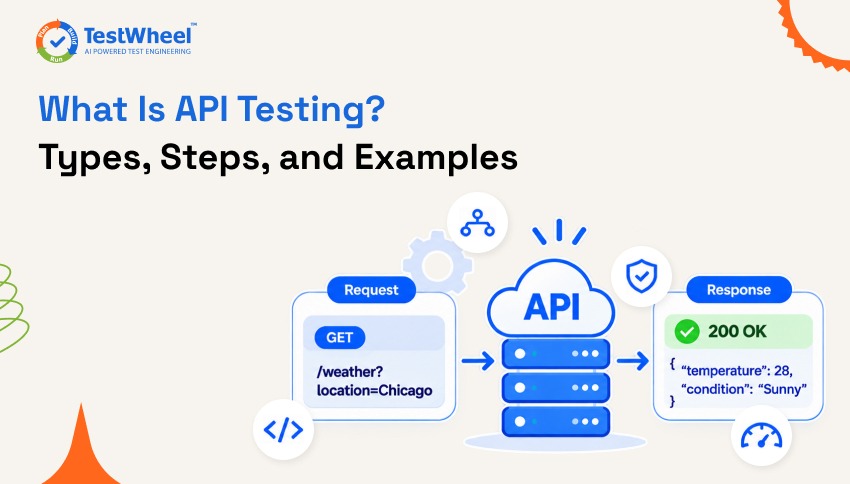
Every API test follows one loop. The client (any app) sends a request to an endpoint, which is basically a web address. The server does the work, maybe checks a database (finds the message or information we need), then sends back a response.
Take a weather app as example:
- Request: GET /weather?location=Chicago
- Response: 200 OK, plus the location, temperature and condition
Now the tester asks: Is the status code right? Are all the fields there? Is it really Chicago’s weather? Was it quick? And what happens if the city is blank?
Why Is API Testing Important?
APIs are the backbone of modern applications. Testing them ensures reliability and efficiency. Key reasons include:
- Catch bugs early: Many APIs are built before the user interface, so early testing ensures core functionality works even before the front end is ready.
- Faster feedback: API tests run quickly and are less prone to false failures than UI tests.
- System stability: A single API problem can impact several apps or services. Testing helps ensure stability across the system.
- Cost savings: Detecting bugs early saves time and reduces costly fixes in production and guess what? You don’t have to lose your customer (Which is also a part of cost saving).
- Efficient validation: Using the right API Testing tools help teams automate test cases, validate responses, and identify issues throughout the development lifecycle. Skipping it is risky. Here’s why you shouldn’t skip testing APIs.
Types of API Testing
| Type | Definition | What It Does | Everyday Example | When It Happens (Ideal SDLC Stage) |
|---|---|---|---|---|
| Functional Testing | Checks if the API does the job it was built for, based on the business logic and rules. | Confirms each request gives the right response and result. | Place a pizza order. Is the order created with the right total ($14 pizza + $2 delivery = $16)? | Happens at the Testing stage, right after a feature is built. Also re-run during development. |
| Unit Testing | Tests one single endpoint or function on its own, with nothing else involved. | Catches small bugs early, before they spread. | When you tap My Profile, the app sends a request to the server. An API test checks that request directly: does the server send back the right profile for user #101? If it does, the scenario is working. | During the Development stage, while developers are writing the code. |
| Integration Testing | Checks that different APIs or services work properly together. | Confirms data passes correctly from one service to the next. | When the order is placed, the restaurant gets notified and the cheese stock gets updated accurately. | Testing stage, after unit tests pass and the pieces are connected. |
| End-to-end Testing | Tests the complete user journey from start to finish. | Proves the whole flow works the way a real customer would use it. | Sign in, order, pay, track, deliver. | Late testing stage, on a staging (practice) setup, before release. |
| Contract Testing | Checks that the API’s response matches the format the teams agreed on. | Stops surprise changes from breaking other apps that depend on the API. | The API promised orderId, status, and deliveryDate. Still true after an update? | Design and development stages, as soon as the API format is agreed. Re-run on every code change. |
| Regression Testing | Re-tests old features after a change, to make sure nothing broke. | Catches the “we fixed one thing and broke three others” problem. | A new coupon or discount feature shouldn’t break normal checkout outcomes. | After every update, in the Testing stage and again in the Maintenance stage. |
| Load Testing | Checks how the API performs under normal-to-heavy expected traffic. | Shows if the API stays fast when lots of people use it. | Friday 7 PM dinner rush with 5,000 orders at once. | Late testing stage, before launch and before big events (Black Friday, Super Bowl Sunday). |
| Stress Testing | Pushes the API far beyond its limit to find the breaking point. | Shows how it fails and whether it recovers. | A free-pizza promo goes viral and 100,000 people hit “order” in one minute. | Late testing stage, right after load testing and before release. |
| Security Testing | Checks logins, permissions, and data protection. | Makes sure people only see what they’re allowed to see. | Logged in as Sarah, can you open someone else’s order by changing the order number? | Throughout the SDLC: planned in design, tested in development, and done in full before release. Repeated regularly in maintenance. |
| Fuzz Testing | Sends random, broken, or junk input to the API. | Finds weird bugs and crashes nobody thought of. | Typing an emoji or 50,000 letters into a phone number field. | Development and Testing stages, often as part of the security checks. |
Confused about load vs stress? Read performance vs load vs stress testing.
How to Do API Testing: Step by Step With Infographic For Easy Understanding!
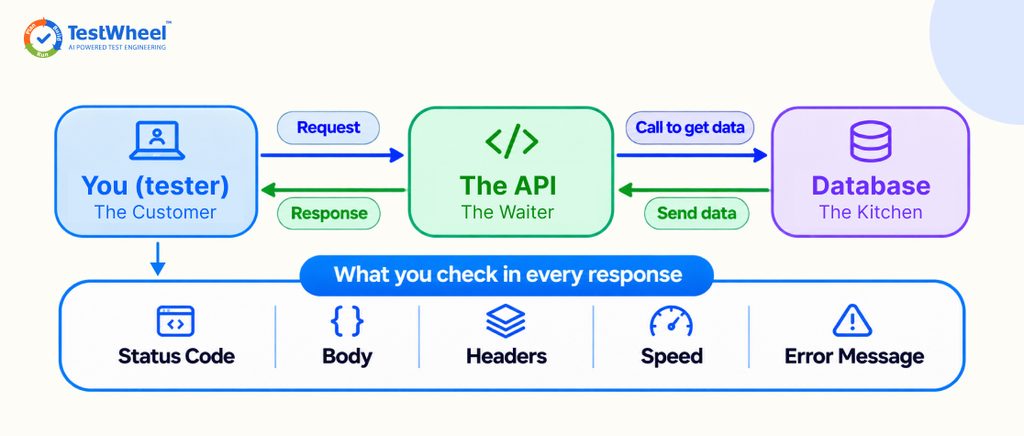
New to API testing? Don’t worry! You don’t need to be an expert in coding to understand how it works. Let’s break it down using a simple example.
Imagine you’re using a food delivery app like Swiggy or Zomato. You select a pizza, add it to your cart, enter your delivery address, and click Place Order. But have you ever wondered what happens behind the scenes?
Your app sends the order details to a server through an API. The server processes your request and sends a response back to the app.
API testing is simply checking whether this communication between the app and the server works correctly.
So, how do you actually test an API? Let’s walk through six simple steps.
1. Read the API documentation
Before you start testing, take a look at the API documentation. Think of it as an instruction manual that tells you how an API works, what information it needs, and what response you should expect.
For example, if you’re testing a food ordering API, the documentation might tell you that you need a customer ID, food item, and quantity to place an order.
Here’s what a sample request looks like:
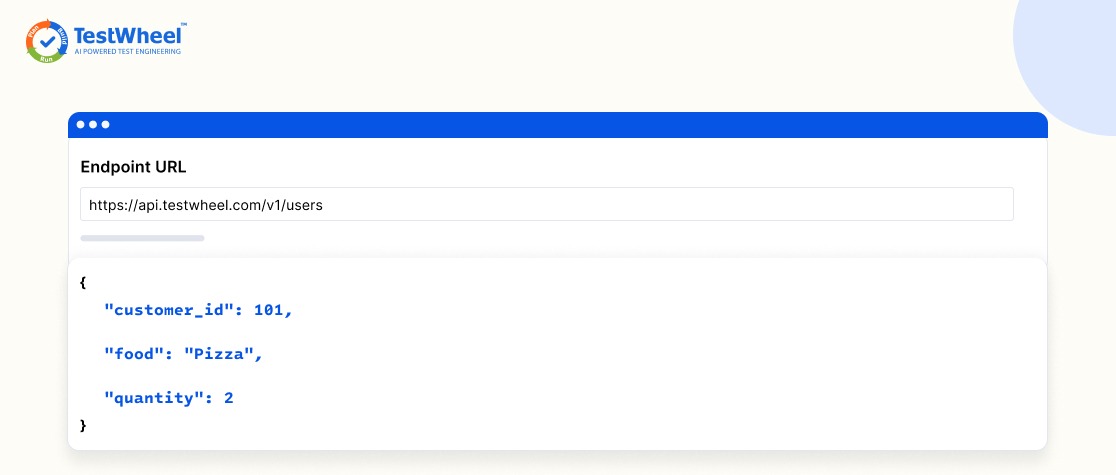
This tells the server that customer 101 wants to order two pizzas.
2. Set up a safe test environment
You wouldn’t want to practise driving on a busy highway, right? You’d choose a safe place instead. API testing follows the same idea.
Set up a staging environment where you can test APIs using fake data and test accounts without affecting actual customers.
For example, create a test account and place sample food orders. This lets you check whether the API works correctly without disturbing real orders.
You’ll commonly come across three environments:
- Development: Where developers build the application.
- Staging: Where testers check the application before release.
- Production: The live application used by actual customers.
Prepare a safe testing environment so you can experiment without affecting real users or their data.
3. Write your API test cases
Now comes the interesting part! Decide what you want to test and how the API should behave in different situations.
A test case is simply a situation you create to check whether an API works as expected.
For example, while testing a food ordering API, consider these three scenarios:
- Positive testing: What if the customer enters valid details and places an order? The API should successfully create the order.
- Negative testing: What if the customer tries to place an order with an empty cart? The API should reject the request and return a proper error message.
- Boundary testing: What if the customer tries ordering an unusually large quantity, such as 10,000 pizzas? The API should handle the input according to its defined limits.
Think about different situations, including correct, incorrect, and unusual inputs, and decide what the API should do in each case.
4. Send the API requests
Now that your test cases are ready, it’s time to send requests to the API. You can use popular pre-built tools to do this without building an application yourself.
But before sending a request, you need to choose the right HTTP method. Each method tells the server what action you want to perform.
| Method | What It Does | Example |
|---|---|---|
| GET | Reads information | View an order |
| POST | Creates something new | Place an order |
| PUT | Replaces a complete record | Replace order details |
| PATCH | Updates part of a record | Change delivery address |
| DELETE | Removes a record | Delete an order |
For example, to place a new order, select POST, enter the /orders endpoint, and provide the required details in the request body.
Once you click Send in Postman, the request travels to the server for processing.
5. Check the API response
You’ve sent the request. But how do you know whether it worked? That’s where API response validation comes in.
The server sends back a response containing information about what happened.
For example:
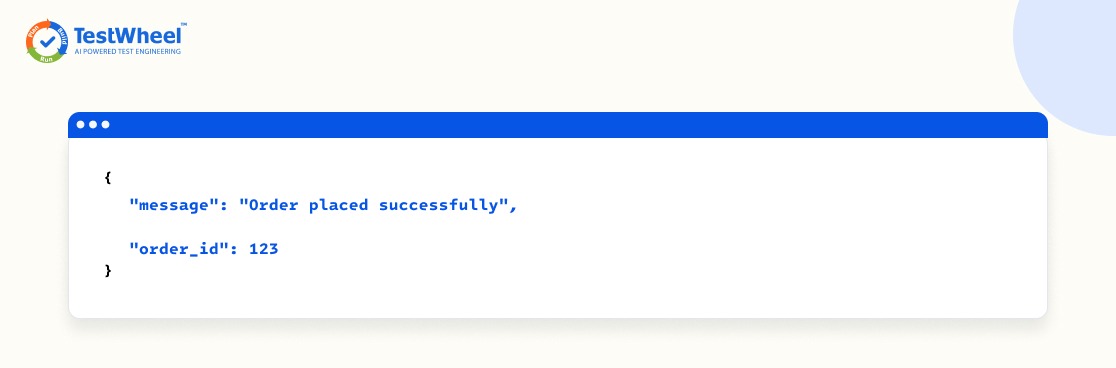
Now, check the HTTP status code to understand the result.
| Status Code | Meaning |
|---|---|
| 200 | Request successful |
| 201 | New resource created |
| 400 | Incorrect request |
| 401 | Authentication required or invalid |
| 404 | Resource not found |
| 500 | Server error |
Don’t stop with the status code! Also check the response body, headers, response time, and error messages to make sure everything works as expected.
Simply put: Verify whether the server returned the correct information and handled your request properly.
6. Automate your API tests and generate reports
Imagine manually testing the same 100 API requests every time developers update the application. Sounds exhausting, right?
That’s why testers use API test automation.
Instead of sending requests manually every time, you can write automated test scripts that execute your test cases and check the responses automatically.
You can also connect these tests to a CI/CD pipeline so they run whenever developers make code changes.
Once the tests finish, reports show which test cases passed, which failed, and what needs attention.
Automate repetitive tests to save time, catch issues early, and track your testing results.
Manual vs Automated API Testing
Manual means you send requests by hand and read the results. Fine for small APIs and quick debugging. Automated means a tool runs the tests again and again. Better for big APIs and frequent releases. See manual vs automation testing.
One more thing. Testing happens before release. API monitoring watches the live API after release. So my simple suggestion would be to use both for more accuracy.
API testing tools that can save your time & money
Tbh! Nobody wants to spend hours writing test scripts, fixing repetitive errors, or managing multiple testing processes when there’s a simpler way to get the job done. The good news? There are plenty of API testing tools out there that can save you time, effort, and even manpower without compromising on quality. From popular tools like Postman and Bruno to GUI Graphical User Interface – based API clients like Kong Insomnia and Swagger UI, each tool brings something different to the table. If you’re into code-based or cloud-based automation, frameworks like Pytest and Tavern let you run API checks using Python libraries such as requests and httpx, or create YAML-based test cases. So, which one is worth your time? These 7 Best API testing tools guide and expert comparisons will help you find the right fit for your testing needs without burning through your budget.
API testing without code in TestWheel
TestWheel’s API testing is built for REST APIs including APIs secured with JWT, OAuth tokens, and API keys, for people who don’t want to write scripts. You can:
- Describe a test in plain English and let the AI agent build it
- Import a Swagger or OpenAPI file to auto-generate tests
- Capture live API calls during functional testing and turn them into test cases
- Generate positive and negative test data automatically
- Add a JWT token once and reuse it
- Switch endpoints on or off before a run
- Connect to GitHub, Jenkins, GitLab, Bitbucket and Azure DevOps, and export pass/fail reports
More on how the AI side works here. Start your 14-day free trial. No credit card needed.
6 API Testing Best Practices To Follow Before Your Next Deployment
- Test early. As soon as an endpoint exists.
- Automate repeat checks, like regression.
- Mix test types. Fast and working isn’t enough, it should be secure too.
- Check more than the status code. Look at the data and error messages.
- Keep tests reusable so updates are quick.
- Monitor the live API after release.
Need a plan? See these API testing strategies.
Conclusion
APIs are the waiters of the software world. When they slip, users feel it fast. Test early, mix your test types, automate what repeats, and keep watching after launch. Want to skip the scripting? Request a demo or try TestWheel free.
If you’re curious about software testing, have a look at: Web Application Testing Guide, Cross-Browser Testing Guide, Mobile Application Testing Guide, and Application Security Testing Guide.
FAQs from API testing
Honestly it is not as difficult as it sounds. If you can follow a recipe you can learn the basics of an API. The idea is simple: you send a request to an API. You receive a response back. The tricky part comes later with things such as authentication and difficult error handling. You can start with a beginner tool such as API testing using Postman send a few requests and become comfortable quickly without writing any code.
Kong, which Gartner has named a Leader for seven years in a row and is known as gravitee.
IBM API Connect, which is a Leader in Gartner’s 2026 report for the time.
Amazon API Gateway, a pick for AWS-based workloads and a top-rated tool on Gartner Peer Insights Integrate IO.
Apigee, which is the natural fit if you’re on Google Cloud.
MuleSoft, which is popular for big enterprise integrations.
If you are starting from zero you can expect about one to two weeks to learn the basics: what an API is, HTTP methods, status codes and how to send requests with a tool such as Postman. To feel confident writing test cases for an API and automating them, plan on four to eight weeks of steady practice. That is an estimate, not a rule. Practicing a little each day is better than cramming.
QA or quality assurance is about preventing problems by building processes. QC or quality control is about catching problems by checking the product. Common standards behind them include ISO 9001 for quality management ISO/IEC 25010 for software quality and ISO/IEC/IEEE 29119 for software testing. For API testing that means following test cases checking every response and fixing issues before users ever see them.
Think of it like a waiter at a restaurant. You do not walk into the kitchen. You tell the waiter what you want and they take your order to the kitchen. They bring your food back. An API does the thing between two apps: one app asks, the other app answers and neither app needs to know how the other works inside.
No one has a ranking so it is hard to name a single winner. What we do know is that REST is the common style of API. Big names that people use every day include the Google Maps API, Stripe for payments and Twilio, for texts and calls.
Yes they can make money. Companies can earn money from APIs in a way: charging for each use, selling monthly subscriptions offering a free tier and then charging for more or taking a small cut of each transaction. Stripe for example earns money when payments run through its API. Gartner even points out that digital product monetization is one of the things that APIs help power.