-
July 3, 2026
- Share:
-

-

-

-

Every app you use today talks to multiple other systems through APIs to get the job done.
For example, your food delivery app uses a payment API. Your bank app uses an authentication API. When those APIs break, user experience is heavily disrupted.
That’s why teams everywhere have to find the best API testing tools they can rely on before a bug reaches production. The API testing market size has grown in recent years. It is predicted to grow from $1.75 billion in 2025 to $2.14 billion in 2026.
This guide covers the best API testing tools in 2026, including their features, pricing, and what makes each one a good choice. If you’re looking for the right API testing tool, this guide will help you compare the top options and choose the one that fits your needs.
What Is API Testing?
API testing is a type of software testing that checks whether an API works correctly. It sends requests to an API and verifies that the responses are accurate, reliable, secure, and fast.
An API, or Application Programming Interface, is a layer connecting two software systems. The most common example to explain this is of a waiter in a restaurant: you give the waiter your order, they pass it to the kitchen, and bring back what you asked for.
If you want to explore more in-depth information about API Testing
Testing that waiter’s functionality, reliability, performance, and security is what the best API testing tools do.
API testing verifies that:
- The API gives the right response to a request
- It handles wrong inputs without crashing
- It responds fast enough
- It keeps data secure
Without proper API testing, a team will end up shipping software that looks perfect in the browser but breaks down when it has to exchange data with another system.
Here’s a breakdown of the best API testing tools available right now.
Best API Testing Tools Comparison Table
| Tool | No-Code Testing | AI / Self-Healing | API Protocol Support | CI/CD Integration | Performance Testing | Security Testing |
|---|---|---|---|---|---|---|
| TestWheel | Yes | Yes (Full AI Suite) | REST, XML, JSON | Jenkins, Azure DevOps, Jira | Yes (Built-in) | Yes (OWASP ZAP) |
| Postman | Partial | Limited (AI Assist) | REST, GraphQL, WebSocket | Yes | No (Basic Only) | No |
| SoapUI | No | No | REST, SOAP, GraphQL | Yes (Pro Only) | Yes (Pro Only) | Yes (Pro Only) |
| Katalon | Yes (Low-Code) | Yes (AI Self-Heal) | REST, SOAP, GraphQL | Yes | No | No |
| JMeter | No | No | REST, SOAP, FTP | Yes | Yes | No |
| REST Assured | No (Code Only) | No | REST | Yes | No | No |
| Bruno | Partial | No | REST | Limited | No | No |
Best API Testing Tools in 2026
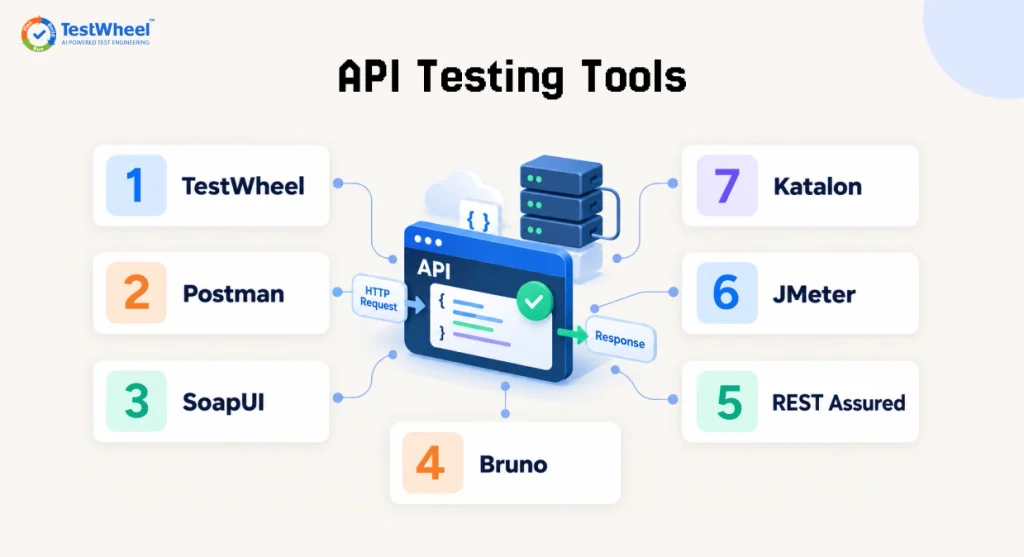
1. TestWheel
TestWheel is an AI-driven, cloud-based test automation platform that covers the full testing lifecycle: web, mobile, API, performance, desktop, and security testing. It is the most practical starting point, and one of the best API testing tools for QA teams that want automated API testing without writing any code.
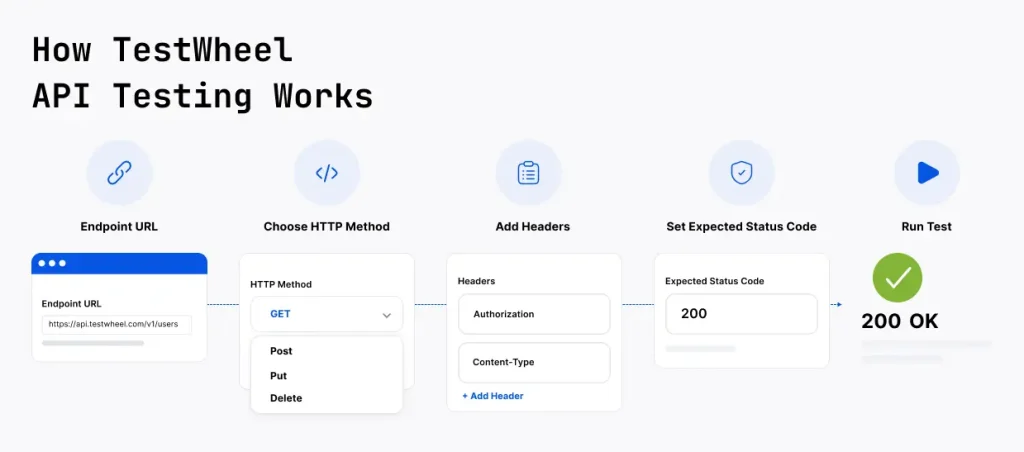
How TestWheel API Testing Works
It takes a few minutes to set up an API test in TestWheel. You enter the endpoint URL, choose your HTTP method (GET, POST, PUT, DELETE), add headers, set your expected status code, and run. The platform handles the rest. No environment configuration.
TestWheel uses AI to:
- Automatically convert manual test cases into automated scripts
- Detect when a UI element or API response structure changes and repair the test (called self-healing)
- Flag flaky tests and predict potential failures before the app reaches production
A recent U.S. Air Force software project using TestWheel cut test execution time from 40 days down to 14. You won’t achieve those numbers with tools that require specialized scripting skills.
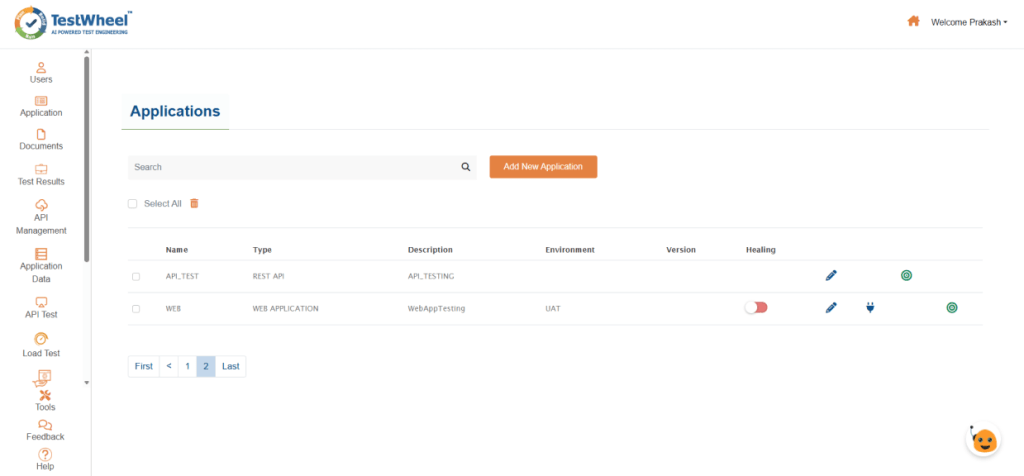
Key Features of the best API testing tools:
- No-code test creation: Enter endpoint details through a simple visual form. No coding needed.
- Built-in assertion validation: Check status codes, response headers, and response body automatically.
- JSON and XML support: TestWheel works with both formats natively.
- Custom API call sequences: Connect multiple API calls to replicate real user workflows, such as “create user, then place order, then check order status.”
- Rerun testing: Run the same test multiple times to verify the result across different runs.
- CI/CD integration: Connect directly with Jenkins, Azure DevOps, and JIRA to run continuous delivery pipelines.
- AI self-healing: When an API response structure changes, the AI engine detects the shift and updates the test automatically.
- Parallel test execution: Run multiple tests simultaneously to get faster results and wider coverage.
- Test video recording: Every test run is recorded on video for easier debugging.
- Security testing: Uses OWASP ZAP integration to scan for common vulnerabilities.
- Performance and load testing: Lets QAs simulate real-world traffic to stress-test API endpoints.
Who Should Use TestWheel?
TestWheel works for QA teams of all sizes, but it’s best for:
- Teams migrating from manual testing who need to set up automated tests quickly
- Organizations using multiple tools for different tests that want to consolidate all testing onto one platform
- Non-technical testers who need to build and run tests without developer help
- Government and enterprise teams that need compliance-ready test infrastructure
Watch video in Youtube – How to do effortless API testing with AI (No Code Required)
Pricing
| Plan | Price | API Testing Limit | Users |
|---|---|---|---|
| Basic | $10/month | Up to 10 APIs | 1 |
| Pro / Team | $30/month | Up to 100 APIs | Up to 5 |
| Enterprise | Custom | Unlimited | Unlimited |
All plans come with access to cloud infra, AI automation, and a free trial (14 days for Basic, 7 days for Pro). The Enterprise plan gives you unlimited parallel runs, full analytics history, advanced security testing, and priority support via phone, chat, and email.
2. Postman
Postman is among the best automation tools for API testing in the industry right now. What started as a Chrome extension for sending HTTP requests has grown into a full API lifecycle tool that covers design, testing, documentation, and monitoring.
The free tier is excellent for individual developers or small teams exploring API behavior. It supports REST, GraphQL, and WebSocket testing, and lets you organize requests into shareable collections.
However, Postman becomes problematic for team collaboration. You can only access advanced features like version control, SSO, audit logs, and custom roles on paid plans, which quickly become expensive.
Pricing: Free tier available. Solo at $9/month, Team at $19/user/month, Enterprise pricing at $49/user/month.
Strengths: Huge community, great documentation, extensive integrations.
Limitations: Much heavier resource usage at scale, team collaboration features are locked behind paid tiers, no built-in self-healing.
3. SoapUI (by SmartBear)
SoapUI has been one of the best automated api testing tools for 2+ decades. It can handle SOAP APIs as a first-class feature, which makes it a necessity for teams running legacy enterprise systems.
The open-source version is pretty good for functional testing for REST and SOAP. The Pro edition (part of SmartBear’s ReadyAPI suite) will give you data-driven testing, security scanning, load testing, and offer detailed reports.
If your team works with SOAP web services alongside modern REST APIs, you’ll need SoapUI for protocol coverage.
Pricing: SoapUI is open source. The commercial version is ReadyAPI, which stands at $6,599/ license, $7,159/ license and $16,055/ license.
Strengths: Deep SOAP support, mature feature set, enterprise-grade reporting.
Limitations: Dated UI, steep learning curve, and useless for teams without technical QA experience.
4. Katalon Studio
Katalon Studio is a comprehensive platform that enables web, mobile, desktop, and API testing. It’s a great option if you want a single tool to manage your entire testing effort without switching between platforms.
It supports REST, SOAP, and GraphQL. Testers can import existing API collections from Postman or OpenAPI specs. You use both codeless and script-based test creation, which lets teams with mixed technical skill levels work in the same environment.
The learning curve is moderate. New users will need some time to understand the full feature set.
Pricing: Team plan at $167/per seat/month. The enterprise plan comes with custom pricing.
Strengths: Unified testing across multiple test types, BDD Cucumber support, strong reporting.
Limitations: Expensive at scale, complex interface for newcomers, lower AI automation depth.
5. Apache JMeter
JMeter started as a performance testing tool and has expanded to cover functional API testing. It’s open-source, runs on any platform with Java, and has a massive community using it.
It is definitely one of the best tools for api testing if your team prioritizes load testing, and has to simulate thousands of simultaneous users hitting an API.
JMeter’s XML-based test files are difficult to manage in version control. Its GUI is also dated compared to modern tools.
Despite this, the tool’s depth for performance scenarios is hard to match, especially at zero cost.
Pricing: Free and open-source.
Strengths: Designed for performance and load testing, widely supported, large plugin library.
Limitations: Complex setup, XML-based configuration is bulky in Git, and not beginner-friendly.
6. REST Assured
REST Assured is an open-source Java library for testing REST APIs. It is used frequently by Java development teams who would rather write tests in code rather than using a visual interface.
If your team already works in Java and uses frameworks like TestNG or JUnit, REST Assured will fit naturally into your existing workflow. But it does not work for non-technical testers or teams without Java experience.
Pricing: Free and open-source.
Strengths: Deep integration with Java testing frameworks, highly flexible, strong for technical teams.
Limitations: Requires deep Java knowledge, no GUI, unsuitable for non-technical testers
7. Bruno
Bruno is the fastest-growing Postman alternative at the time of writing this article. It shows up in “best API testing tools” lists mainly because it stores all API collections as plain text files on your local file system. That means they exist inside your Git repository alongside code.
You don’t have to deal with any cloud lock-in or proprietary formats.
Bruno is lightweight, especially for devs who want complete control over their API testing files and prefer Git-based workflows.
It cannot handle heavy test automation pipelines or non-technical users.
Pricing: Free tier available. Pro plan is $6/user/month, billed annually. The Ultimate plan is at $11/ user/month, billed annually.
Strengths: Git-native, privacy-friendly, fast and lightweight with no cloud dependency.
Limitations: Limited CI/CD integration out of the box, works primarily as a manual testing client.
Why Choose TestWheel for API Testing?
Most API testing tools are either meant for developers who write code or serve testers who need a simple interface. TestWheel works for both, and here are the advantages it holds in that position:
Read More: Your Essential API Testing Checklist
You don’t have to rebuild your test process from scratch
TestWheel can take your existing manual test cases and convert them into automated scripts. Teams migrating from Selenium or spreadsheet-based testing don’t have to start over.
One subscription
No need to pay for Postman for API testing, JMeter for load testing, OWASP ZAP for security, and something else for mobile. TestWheel covers these in one platform.
Great for non-technical testers
TestWheel’s no-code interface lets product managers, business analysts, and non-technical QAs write and run API tests without waiting for a developer. This speeds up test coverage.
Self-healing
API responses and schemas change as software evolves and undergoes updates. With most tools, every change breaks your existing tests, and someone has to fix each one manually. TestWheel’s AI engine detects changes and repairs all relevant tests automatically, reducing the maintenance burden a great deal.
The pricing is accessible
At $10/month for the Basic plan and $30/month for team usage, TestWheel is priced for teams of all sizes, not just enterprises with five-figure testing budgets. You can test it with a 14-day free trial on the Basic plan before committing.
Why are Automated API Testing Tools Important?
There are two major reasons to care about choosing the right automated api testing tools:
- Testing APIs manually takes time. For a single release, a QA team might need to run hundreds of checks. Do that by hand, and you’ll slow down every deployment and development. If you’d like to understand why API testing is essential, read our guide on Why You Shouldn’t Skip Testing APIs.
- The best API testing tools handle the repetitive work. They run tests on every code change, catch issues early, and give developers fast feedback. This kind of speed is the only way to keep up with fast release cycles.
Choosing the right automated API testing tool is harder than it sounds. The market has dozens of options. Some are built for developers who write code. Others are designed for testers without a programming background. Some cover only REST APIs, while others handle SOAP, GraphQL, and performance testing too.
So, which of the best API testing tools should you pick?
The best API testing tools are the ones that fit how your team works, day to day. If you’re a Java developer, REST Assured might be all you need. If you’re managing a SOAP-heavy legacy system, you need SoapUI. If you want a free, Git-friendly client for daily exploration, Bruno gives you real ROI.
But if you’re looking for a tool that combines automated API testing, AI self-healing, no-code test creation, performance testing, and security scanning in a single affordable platform, TestWheel is the clearest choice.
The starting point is to try TestWheel’s free trial and see how quickly you can go from zero tests to a working automated API test suite.
Explore Other Application testing tools
Mobile Application Testing Tools
Application Security Testing Tools
Frequently Asked Questions
1. What are API testing tools used for?
API testing tools are used to verify that APIs work correctly. They send requests to API endpoints, check the responses, validate data formats, measure response times, and flag errors; all without needing a browser or user interface.
2. What is the best API testing tool for beginners?
For beginners with no coding background, TestWheel and Postman are the easiest starting points. TestWheel’s no-code interface walks you through setting up a test step by step. Postman’s free tier is also beginner-friendly for exploring and sending requests manually.
3. What is the difference between manual and automated API testing?
Manual API testing means a person sends each request and verifies each response themselves. Automated API testing uses a tool to run those same checks every time code changes, without human intervention. Automated testing is faster, more consistent, and scales with your project. Manual testing is important for exploratory checks and early-stage development.
4. Can I do API testing without coding?
Yes. The best API testing tools like TestWheel allow you to create and run API tests through a visual interface without writing any code. You enter the endpoint, pick an HTTP method, add headers, and run the test. TestWheel also lets you write tests in plain English and uses AI to convert them into automation scripts.
5. What is the difference between REST API testing and SOAP API testing?
REST APIs use standard HTTP methods and exchange data in JSON format. They’re lightweight and widely used in modern apps. SOAP APIs use XML and follow a stricter message structure with built-in security standards. SOAP is more common in legacy enterprise systems, banking, and government solutions.
6. What should I look for when choosing an API testing tool?
The most important factors to look for are: ease of use for your team, support for the API protocols you use (REST, SOAP, GraphQL), CI/CD pipeline integration, how well it handles test maintenance as your API changes, and total cost across your team. These help the best API testing tools stand out from other options in the market.
7. How does API testing fit into a CI/CD pipeline?
API tests can be triggered automatically every time a developer pushes new code. The best API testing tools integrate with Jenkins, Azure DevOps, or GitHub Actions can run your full API test suite as part of the build process and block deployments if tests fail. This catches API regressions before they reach production.