-
August 27, 2026
- Share:
-

-

-

-

A web application can look perfect during development and still fail when real users start using it.
Imagine a retail company spends months building a new checkout flow. The launch goes live, traffic increases, and suddenly the Place Order button stops working for some users on mobile devices.
The QA team tested the feature on Chrome, on a laptop, and under a normal internet connection. But real users access the application from different browsers, devices, screen sizes, operating systems, and network conditions.
This is where web application testing becomes important.
Web application testing helps teams find issues before they affect users. It checks whether the application works as expected, performs well, remains secure, and provides a consistent experience across different environments.
In this guide, we will explain what web application testing is, why it is important, the different types of testing, the testing process, and how to build an effective web application testing strategy.
What Is Web Application Testing?
Web application testing is the process of checking a web-based application to make sure it works correctly and provides the expected experience to users.
It can include checking whether buttons and forms work, pages load correctly, data is handled properly, users can complete important tasks, and the application works across different browsers and devices.
For example, consider an online banking application. Users may log in, check their account balance, transfer money, download statements, and update their personal information. Each of these actions needs to work correctly and securely.
A web application is different from a simple website. A website may mainly provide information, while a web application allows users to perform actions and interact with data.
Examples include:
- Online banking applications
- E-commerce platforms
- Customer portals
- SaaS applications
- Food delivery applications
- Online booking systems
- Project management applications
Because users interact with these applications in many different ways, testing needs to cover more than just whether a page looks correct.
Web Testing vs. Web Application Testing
The terms web testing and web application testing are often used interchangeably. Both involve checking web-based software to make sure it works as expected.
However, web application testing usually focuses more on applications where users perform actions, submit information, interact with features, and work with stored data.
For example, testing a static company website may focus mainly on links, content, layout, and browser compatibility is web testing. Testing an e-commerce application requires much more, including login, product search, shopping carts, payments, order processing, security, and performance is web application testing.
That is why a web application needs a more complete testing approach.
Types of Web Application Testing
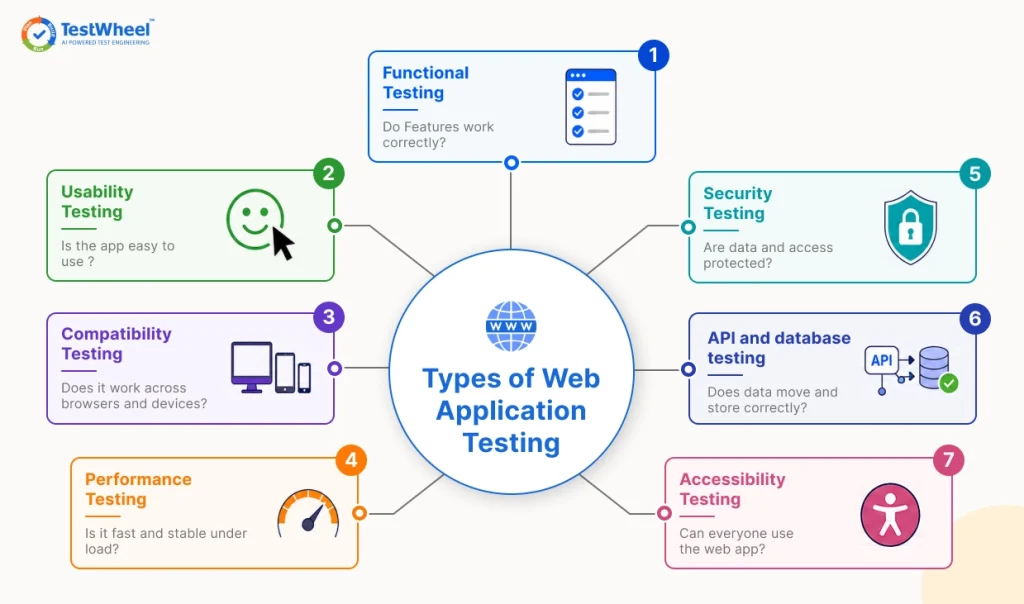
At the doctor, you don’t just check blood pressure. You check the heart, the eyes, the blood work, and more, because each test catches a different problem. Web application testing works the same way. Here are the types of web app tests you’ll encounter in your pipeline:
Functional testing
Functional testing is the process of checking whether the application does what it is supposed to do. Does the login form accept the right password and reject the wrong one? Does clicking “Add to Cart” actually add the item? This is usually the first type of testing a team runs.
Usability testing
Usability testing looks at how easy the application is to use. A banking app might work perfectly on a technical level, but if users cannot find the “Transfer Money” button without help, it’s still a failure. Usability testing catches confusing layouts, unclear error messages, and navigation issues real users will face.
Compatibility testing (also called cross-browser testing)
Browser Compatibility tests verify that the web app behaves the same way across Chrome, Firefox, Safari, and Edge, and across different devices and screen sizes. A layout that looks perfect on a 27-inch monitor can scramble on a small phone screen. This is one of the most common places bugs slip through.
Performance testing
Performance testing measure how the application behaves under pressure. How fast does the page load with 500 people browsing at once? What happens when 5000 users try to check out in the same minute? This includes load testing (expected traffic), stress testing (pushing past the limit to find the breaking point), and scalability testing (if the app can grow with more users).
Explore the difference between Performance vs Load vs Stress testing
Security testing
Security tests scan for vulnerabilities that an attacker could exploit to steal data, break in without permission, or crash the application on purpose. This is where web application penetration testing comes in. In a penetration test, or “pen test,”, a tester (or a tool) deliberately tries to attack the application the way a hacker would, probing login forms, API endpoints, and file uploads.
It looks for weak spots, so the team can fix them before malicious actors can exploit them. TestWheel’s security testing coverage goes into more depth on how this works.
API and database testing
These particular tests study the parts users never see directly. When you submit a form, that data goes to a server, gets processed, and gets stored somewhere. API testing verifies that data moves along the right paths between systems. Database testing confirms it is saved accurately and can be retrieved without corruption.
Accessibility testing
Accessibility testing checks whether people using screen readers, keyboard-only navigation, or other assistive tools can use the web app. This has become a legal mandate in many countries.
Most real-world QA projects do not run every single type of test on every release. Teams pick a mix of tests that matches their risk. For instance, a hospital scheduling portal will focus on security and functional testing. A media site with huge traffic spikes will prioritize performance testing.
Why Web Application Testing Matters Now
In 2026, teams ship code changes weekly, sometimes daily, using CI/CD pipelines. Every one of those changes is a chance for something to break somewhere that worked fine before the change.
There is also more at stake. People do their banking, their taxes, their healthcare appointments, and their grocery shopping through web applications. A bug can mean a missed medical appointment or a failed payment.
According to Google’s own documentation, a slow or broken experience directly drives users away and hurts a site’s ranking and conversion rates. In other words, testing is a business concern.
Security stakes have also gone up. The DORA (DevOps Research and Assessment) State of DevOps research shows that teams with strong automated testing and continuous delivery practices recover from failures faster and ship with fewer defects than manual, end-of-cycle testing alone.
Top 5 Web Application Testing tools
| Tool | Coding Required |
AI Self-Healing |
Unified Web + Mobile + API |
CI/CD Integration |
Free Trial |
|---|---|---|---|---|---|
| TestWheel | No | Yes | Yes | Yes | 14 days |
| Playwright | Yes | No | No (web-focused) | Yes, with setup | N/A |
| Cypress | Yes | No | No (web-focused) | Yes | Free plan available |
| BrowserStack | Depends on framework used | No | Device/browser access only | Yes | Yes |
| Katalon Studio | Optional | Limited | Yes | Yes | Yes |
If you want to explore more about the Best Web Application Testing Tools
How AI Makes Web Application Testing Simple
AI has changed one of the most exhausting parts of web application testing, i.e., keeping tests updated.
Imagine you wrote 200 automated tests for your site. Then a developer renames a button from “Submit” to “Confirm Order.”
In the old way of testing, every single test that clicked that button now fails, because the test script cannot find the button anymore. Someone has to go fix every one of those scripts manually.
- AI-driven automated testing of web applications changes this with self-healing test automation. When a button, menu, or form field moves or gets renamed, the AI recognizes the element by its role and context rather than just its old label or position. It updates the test automatically instead of breaking scripts.
This alone removes a massive chunk of the maintenance work that used to eat up a QA team’s week.
- AI also helps non-coders create tests. Instead of writing a script in Java or Python, a tester can describe a test in plain English. For example, “open the signup page, enter an email, click submit”. AI turns that into a working automated test.
Testing is no longer locked behind a programming skill requirement. A product manager or a junior QA analyst can contribute real tests without learning to code first.
- AI is also getting better at spotting flaky tests. It can be trained to flag them before they cause a false alarm in a build pipeline. That saves teams from chasing bugs that don’t exist.
Web Testing Strategy
A testing strategy is the plan for deciding what gets tested, how often, and by whom. A solid web testing strategy usually answers four questions:
What needs the most coverage?
A checkout flow that handles real money deserves far more test coverage than a footer link to a company’s blog. Risk-based prioritization will focus your limited testing time where a failure hurts the most.
Manual, automated, or both?
Manual testing is best for exploratory work. Automated testing is best for repetitive checks that need to run the same way, every time, on every release. Something like confirming the login page still works after every deployment.
Know the unique and key difference between Manual vs automation Testing
Most QA teams run both, automating the repetitive regression checks and reserving human testers for usability and edge cases.
If you’re curious, here’s a breakdown of web testing strategy options that compares manual testing, script-based automation, and low-code platforms in more detail.
When does testing happen?
Shift-left testing pushes quality checks earlier, during development rather than after it. Catching a bug while a developer is still writing the code is cheaper and faster to fix than catching it after the feature has already shipped.
How do you measure it working?
Track test pass rate, how many bugs get caught before release versus after, and how long a full test cycle takes. If your test cycle takes three weeks and your release cycle is two weeks, your strategy must change.
Web Application Testing Process
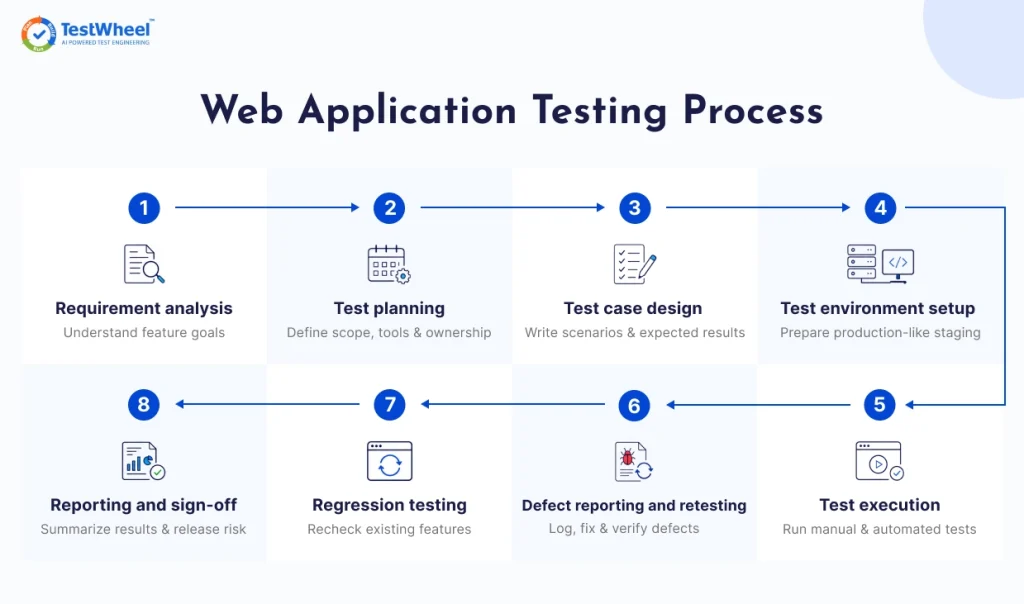
The testing process is the step-by-step path a team follows for each release. It usually includes the following steps:
1. Requirement analysis
Before writing any tests, the team reviews what the feature is supposed to do. If a new “forgot password” flow is being built, the tester needs to know what a valid password reset looks like before checking if it works.
2. Test planning
The team decides scope, tools, timeline, and who owns what. It also includes deciding which testing types from the earlier section actually apply to this release.
3. Test case design
Testers write out specific scenarios to test. For a password reset feature example, that might include: a valid email gets a reset link, an invalid email shows an error, an expired link is rejected, and a new password meets the security requirements.
Explore more about Test Case Template and Test Case Mistake.
4. Test environment setup
Tests should not run directly on the live production site. QA teams build a staging environment that mirrors production closely enough for reliable results, without risking real user data.
5. Test execution
Test execution occurs at this point, manually or through automated scripts, across multiple browsers, devices, and conditions defined in the strategy.
6. Defect reporting and retesting
When a test fails, it is logged with enough detail (steps to reproduce, screenshots, expected versus actual result) for a developer to fix it. Once remedied, the same test runs again to confirm the fix actually worked and did not disrupt anything else.
7. Regression testing
Every time new code ships, older features need to be tested again to make sure the new change did not disrupt a feature that already worked. This is why automation is a necessity for most QA teams. Running the same 500 regression checks by hand every release is not realistic.
8. Reporting and sign-off
Results are summarized for the team, showing what passed, what failed, and the risk level if the release goes out as it is.
Advantages and Challenges of Testing Web Applications
Advantages of web application testing:
The upside is straightforward.
- Catches bugs early, while they’re still cheap and fast to fix.
- Protects user trust by keeping the experience reliable every time someone uses the web app.
- Reduces security risk by finding weak spots before an attacker does.
- Prevents issues from ending up on social media and hurting the brand.
- Gives teams confidence to release faster, since automated regression checks scan each app before deployment.
Challenges of web application testing:
- Testing Chrome on desktop is not the same as Chrome on Android, and neither covers Safari on an iPhone.
- Test maintenance eats up time, since every UI change can break existing test scripts if the tool cannot heal them automatically.
- Coordination between developers, testers, and product owners can get difficult on tight release schedules.
- Using real user data for testing (especially web application penetration testing) raises privacy concerns, but fake data doesn’t always reveal the same bugs.
Some organizations bring in outside web application testing services rather than build everything in-house. A dedicated testing partner can bring device labs, security expertise, and automation infrastructure that would otherwise take months to set up internally, which is faster and cheaper than hiring and training a full QA team from scratch.
Web Application Testing Best Practices
A few habits help teams catch bugs early instead of finding them in production.
Test early and often
Do not wait until a feature is “done” to start testing it. Start testing alongside development. It catches problems while they are still cheap and fast to fix.
Automate the repetitive stuff
If a test needs to run the same way every single release, it belongs in an automated suite, not on a person’s to-do list.
Cover real-world conditions
Test what happens when the internet connection drops mid-form-submission, or when a user pastes an emoji into a name field, or when someone hits the back button halfway through checkout. Real users are always doing unexpected things.
Prioritize based on risk
Don’t test the easy features first. Test the ones where failure would hurt the business or the user.
Get more information more Test Priority
Keep browser and device coverage realistic
Check your own site analytics to see what your actual users are using, then test on them. TestWheel’s cross-browser testing checklist can help you decide which combinations are worth your testing time.
Document everything
A bug report without clear steps to reproduce it doesn’t get anything done. A test case without a clear expected outcome doesn’t test anything. Document every variable, requirement, and goal.
Here you can learn the common web testing mistakes to have best practices
How TestWheel Makes Web Application Testing Easier
TestWheel is a cloud-based, AI-driven test automation platform that covers the full picture described in this guide. It spans functional, compatibility, performance, security, and API testing, all from one account.
Testers can describe a test in plain English, record a workflow directly in the browser, or upload an Excel sheet of test steps. TestWheel converts it into a working automated test.
When the application’s UI changes, TestWheel’s self-healing engine updates the affected tests automatically.
For security testing, TestWheel runs on the OWASP ZAP engine to scan for common vulnerabilities without slowing down the application being tested.
This approach has held up under serious pressure. In a U.S. Air Force software modernization project (AFRISS-TF), TestWheel reduced test execution time from 40 days down to 14, while maintaining full regression coverage.
TestWheel is also listed on the DoD’s Iron Bank, the Department of Defense’s repository of security-vetted software, which reflects its hardened, security-first architecture.
Whether you are a solo developer testing a side project or a QA team supporting a large enterprise application, TestWheel will help you catch problems before your users do. You can start a free trial to see how the platform handles your application’s test cases.
The Takeaway on Web Application Testing
Web application testing is an ongoing practice made up of different testing types, each catching a different kind of risk, driven by a repeatable strategy that matches your team’s priorities.
This form of testing works best for QA teams who test early, automate the repetitive work, and keep their process tight enough to move as fast as their release schedule demands.
Get those pieces in place, and the kind of failure described at the start of this guide becomes something you catch on a staging server.
Explore other comprehensive testing guides
Application Security Testing Guide
Frequently Asked Questions
Web application testing is the process of checking a browser-based application to confirm it works correctly, is secure, performs well under load, and provides a good user experience across browsers and devices.
A website is often mostly static, focused on displaying information. A web application entails user interaction, like logging in, submitting forms, or processing payments. Web application testing covers that extra complexity, including data handling, user sessions, and backend integrations.
The main web application testing types are functional, usability, compatibility (cross-browser), performance, security (including penetration testing), API and database testing, and accessibility testing. Most projects combine these tests based on their risk analysis.
Both, usually together. Manual testing is ideal for exploratory checks and judging user experience. Automated testing works best for repetitive checks, like regression tests, that need to run the same way on every release.
This is a security test where a tester intentionally tries to break into the application the way a real attacker would. It checks login forms, file uploads, and APIs for weak points that malicious actors can exploit.
The cost depends on the scope, the number of test types needed, and if you’re using an in-house team, an outsourced service, or a testing platform. Cloud-based automation platforms with AI automation, like TestWheel, generally cost less over time than building a full manual QA team. Automation reduces the ongoing labor needed for regression testing.
The web application testing lifecycle typically includes requirement analysis, test planning, test case design, environment setup, test execution, defect reporting and retesting, regression testing, and final reporting before release.
Not entirely. AI is great at automating repetitive checks and adapting to UI changes through self-healing. Human testers are still needed for usability judgment, exploratory testing, and catching issues an automated script was never told to look for.
Web application testing focuses on browser-based behavior across different browsers and screen sizes. Mobile app testing looks into native device factors like hardware sensors, OS-specific behavior, app store requirements, and offline functionality. These are attributes that a browser-based test does not need to account for.
Any business website can lose trust from a broken checkout or a security breach. Small businesses often have fewer resources to recover from the damage. Early web application testing prevents costly fixes and protects customer trust regardless of company size.